Level 3 · Shipping
The AI wrote 500 lines. How do you know they're safe?
- Code review
- Reading a diff
- Pull request review
- Review checklist
- Asking the AI to explain its changes
- Small changes
The AI wrote 500 lines. How do you know they’re safe?
Before you start This lesson uses a few words from earlier lessons:
- Diff: the list of changes between two versions of code. Removed lines start with
-, and added lines start with+. (The AI broke your working app. Here’s your undo button)- Pull request: a request on GitHub to merge a branch into
main. There, you can see and discuss the changes first. (From your laptop to a real website in one push)- Authorization: a check that a logged-in user can do this specific thing. (Change one number in the URL, see everyone’s invoices)
- CI: checks, such as tests, that run automatically on every push before code can go live. (Stop broken code before it ever goes live)
Merge?
You asked your AI for one feature: “Let team admins invite people to their team by email.”
Twenty minutes later, the feature is done. The AI changed 9 files and added about 500 lines: new API routes, a database table, an email template, a page and some tests. The tests pass. You open the preview link, invite a friend, and it works.
There is a green Merge button in front of you.
You did not write these 500 lines. Maybe you cannot write them yourself yet. So how do you know that they are safe?
In three levels, you learned how apps break: missing ownership checks, leaked keys, SQL injection, double charges, bills with no limit. This lesson turns all of that into one habit: review a change before it goes live. A code review means that you read a change and look for bugs and security holes.
The mental model: an inspector with a checklist
When builders finish a new house, an inspector checks it before people move in. The inspector does not build the house again, and does not look at every brick. Inspectors know where houses usually fail: wiring, fire exits, smoke alarms, the gas pipe. They walk through with a checklist and look carefully at those places.
A review of AI code works in the same way:
- You review the change (the diff), not the full app.
- You look most carefully at the places where apps usually fail. You now know those places.
- You follow a checklist, so you do not need to remember everything.
You do not need to understand every line. You need to find the lines that matter, and understand those.
Where the comparison stops working: a house inspector is independent from the builder. Your AI can help you inspect, and it should. But the AI wrote the code, so it can make the same mistakes again. If it misunderstood your rules when it wrote the code, it often misunderstands them in the review too. You are the person who knows the rules of your app.
“It works” is not “it’s safe”
When you click through the preview, you learn that the happy path works. The happy path is the normal case: the right person, with normal input. Most security holes do not show there. A missing ownership check breaks nothing for you. The feature works perfectly for everyone, also for people who must not have access.
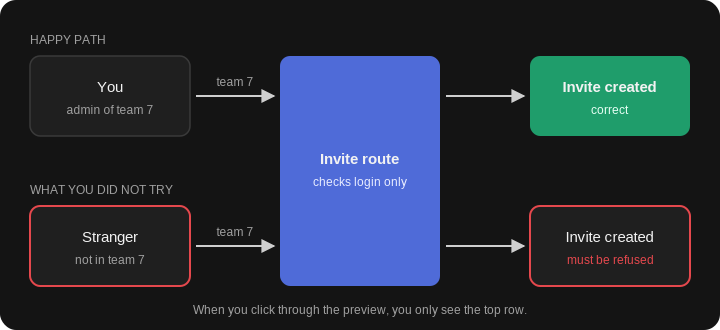
So passing tests and a working preview are necessary, but not enough.
How to read a diff
On GitHub, open the pull request and click the Files changed tab. Each file shows removed lines in red (they start with -) and added lines in green (they start with +). When you finish a file, you can tick Viewed. To comment on a line, move the pointer over it and click the blue comment icon.
On your own computer, git diff --stat main lists each changed file and how many lines changed, compared with main.
Do not read from top to bottom. Read in this order:
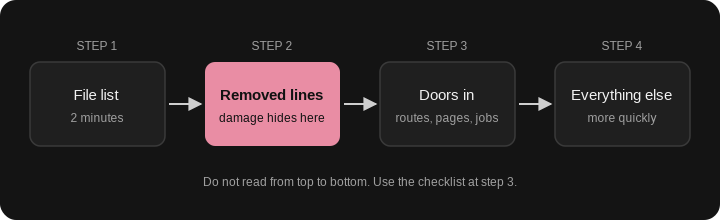
1. The file list (2 minutes). What changed that you did not expect? Look carefully at:
package.jsonand the lockfile: new packages.envfiles, config files, and any file with “auth”, “middleware” or “security” in its name. Middleware is code that runs before your routes, often for login checks.- Database migrations
- Test files and CI workflow files, especially deletions
2. The removed lines. People pay attention to added lines, but not to removed lines. So removed lines are where AI changes hide damage. When the AI cannot fix an error, it sometimes deletes the check that caused the error:
   const invoice = await db.invoice.findFirst({
-    where: { id: req.params.id, userId: req.user.id },
+    where: { id: req.params.id },
   });
The - line limited the search to the invoices of the logged-in user. The + line does not. After this one small change, every user can read every invoice. Also look for removed tests, and for tests that now expect a weaker result.
3. The doors into your app. Find every new or changed API route, page that loads data, webhook handler and background job. Outside input enters your app at these places. Use the checklist on each one.
4. Everything else, more quickly.
Ask the AI to explain its own change
Before you read, ask for a map. Paste this into your AI tool:
“Explain this change file by file. For each new or changed route: who can call it, what it checks, and what data it reads or changes. List everything you removed or weakened. List any assumptions you made about my rules, and anything I asked for that you didn’t do.”
This is very useful. It tells you where to look. It often shows a misunderstanding. For example: “I assumed any team member can invite others.” But an explanation is a map, not proof. The AI can describe what it planned to write, not what it wrote. When it says “every route checks authorization”, open each route and find the check.
For a second opinion, start a new chat that did not write the code. Paste the diff, and ask it to review the diff against the checklist below. A new chat does not know the reasons that the first chat had for its code.
The checklist
Each item has links to the lessons that explain it. For each door into your app, ask:
1. Who can do this?
- Does the route check login and that this user can change this record?
- Does the user’s ID come from the session, and never from the request?
- Does it accept only the fields that users can change, not everything in
req.body?
2. Does the server check the input?
- Does the server check every input against a schema (a description of the allowed data), including sizes and types? Are file uploads limited?
Can strangers read your whole database? Check in 5 minutes · The profile picture that ran code on your site
3. Can input become code?
- Does the code build SQL by joining pieces of text, or pass SQL to a “raw” or “unsafe” query function?
- Does the code put user content into the page with
dangerouslySetInnerHTMLorinnerHTML?
How one line of text can dump your whole database · A comment that runs code in every visitor’s browser
4. Are secrets safe?
- Is any key, password or token written in the code? Does any secret have a
NEXT_PUBLIC_orVITE_name? - Do logs print passwords, tokens or full user records?
Your API key leaked, and strangers are spending your money · Your app was down for six hours and nobody noticed
5. Is login handled correctly?
- Does the app use a login service or a well-known library, not home-made code?
- If it stores passwords: Argon2id first (scrypt if Argon2id is not available; bcrypt only in older systems that already use it). Never plain SHA-256 or MD5.
- Does the code make secret tokens with the
cryptomodule, and never withMath.random()?
6. What happens when it fails?
- Does the user get raw error details? Does an empty
catchhide errors? - When a check fails, does the code refuse (fail safe), or continue?
7. Does it talk to other services safely?
- Are timeouts set? Are retries limited? Do payments and orders have idempotency keys?
- Is slow work in a background job, not in the request? Does the code verify webhook signatures?
The payment timed out. Did it go through? · Sign-up takes 10 seconds because of one email · Free stuff with one fake “payment succeeded” message
8. Can it cost money without limit?
- Does every route that calls a paid service have login, per-user limits and size limits?
You woke up to a $10,000 cloud bill. What happened? · Bots signed up 10,000 times overnight. Now what?
9. Is the database change safe?
- Are schema changes in a migration file? Does anything rename or delete a column in one step?
- Are there database queries inside a loop? Are there lists with no limit on how many rows they load? These work with 10 rows and become very slow with 10,000.
You renamed one column and the live app crashed · One page, 500 database queries (Level 4)
10. Are new packages real and necessary?
- Does each new package exist and have real users? Does it do something that you cannot do in a few lines?
The AI suggested a package that didn’t exist. Then someone made it
11. Is it tested, and did the AI switch anything off?
- Are there tests for the new behavior, including “the wrong user gets refused”?
- Were tests deleted, skipped (
.skip) or weakened? Were checks switched off with@ts-ignore,eslint-disable,--no-verify, or a CORS setting oforigin: "*"?
The AI fixed one bug and quietly broke three others · “Blocked by CORS policy”: why the browser said no
Quick searches
You can do part of the checklist with the search box of your code editor, over the changed files:
| Search for | Why |
|---|---|
req.body, req.query, req.params |
Data that the user controls. Does the server check it? Does the code use an ID from here without an ownership check? |
NEXT_PUBLIC_, VITE_, sk_, secret, password |
Possible secrets in the wrong place |
queryRaw, Unsafe, `SELECT, dangerouslySetInnerHTML |
Possible injection |
catch { , catch (e) {}, console.log( |
Hidden errors, logs that show too much |
Math.random |
Weak tokens, if the code uses it for anything secret |
while (true), .skip(, @ts-ignore, eslint-disable |
Loops that never end, checks that are switched off |
A match is not automatically a bug. It is a place to look.
Practice: review this
Here is part of the AI’s code for team invites. Before you read further, use the checklist on it. How many problems can you find?
app.post("/api/teams/:teamId/invites", requireLogin, async (req, res) => {
  const { email, role } = req.body;
  const token = Math.random().toString(36).slice(2);
  const invite = await db.invite.create({ data: { teamId: req.params.teamId, email, role, token } });
  await sendInviteEmail(email, token);
  console.log("Invite created", invite);
  res.json(invite);
});
In plain English: a logged-in user sends an email address and a role. The code makes a random token and saves the invite. Then it emails the token, writes the invite to the log, and sends the invite back.
A good review finds at least six problems:
- Authorization (item 1). Any logged-in user can invite people into any team. They only change
teamIdin the web address. The route must check that the user is an admin of that team. - Fields with no check (items 1 and 2).
rolecomes directly from the request. An admin, or anyone who gets past item 1, can invite someone as"owner". Allow only a fixed list of roles. Also check thatemailreally is an email address. - Weak secret (item 5).
Math.random()is not made for secrets. MDN says that it does not give cryptographically secure random numbers (numbers that an attacker cannot predict). Use thecryptomodule, for examplecrypto.randomUUID(). - Secret in the logs (item 4).
console.logprints the full invite, and the invite includes the token. - Slow work in the request (item 7). The email goes out before the reply. If the email service is down, the invite fails. Use a background job.
- No limits (item 8). Nothing stops one account from sending 10,000 invite emails. That costs you money. It can also cause email services to mark your email domain as spam.
Eight lines, six problems, and the feature still “works” in the preview. That is why you review.
How it goes wrong
Reviewing by feeling. “It looks professional” and “it worked when I clicked it” are not reviews. AI code almost always looks tidy. Tidy code is not always safe code.
Merging what you cannot read. People read a 500-line change too quickly. They approve a 1,200-line change without reading it. If a change is too big to review, it is too big to merge.
Letting the AI check its own work. “I’ve added proper security checks” is a claim. Treat it like a claim.
No new review after “fixes”. You ask for a fix to one problem, and the AI changes three files. Review the new diff too, not only the one line that you asked about.
What good looks like
Here is a review process for a beginner’s week:
- Ask for small steps. Before any code, ask the AI for a plan. Then build it step by step: the table first, then one route, then the page. Each step is a small diff that you can read in ten minutes.
- Work on a branch and open a pull request, even if you work alone. Your CI checks run, and you get the Files changed view.
- Ask the AI to explain the change with the prompt above.
- Read in order: file list, removed lines, doors in, then the checklist.
- Try the unhappy paths yourself on the preview link. Use a second account to try to reach the first account’s data. Also try wrong input, a double-click and a very long text.
- Request changes, then review the new diff. Merge only when the checks pass and you can explain the change in your own words.
The last point is the real test. You do not need to be able to write every line. You need to be able to say what the change does, who can use it, and what stops the wrong person.
Test your own app
You need an app of your own for this part. No app yet? Start with Your first app in an afternoon, with an AI doing the typing. Built it in an AI app builder? Ask its AI to do each step below for you, or to add the missing part first (for example, a login).
- Review your last big AI change. Run
git log --onelineand find a change from the past week. To see its files, rungit diff --stat <hash>~1 <hash>. To read it, rungit diff <hash>~1 <hash>. Go through the checklist and write down what you find. - Do the quick searches over your full project, not only the latest change.
- Ask for the explanation of that change with the prompt from this lesson. Then check two of its claims in the code. Were they true?
- Make it a habit. Turn on required checks and pull requests for
main. Then nothing reaches production without a review.
Takeaways
Key terms
- Code review: reading a change before it goes live, to find bugs and security holes
- Diff: the removed (
-) and added (+) lines of a change - Happy path: the normal case, done by the right person with normal input
- Review checklist: a fixed list of questions that you ask about every change
Red flags in a diff
- Removed lines with checks, filters like
userId: req.user.id, or tests - New routes with a login check but no ownership check
- Fields taken from
req.bodyand saved without a list of allowed fields - New packages that you did not ask for
- Checks switched off:
.skip,@ts-ignore,eslint-disable,origin: "*" - A change too large to read at one time
Ask your AI
- “Explain this change file by file. For each new or changed route: who can call it, what it checks, and what data it reads or changes. List everything you removed or weakened, and every assumption you made.”
- “Review this diff against this checklist: authorization, input validation, injection, secrets, login, error handling, outside services, cost, database changes, new packages, tests. Quote the exact lines for each problem.”
- “Split this feature into small steps that I can review one at a time. Don’t write code yet.”
Going deeper (optional, for readers who want more detail)
Automatic reviewers. Tools can do part of the checklist on every pull request. Code scanners look for common security bugs such as injection. Dependency checkers warn about packages with known security problems. Linters (tools that check code for known bad patterns) mark risky code.
These tools are useful, but they do not know the rules of your app. So they rarely find a missing ownership check. You still need a human review.
Review comments that work. A good comment points at a line, says what can go wrong, and suggests a fix: “Any user can change teamId here. Check that req.user is an admin of this team.”
When you paste comments back to the AI, include the line and the reason, not only “fix this”.
What you can skip. Formatting, names and code style matter less than safety. A formatter is a tool that fixes the layout of code automatically. If a formatter and a linter run in CI, let them handle style. Use your attention for the checklist.
Read the tests as a specification. A specification is a description of what the code must do. The tests tell you what the AI thinks that the feature must do. If no test says “a user from another team gets refused”, maybe the AI did not think about that case. Missing tests show you missing thinking.
Password storage note. The OWASP Password Storage Cheat Sheet recommends Argon2id first, and scrypt when Argon2id is not available. It recommends bcrypt only for older systems. If AI code chooses bcrypt for a new app, that is not a disaster, but ask why. If the code uses a fast hash like SHA-256 or MD5, or encrypts passwords, stop and fix it.
References (4)
- Reviewing proposed changes in a pull request: GitHub Docs. The Files changed tab, the Viewed checkbox and commenting on a line.
- Math.random(): MDN.
Math.random()does not provide cryptographically secure random numbers and must not be used for security. - Crypto: randomUUID() method: MDN.
crypto.randomUUID()makes a random ID with a cryptographically secure random number generator. - Password Storage Cheat Sheet: OWASP. Argon2id first, scrypt when Argon2id isn’t available, bcrypt only for legacy systems.