Level 2 · Builder
A comment that runs code in every visitor's browser
- Cross-site scripting (XSS)
- Stored and reflected XSS
- Escaping output
- HTML sanitization
- Content Security Policy
A comment that runs code in every visitor’s browser
Before you start This lesson uses a few words from earlier lessons:
- HTML and JavaScript: HTML describes what is on a page. JavaScript is code that the browser runs to make the page do things. (Take a web page apart and see what’s inside)
- Cookie and session: a small note your browser keeps after you log in. The browser sends it with each request to prove who you are. (Never store a password. Here’s what to store instead)
- Server-side validation: checks that your server does on data before it uses the data. (Can strangers read your whole database? Check in 5 minutes)
- SQL injection: user input that becomes part of a database command. (How one line of text can dump your whole database)
The pop-up nobody wrote
You built a book club website with AI. Members write reviews, and anyone can leave a comment under a review. The comment box is plain. You type some text, press “Post”, and your comment appears for everyone.
One morning, every member who opens a popular review sees a small pop-up box:
hi from Leo :)
You never wrote that pop-up. It is not in your code. You look at the comments, and Leo’s latest comment looks almost empty. But it is not empty. It contains a few characters of HTML, and every visitor’s browser runs them.
This time it was a joke. But Leo’s comment could contain any code at all. That code would run inside your site for every person who opened that page, and that includes you.
This lesson explains how a comment becomes code. It also shows how to make sure that user text always stays text.
The browser reads HTML as instructions
Your server is the computer that runs your app’s code and sends pages to browsers. When your server sends a page, it sends HTML. The browser reads all of it as instructions: “draw a heading here”, “show this image”, “run this code”.
Now imagine that your server builds the comment section. It puts each comment’s text directly into the HTML:
<p>Great review, I loved this book!</p>That is safe: it is a paragraph with friendly text. But here is what Leo posted as his comment:
<img src="x" onerror="alert('hi from Leo :)')">When the server puts Leo’s comment into the page, the browser gets this:
<p><img src="x" onerror="alert('hi from Leo :)')"></p>The browser does not know which parts you wrote and which parts Leo wrote. It sees an <img> tag, which is an instruction to show an image. Inside the tag are attributes: extra settings like src and onerror. The image’s address, x, does not exist, so the image fails to load. onerror means “if this fails, run this JavaScript”. So the browser runs alert(...), which shows a pop-up.
This bug is called cross-site scripting, usually shortened to XSS. It happens when a site puts someone else’s text into its pages in a way that lets the browser run that text as code.
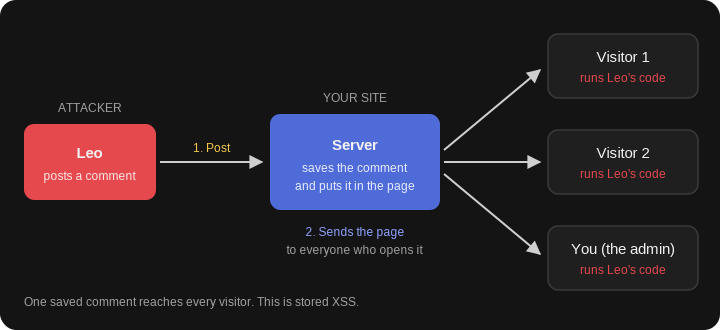
XSS is the same idea as SQL injection. In SQL injection, user text broke out of its place and became a database command. In XSS, user text breaks out of its place and becomes HTML and JavaScript. The language is different, but the mistake is the same: data was mixed into instructions.
Why it’s dangerous
Leo’s code ran as part of your site. The browser cannot tell it apart from your own code. MDN is the main reference for web developers. MDN says that injected code (code that an attacker puts into your page) can do anything that the site’s own code can do. That includes:
- Reading everything on the page, like private messages, email addresses or account details
- Sending requests to your server as the logged-in visitor. The browser attaches the visitor’s cookie to those requests automatically. So the code can post, delete and change settings, all as that visitor.
- Changing what the page shows, for example replacing your login form with a fake one
OWASP is a nonprofit security organization. It also lists these possible results: pretending to be the visitor (account impersonation) and stealing sensitive data.
If you, the admin, open the page, the code runs with your powers.
Two common kinds of XSS
Stored XSS. The attacker’s code is saved on your server, usually in the database. The server then sends it to everyone who views it. Leo’s comment is stored XSS. It is especially bad because one comment affects every visitor, and the attacker does nothing more.
Reflected XSS. The attacker’s code arrives in a request, usually inside a link. The server puts it directly back into the page that it sends. Nothing is saved. For example, your search page shows “Results for: …” with the text from the web address:
app.get("/search", (req, res) => {
  res.send(`<h1>Results for: ${req.query.q}</h1>`);
});
In plain English: when someone opens /search?q=dragons, the server replies with a heading that says “Results for: dragons”. req.query.q is the q part of the web address. The code puts it directly into the HTML.
An attacker makes a link to your site where q is HTML with code in it. Then the attacker sends the link to your users. Anyone who clicks it gets a page from your site that runs the attacker’s code. The link points to your real website, so it looks trustworthy.
How it goes wrong
Mistake 1: Building HTML by joining strings
A string is a piece of text in code. Both examples above make the same mistake: they join user text into HTML without changing it. In AI-written code, look for these:
- Server code that builds HTML with
${...}or+and includes anything from the request or the database - Frontend code (code that runs in the browser) that sets
innerHTMLto user text, likecommentBox.innerHTML = comment.text
innerHTML tells the browser “read this text as HTML”. MDN says that it is probably the most common way that XSS gets in. Browsers do not run <script> tags that are added this way. But an <img> with onerror, like Leo’s, still runs.
Mistake 2: Switching off React’s protection
Many AI-built apps use React, a popular package for building frontends. (A package is ready-made code that you add to your app.) React has an important safety feature: it escapes text by default.
Escaping means replacing the characters that HTML treats as special with codes. The browser shows these codes as plain characters:
| Character | Escaped as |
|---|---|
< |
< |
> |
> |
& |
& |
" |
" |
After escaping, Leo’s comment reaches the browser as <img src=...>. The browser shows the characters <img src=...> on the screen, as text. Nothing runs.
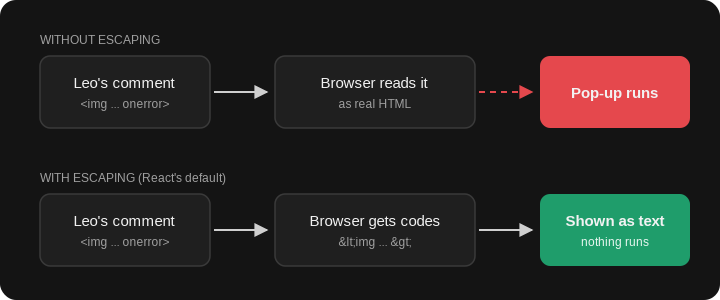
So this React code is safe, even with Leo’s comment:
function Comment({ comment }) {
  return <p>{comment.text}</p>;
}
In plain English: show the comment’s text inside a paragraph. The curly braces {...} mean “put this value here”, and React escapes the value first. MDN confirms that React automatically encodes values that you put in this way.
But React also has a way to switch this off. It has a deliberately scary name:
function Comment({ comment }) {
  return <p dangerouslySetInnerHTML={{ __html: comment.text }} />;
}
In plain English: take the comment’s text and insert it as raw HTML, with no escaping. This is React’s version of innerHTML. With Leo’s comment, the pop-up runs again.
React’s documentation gives a warning. If the HTML is not trusted, for example if it comes from user data, this can cause an XSS bug. The documentation says to use it only with trusted and sanitized (cleaned) data.
When does the AI use this? Usually when you ask for rich text: comments with bold, italics or links. Or when you ask it to show Markdown, a simple formatting language where **bold** becomes bold. The AI turns the Markdown into HTML, and then it needs a way to show that HTML. dangerouslySetInnerHTML is the quick answer. Unless the Markdown package sanitizes its output, any HTML that a user writes inside the Markdown can pass directly through.
Mistake 3: Links that users supply
A profile has a “My website” field, and the AI shows it as a link. A link’s address can start with javascript: instead of https:, and a click on that link runs code. React 19 blocks javascript: addresses in links. But OWASP warns that this does not replace your own checks of addresses, and not every package does it. Allow only addresses that start with https:// or http://.
What good looks like
1. Let your tools escape for you
The best defense is the default. Show user text with {...} in React, or with the normal way that your framework shows text. A framework is a set of ready-made tools for building apps, like React, Vue or Next.js. Most modern frameworks escape text by default.
In plain JavaScript without a framework, use textContent instead of innerHTML. textContent always treats the value as plain text.
2. If you must show user HTML, sanitize it
Sometimes you really need formatting that users write. Then you need a sanitizer. A sanitizer is a package that takes HTML and removes everything dangerous, like scripts and onerror. It keeps the safe parts, like bold text. OWASP and MDN both name DOMPurify as a sanitizer to use.
import DOMPurify from "dompurify";

function Comment({ comment }) {
  const clean = DOMPurify.sanitize(comment.html);
  return <div dangerouslySetInnerHTML={{ __html: clean }} />;
}
In plain English:
- Line 4: clean the comment’s HTML. DOMPurify keeps harmless tags and removes anything that can run code. Leo’s tag would come out as
<img src="x">, withoutonerror. - Line 5: show the cleaned HTML.
Sanitize the HTML immediately before you show it. Do not change the HTML after you clean it. Keep DOMPurify updated, because people find new tricks over time.
For Markdown in React, a renderer such as react-markdown is a simpler choice. A renderer is a package that turns Markdown into something the page can show. The react-markdown documentation says that it is secure by default. It does not use dangerouslySetInnerHTML, and it escapes raw HTML inside the Markdown. Be careful with add-ons that turn HTML back on. The package’s own documentation says to use those add-ons only with Markdown that you trust.
3. Add a backup layer: Content Security Policy
Even careful apps miss one place. A header is a short line of extra information that the server sends with a response. A Content Security Policy (CSP) is a header that your server sends with each page. It tells the browser which scripts the browser may run. For example:
Content-Security-Policy: script-src 'self'In plain English: “only run JavaScript from files on my own site”. MDN explains the result of a policy like this. The browser blocks code that is written directly inside the HTML, including <script> blocks and attributes like onerror. So the browser would block Leo’s pop-up even if escaping failed.
Two warnings:
- Do not use CSP as your main fix. It is a backup. OWASP and MDN both say that CSP should not be your main defense. Escaping and sanitizing come first.
- CSP can break your own app. Some frameworks and tools add small scripts of their own to the page. Ask your AI to set up CSP for your specific framework. Start with
Content-Security-Policy-Report-Only. This header reports problems but blocks nothing. Switch to the real header when nothing breaks.
Go deeper: The app said “Saved!”. The note was never saved (Level 2) explains headers and where to see them.
Test your own app in 10 minutes
You need an app of your own for this part. No app yet? Start with Your first app in an afternoon, with an AI doing the typing. Built it in an AI app builder? Ask its AI to do each step below for you, or to add the missing part first (for example, a login).
Test only apps that you own.
Test 1: Does your app show user HTML? Find any place where users write text that other people see: comments, profile names, bios, post titles. Post this:
<b>bold test</b>- If you see the characters
<b>bold test</b>on the page, your app escapes HTML there. Good. - If you see bold test in bold, your app shows user HTML. Go to Test 2.
Test 2: Does it run code? In the same place, post:
<img src="x" onerror="alert('XSS')">If a pop-up appears, you have XSS. Ask your AI to fix it with escaping, or with DOMPurify if you need formatting. Then delete the test comment.
Test 3: Search your code. Look for dangerouslySetInnerHTML, innerHTML, outerHTML, document.write and v-html (Vue’s version). For each one, ask two questions. Where does this text come from? Is it sanitized?
Test 4: Check for a CSP.
- Open your browser’s developer tools.
- Click the Network tab.
- Reload the page.
- Click the first line (your page).
- Under Response Headers, look for
content-security-policy.
Takeaways
Key terms
- XSS (cross-site scripting): user text that a site’s pages run as code in visitors’ browsers
- Stored XSS: the code is saved on your server, for example in a comment, and affects everyone who views it
- Reflected XSS: the code arrives in a request, often a link, and the server puts it directly into the page
- Escaping: turning special HTML characters into codes that the browser shows as plain text
- Sanitizer: a package, like DOMPurify, that removes dangerous parts from HTML
- Content Security Policy (CSP): a header that tells the browser which scripts it may run
Red flags in AI-written code
dangerouslySetInnerHTML,innerHTMLorv-htmlwith text that users wrote, and no sanitizer- Server code that builds HTML with
${...}from request or database values - Markdown that is turned into HTML and shown without sanitizing
- Links that users supply, shown without a check that they start with
https://orhttp:// - “It’s fine, users can only type text”
Ask your AI
- “Find every place where my app shows text that users wrote. Is it escaped by default, or shown as raw HTML?”
- “List every use of dangerouslySetInnerHTML or innerHTML. Where does the content come from, and is it sanitized with DOMPurify?”
- “Set up a Content Security Policy for my app. Start in report-only mode and tell me what it would block.”
Going deeper (optional, for readers who want more detail)
DOM-based XSS. The DOM is the browser’s live model of the page, which JavaScript can change. A third kind of XSS happens entirely in the browser. Your own JavaScript reads something that an attacker controls, like part of the web address. Then it puts that text into the page with innerHTML. The server never sees the attack. The fix is the same: use textContent or your framework’s normal escaping.
Escaping depends on where the text goes. Escaping for the middle of an HTML page is different from escaping for an HTML attribute. It is also different inside a <script> block, in a CSS value or in a web address. OWASP’s XSS Prevention Cheat Sheet lists the rules for each place. Frameworks handle the common places for you. Do not put user text inside a <script> block or a style attribute. It is risky even with escaping.
HttpOnly cookies. JavaScript cannot read a cookie that has the HttpOnly attribute through document.cookie. MDN says that this helps against XSS, because injected code cannot steal the cookie. But it is not a full fix. The browser still attaches the cookie to requests that the injected code sends. So the code can still act as the user while the page is open.
Sanitizing on the server. You can clean HTML before you save it or before you show it. Either way, make sure that it is clean before it reaches a page. If you sanitize on the server, ask your AI how to run your sanitizer there. Some sanitizers are built for the browser.
Stronger CSP. MDN recommends a “strict” CSP that uses a nonce: a new random value in each response. Only <script> tags that carry that value can run. Injected code does not know the value, so the browser blocks it. Many frameworks have a guide for this setup.
Trusted Types. This is a newer browser feature. You turn it on through CSP with require-trusted-types-for. It makes the browser refuse plain text in dangerous places like innerHTML. The browser accepts only values that went through your own cleaning function.
Where it ranks. The OWASP Top 10:2025 puts XSS in the “Injection” category (A05), together with SQL injection. OWASP lists more than 30,000 published security weaknesses (called CVEs) for cross-site scripting.
References (8)
- Cross-site scripting (XSS): MDN. What injected code can do, stored XSS, React’s automatic encoding, DOMPurify, CSP as a backup, strict CSP and Trusted Types.
- Element: innerHTML property: MDN.
innerHTMLis probably the most common way XSS gets in; injected<script>tags don’t run, butonerrordoes. - Content Security Policy (CSP): MDN. Blocking inline scripts and event handlers, nonces, report-only mode, and why CSP doesn’t replace sanitizing.
- Set-Cookie header: MDN.
HttpOnlystops JavaScript reading a cookie, but the cookie is still sent with requests. - Cross Site Scripting Prevention Cheat Sheet: OWASP. Possible results of XSS (account impersonation, stealing data), framework escaping and escape hatches, DOMPurify, React 19 and
javascript:links, escaping rules for each place, and CSP as an extra layer. - A05:2025 Injection: OWASP Top 10:2025. XSS sits in the Injection category with SQL injection, with more than 30,000 CVEs.
- Common components: React docs. The
dangerouslySetInnerHTMLwarning: use it only with trusted and sanitized data. - react-markdown: remarkjs on GitHub. Secure by default, escapes raw HTML, and add-ons like
rehype-rawonly for trusted Markdown.