Level 2 · Builder
Change one number in the URL, see everyone's invoices
Change one number in the URL, see everyone’s invoices
Before you start This lesson uses these words from earlier lessons.
- Request: a message that your browser sends to a server. (You pressed Enter. What happened in the next second?)
- API route: a server address that your app’s pages send requests to. (The hidden conversation behind every button you tap)
- Database: the place where your app keeps its data, in tables. (Your app forgot everyone’s messages overnight. Why?)
- Session: the server’s record that a browser belongs to a logged-in user. (Never store a password. Here’s what to store instead)
Friday launch, Sunday email
You built an invoicing app with AI over the weekend. Small businesses sign up, make bills for their customers and see a list of them. Sign-up works. Login works. You launch on Friday.
Each invoice has its own page. The page has a web address (a URL) like this:
myapp.com/invoices/1042The number at the end is the invoice’s ID. An ID is a number that the app uses to tell invoices apart, like a receipt number.
On Sunday, a user sends you an email:
“I changed 1042 in the web address to 1041, and I could see someone else’s invoice. Then 1040. Then all of them.”
Nobody stole a password. Nobody used hacking tools. Your user changed one number in their browser. Your app did exactly what its code told it to do. But the code never asked one important question.
This lesson is about that question.
Two questions every app must ask
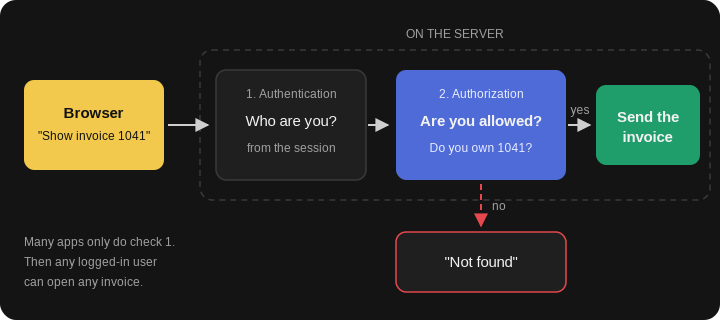
Your server is the computer that runs your app’s code. Each time someone asks your server to do something, the server must answer two different questions:
- Who are you?
- Are you allowed to do this?
The first question is called authentication. The second question is called authorization. You often see the short names authn and authz.
The two words sound alike, but they are different jobs. People often mix them up, and this is one of the most common security mistakes on the internet.
Think of a hotel. At the front desk, you show your ID card and get a room key. That is authentication: the hotel now knows who you are. Your key opens room 304 and no other room. That is authorization: who you are decides which doors you can open.
Where this comparison stops working: in a hotel, every door has a lock. In your app, there is no lock until you write one. Each part of your app that shows or changes data needs its own lock. If one lock is missing, that door opens for every guest in the building.
Why AI gets one right and misses the other
Authentication works in almost the same way in every app: sign up, log in, log out. Ready-made login services and code packages do this work for you. Examples are Clerk, Supabase Auth, Firebase Auth and Auth.js. AI is very good at setting these up.
Authorization is different for every app, because it depends on your rules:
- Invoices belong to the user who made them.
- Team members can view invoices, but not delete them.
- Admins can do everything.
No code package knows these rules. The AI only knows them if you tell it. So the AI often writes code that checks “is this person logged in?” and then stops.
What the server can trust
Here is a short reminder of how login works:
- You log in one time with your email and password.
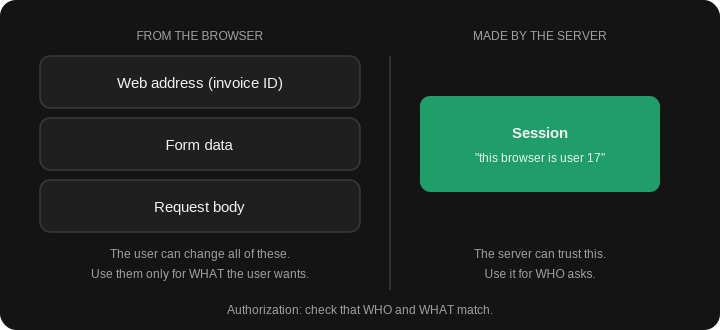
- The server checks them and creates a session. The session is a record that says “this browser belongs to user 17”.
- Your browser keeps a small piece of data that points to that session. This data is usually in a cookie. The browser automatically sends the cookie back with every request to that website.
- The server reads the cookie and knows that it is you.
It is like a wristband at a concert. You show your ticket one time at the entrance. After that, the staff only look at the wristband.
Here is the key idea: the server created the session itself, so it can trust the session.
The server cannot trust anything else that the browser sends: the web address, the data in a form, or the contents of a request. The user controls all of it. Every browser has built-in developer tools (press F12 on Windows, or Cmd+Option+I on Mac). With these tools, anyone can see and change what their browser sends. This is not hacking. It is a normal browser feature.
Go deeper: Never store a password. Here’s what to store instead (Level 2) explains sessions, cookies and tokens in full.
So remember this rule:
Who asks → comes from the session. What they want → comes from the request. Authorization → a check that the two match.
How it goes wrong
Bug 1: A login check, but no ownership check
You ask your AI: “Add an API route to get an invoice by its ID. Only logged-in users can use it.”
The AI gives you code like this:
app.get("/api/invoices/:id", requireLogin, async (req, res) => {
  const invoice = await db.invoice.findUnique({
    where: { id: req.params.id },
  });
  if (!invoice) return res.status(404).json({ error: "Not found" });
  res.json(invoice);
});
You do not need to read every symbol. Here is what the code does, in plain English:
- Line 1: A request comes to
/api/invoices/with an ID at the end. First,requireLoginruns and checks that the person is logged in. - Lines 2–4: The code looks in the database for the invoice with the ID from the web address.
- Line 5: If there is no such invoice, the server replies “Not found”.
- Line 6: If the invoice exists, the server sends it back.
It looks correct. It even does exactly what you asked: only logged-in users can use it.
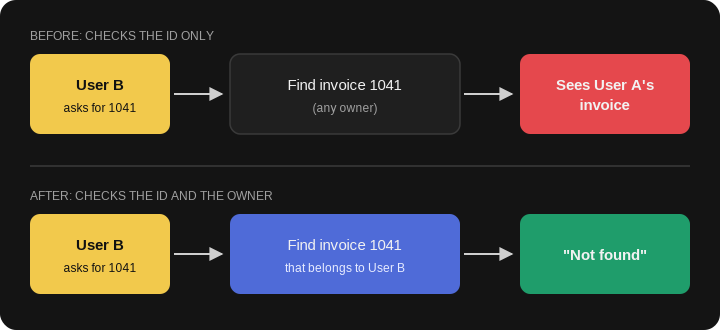
But look at step 2 again. The code finds the invoice with only the ID. Nothing asks “does this invoice belong to the person who asks?” So any logged-in user can open any invoice. And anyone can sign up for free. So “any logged-in user” really means “anyone with an email address”.
This bug has a name: IDOR, short for Insecure Direct Object Reference. Here is what the words mean:
- Object: a piece of data, like one invoice.
- Direct reference: the ID in the web address points straight at it.
- Insecure: nothing checks if you are allowed to see it.
“But my IDs are random”
Some apps use long random IDs like 3f8a1c9e-72b4-4d1a-9c3e-5b6f8a2d1e7c, not 1, 2, 3. These IDs are called UUIDs. Many people think that random IDs fix the problem.
Random IDs are harder to guess, but they do not fix the bug. IDs get into shared links, screenshots, browser history and support emails. When someone has an ID, nothing stops them from using it.
A hidden ID is not the same as a locked door.
Bug 2: The browser says who the user is
Here is a second version that you will see a lot. You ask the AI to let users create invoices:
app.post("/api/invoices", requireLogin, async (req, res) => {
  const { userId, amount, customer } = req.body;
  const invoice = await db.invoice.create({
    data: { userId, amount, customer },
  });
  res.json(invoice);
});
In plain English:
- Line 1: A logged-in user sends a new invoice.
- Line 2: The code takes
userId,amountandcustomerfrom the request body. The request body is the data that the browser sends, like the contents of a form. - Lines 3–5: The code saves a new invoice with those values.
Your app’s page sends the logged-in user’s own ID as userId. When you test it, everything works.
But userId comes from the browser, and the user controls the browser. With developer tools, anyone can change userId to the ID of a different user. Then they can create invoices in that person’s account.
The same mistake can be much worse. Think of an “edit my profile” feature that saves every field that the browser sends. A user adds "role": "admin" to their request, and now they are an admin. This bug is called mass assignment: the server saves every field that it gets, not only the fields that it expects.
What good looks like
Fix 1: Ask for the invoice and its owner
app.get("/api/invoices/:id", requireLogin, async (req, res) => {
  const invoice = await db.invoice.findFirst({
    where: { id: req.params.id, userId: req.user.id }, // ← changed
  });
  if (!invoice) return res.status(404).json({ error: "Not found" });
  res.json(invoice);
});
Only one line changed. req.user.id is the logged-in user’s ID. It comes from the session, so the server can trust it.
Before the fix, the database search meant “find invoice 1041”. Now it means “find invoice 1041 that belongs to me”. If the invoice belongs to a different user, the database finds nothing. Then the app replies “Not found”.
The reply is “Not found”, not “You’re not allowed”. This is on purpose. “Not allowed” tells the person that invoice 1041 exists. “Not found” tells them nothing.
Go deeper: The app said “Saved!”. The note was never saved (Level 2) explains these replies, called status codes.
Fix 2: Get the user from the session, never from the browser
const { amount, customer } = req.body;
const invoice = await db.invoice.create({
  data: { userId: req.user.id, amount, customer },
});
Two things changed:
- The owner is now
req.user.id, from the session. The code ignores anyuserIdthat the browser sends. - The code takes only
amountandcustomerfrom the browser. A list of the exact fields that you accept stops mass assignment.
Check every feature, not only one
In real apps, the check is rarely missing everywhere. Usually the “view” feature has the check, but “edit” or “delete” does not. Here is how that happens. You asked for “view” first, and the AI added a check. A week later, in a new chat, you asked for a delete button. The AI did not know about your rule.
Every API route that shows, changes or deletes data needs its own check. A hidden button on the page does not count, because anyone can send the request without the button.
When your app grows, keep your rules in one place. Do not copy them into every route.
Go deeper: Can strangers read your whole database? Check in 5 minutes (Level 2) shows how to put these rules inside the database itself.
Test your own app in 5 minutes
You need an app of your own for this part. No app yet? Start with Your first app in an afternoon, with an AI doing the typing. Built it in an AI app builder? Ask its AI to do each step below for you, or to add the missing part first (for example, a login).
You do not need any security tools. You need two accounts.
- Open your app in a normal browser window. Sign up as User A.
- Open a private window (called “Incognito” in Chrome). Sign up as User B.
- As User A, create something, for example an invoice, a note or a project.
- Copy the web address of that item.
- Paste that web address into User B’s window.
If User B can see User A’s data, you have an IDOR. Fix it before someone else finds it.
Optional: test edits and deletes too (in Chrome).
- In User A’s window, open developer tools (F12 on Windows, Cmd+Option+I on Mac).
- Click the Network tab.
- Edit or delete something as User A. A new line appears in the Network tab.
- Right-click that line and choose Copy → Copy as fetch. This copies the request as code.
- In User B’s window, open developer tools and click the Console tab.
- Paste the code and press Enter.
If User A’s data changed, User B was able to edit it. That is the same bug.
One catch: look at the text that you copied. It can have a line that starts with "authorization". That line contains User A’s login, so the request runs as User A. Then the test proves nothing. If you see this line, ask your AI to help you run the test with User B’s login.
Takeaways
Key terms
- Authentication: proof of who you are (you log in).
- Authorization: the decision about what you are allowed to do.
- IDOR: you see or change someone else’s data when you change an ID in a request.
- Mass assignment: the server saves fields that it never meant to let users change.
Red flags in AI-written code
- The route checks login, but the database search uses only an ID from the request.
- The code takes
userId,ownerIdorrolefrom the request, not from the session. In code, look forreq.body,req.queryorreq.params. These all hold data that the browser sent. - The “view” route checks ownership, but “edit” or “delete” does not.
- Someone says “It’s safe because the IDs are random”.
Ask your AI
If you can’t read the code yet, paste these prompts into your AI tool:
- “For every API route in my app, show me where it checks that the logged-in user is allowed to access that record.”
- “Is any user ID, owner ID or role taken from the request instead of the session?”
- “List every route that reads, changes or deletes data, and the authorization check each one has.”
Going deeper (optional, for readers who want more detail)
HTTP status codes for access problems. A server replies with a number that describes the result:
- 401 Unauthorized: you are not logged in. The name says “unauthorized”, but this code is about authentication.
- 403 Forbidden: the server knows who you are, and you are not allowed.
- 404 Not Found: the thing does not exist, or you are not allowed to know that it exists.
Use 404 when you must not show that a record exists, as in this lesson. Use 403 when the user already knows that the thing exists. For example, a team member tries to delete a shared project that they can only view.
Broken Access Control. IDOR is part of a larger group of bugs called Broken Access Control. In these bugs, users can do things outside their permissions. The OWASP Top 10 is the industry’s standard list of web security risks. Broken Access Control was the #1 risk in both the 2021 and 2025 editions.
Sessions vs tokens. Some login systems do not keep a session record on the server. They put the user’s ID inside a signed token (often a JWT, a JSON Web Token). The browser sends the token back with each request. The rule in this lesson does not change. The server checked the signature on that token, so it can trust the user ID inside it. It cannot trust anything else in the request.
Rules in one place. If you copy checks into every route, you will miss one when the app grows. Common patterns:
- A helper function, such as
canAccessInvoice(user, invoice), that every route calls. - A policy library, which describes rules separately from routes (for example CASL in JavaScript or Pundit in Ruby).
- Row Level Security in the database, explained in Can strangers read your whole database? Check in 5 minutes.
Lists. List pages need the same check. findMany() without a userId filter returns everyone’s records. This mistake is easy to miss, because the page looks correct while you are the only user.
References (8)
- A01:2021 Broken Access Control: OWASP Top 10:2021. Broken Access Control moved up to the first spot (A01) in the 2021 edition.
- A01:2025 Broken Access Control: OWASP Top 10:2025. Broken Access Control kept the #1 spot in 2025; its example attack is changing an account number in the web address.
- Insecure Direct Object Reference Prevention Cheat Sheet: OWASP. What IDOR is, why random IDs don’t replace access checks, and scoping lookups to the current user.
- Mass Assignment Cheat Sheet: OWASP. An attacker adding an admin field to a request, and the fix of allow-listing fields.
- 401 Unauthorized: MDN. 401 means the request lacks valid authentication credentials, and 403 is for a known user without permission.
- 403 Forbidden: MDN. 403 means the user is known but lacks permission, and servers may send 404 instead to hide that a resource exists.
- Network features reference: Chrome for Developers. The Network tab and the “Copy as fetch” option used in the self-test.
- Open Chrome DevTools: Chrome for Developers. The F12 and Cmd+Option+I shortcuts.