Level 4 · Reliability & scale
One page, 500 database queries
One page, 500 database queries
Before you start This lesson uses a few words from earlier lessons:
- Query and join: a query is a request to the database. A join combines rows from two tables in one query. (You changed your name. Half the app still shows the old one)
- ORM: a package, such as Prisma, that lets your code use the database without writing SQL (the database language) by hand. (How one line of text can dump your whole database)
- Index: a sorted list that lets the database find rows without reading the whole table. (Fast with 100 users, frozen at 10,000. The missing index)
- Logs: lines of text your app writes about what it does, so you can read them later. (The error message is telling you what’s wrong. Read it first)
The homepage that got slower every day
You built a recipe-sharing site with AI. The homepage shows the latest recipes. Each card shows a title, the author’s name, the number of likes and comments, and the tags.
When you built it, there were 10 test recipes, and the page was instant. Now the homepage shows 100 recipes, and it takes four seconds to load. Your database company shows a dashboard, a page with charts about your database. It says the database is busy all day, but you only have a few hundred visitors.
You ask your AI to log every database query for one visit to the homepage. You count them: 401 queries. That’s for one page and one visitor.
Each query is fast, about a millisecond on its own. That’s why nothing looks wrong in the code. The problem is the number of queries. This lesson explains where the 401 came from and how to find the pattern in any app. It also shows how to bring the number down to one or two.
The mental model: one trip per item
Imagine that you cook dinner and need 20 ingredients. You can walk to the shop, buy the onion and walk home. Then you walk back, buy the garlic and walk home again. That’s twenty trips. Or you can write a list and go once.
Each query that your app sends is a trip. The trip has a cost even when the shopping is quick. The message travels to the database. The database reads and plans the query. Then the answer travels back. The time for one trip there and back is a round trip.
Here’s what the homepage does:
- 1 query to get the list of 100 recipes.
- Then, for each recipe, 1 query for the author, 1 for the like count, 1 for the comment count and 1 for the tags. That’s 4 × 100 = 400 queries.
1 + 400 = 401. The name for this pattern is the N+1 query problem: one query for a list of N items, then one more query for each item. (Here it’s really 4N+1, but the name is the same.)
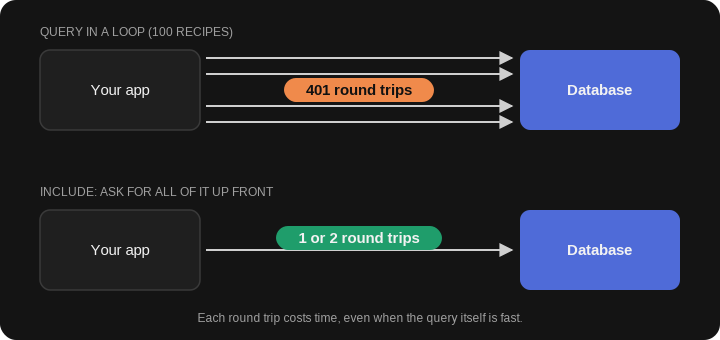
Where the comparison stops working: in real life, a longer shopping list makes the one trip a bit slower. A database is very good at long lists. Finding 100 authors in one query costs only a little more than finding one.
Why it hides
The number of queries grows with the number of items on the page. With 10 test recipes, the page runs 41 queries, and it feels instant on your laptop. Nothing in the code looks slow, and each query on its own is fast. The cost appears only when the data grows.
What it costs, in numbers
The page runs its queries one after another, so the waiting adds up. A data center is a building full of computers. A region is an area of the world where a cloud company has data centers, such as “US East”.
| Time for one round trip | 41 queries (10 recipes) | 401 queries (100 recipes) |
|---|---|---|
| 1 ms (app and database in the same data center) | 0.04 seconds | 0.4 seconds |
| 10 ms | 0.4 seconds | 4 seconds |
| 50 ms (app and database in different regions) | 2 seconds | 20 seconds |
These are simple multiplications, not measurements. But they show the pattern: the slower each trip, the more N+1 hurts. A common cause of slow trips: your hosting platform runs your code in one region, and your database is in another region.
The database feels it too. If 20 people open the homepage every second, that’s about 8,000 queries per second. With the right code, the same page needs maybe 40.
Go deeper: Fast in the US, painfully slow in India (Level 4) explains why distance makes every round trip slower.
How it goes wrong
Bug 1: A query inside a loop
A loop is code that repeats for each item in a list. Here’s the kind of code the AI writes for the homepage:
const recipes = await prisma.recipe.findMany({ take: 100 });
for (const recipe of recipes) {
  recipe.author = await prisma.user.findUnique({ where: { id: recipe.authorId } });
  recipe.likes = await prisma.like.count({ where: { recipeId: recipe.id } });
  // ... same for comments and tags
}
In plain English:
- Line 1: get 100 recipes. One query.
- Lines 2–5: for each recipe, ask the database for its author, then its like count, and so on.
awaitwaits for the answer. So each query finishes its round trip before the next one starts.
This code is easy to read, and it gives the correct result. It also makes 401 trips.
Bug 2: The loop is hidden
Often you can’t see a loop. The page shows a list of RecipeCard components (small, reusable parts of the page), and each card loads its own author. Or a helper function such as getLikeCount(recipe) runs a query, and someone calls it for each item in a list. Each part looks fine alone. Together, they make an N+1.
Some ORMs, and frameworks in other languages, hide it even more. When you first read recipe.author, the ORM can run a query by itself. The name for this is lazy loading. The code doesn’t look like it talks to the database at all.
Bug 3: “Fixing” it with Promise.all
Promise.all is a JavaScript tool that starts many tasks together and waits until all of them finish. Ask the AI to make Bug 1 faster, and it may suggest this:
await Promise.all(recipes.map(async (recipe) => {
  recipe.likes = await prisma.like.count({ where: { recipeId: recipe.id } });
}));
In plain English: start one like-count query for each recipe at the same time, and wait until all of them finish.
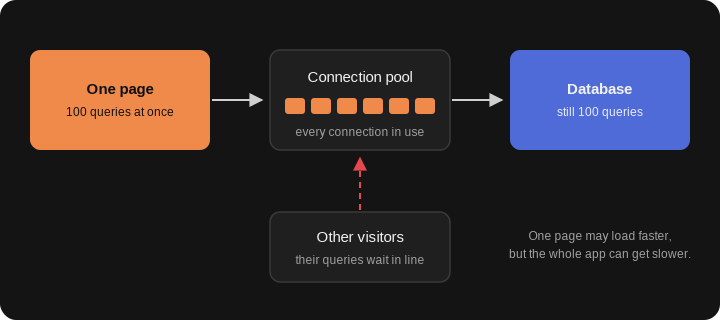
The page may get faster, because the queries no longer wait for each other. But the database still gets 100 queries per page. Also, your app talks to the database through a limited number of open connections. The app keeps them ready in a connection pool. 100 queries at once from one page can use the whole pool, and other visitors’ queries wait in line. Under real traffic, this can make the whole app slower.
How to find it
In your logs
Turn on query logging. With Prisma, it’s one option:
const prisma = new PrismaClient({ log: ["query"] });Load the page once, and read the log. An N+1 looks like this (shortened):
prisma:query SELECT ... FROM "public"."Recipe" ... LIMIT $1
prisma:query SELECT ... FROM "public"."User" WHERE ... "id" = $1 ...
prisma:query SELECT COUNT(*) ... FROM "public"."Like" WHERE ... "recipeId" = $1 ...
prisma:query SELECT ... FROM "public"."User" WHERE ... "id" = $1 ...
prisma:query SELECT COUNT(*) ... FROM "public"."Like" WHERE ... "recipeId" = $1 ...
... the same lines again, about 100 times
The signs:
- The same query shape, again and again. Only the value of
$1changes. - The count grows with the page. Show 10 items, then 100. If the number of queries grows too, you found one.
Use this logging only in development (on your own computer). In production (the live app that real users use), it writes a line for every query.
In your monitoring
Monitoring tools watch your live app and show you numbers and problems.
- Your database may keep query statistics. On Supabase (a database hosting company), it’s the Query Performance report. Look for a fast query with a very large number of calls.
- Performance tools such as Sentry can find N+1 queries automatically. They look for similar queries that run one after another, and they show which page caused them.
Go deeper: Your app was down for six hours and nobody noticed (Level 3) covers monitoring tools.
What good looks like
The goal: the number of queries must not depend on the number of items. A page with 10 recipes and a page with 100 must run about the same number of queries.
Fix 1: Ask for related data up front with include
In Prisma, you ask for the related data in the same call, with include:
const recipes = await prisma.recipe.findMany({
  take: 100,
  include: {
    author: { select: { name: true } },
    _count: { select: { likes: true, comments: true } },
  },
});
In plain English: get 100 recipes. With them, get each author’s name and the number of likes and comments for each recipe.
Prisma now loads all of it with a small, fixed number of queries. It uses one query with a join, or one query per table. This depends on your Prisma version and settings. In both cases, 100 recipes no longer means 400 extra trips.
Two details matter when the app grows:
selectonly what you show.author: trueloads every column of each user, maybe with data the page never uses.select: { name: true }loads only the name.- Count, don’t load.
_countasks the database to count the likes. If you load every like row and count the rows in JavaScript, you move thousands of rows for one number.
Fix 2: One query with a join
If you write SQL yourself, a join gets recipes and their authors in a single trip:
SELECT recipes.id, recipes.title, users.name AS author_name
FROM recipes
JOIN users ON users.id = recipes.author_id
ORDER BY recipes.created_at DESC
LIMIT 100;
In plain English: take the newest 100 recipes. For each one, find the user whose id matches its author_id. Return the recipe’s title with the author’s name. That’s one query and one round trip.
Fix 3: Batch with a list of IDs
Sometimes you can’t use a join. The data can be in another service (a separate app with its own data). Or the code that needs the data is far from the code that loaded the list. Then collect the IDs and get them all at once. The name for this is batching:
const ids = [...new Set(recipes.map((r) => r.authorId))];
const authors = await prisma.user.findMany({ where: { id: { in: ids } } });
const byId = new Map(authors.map((a) => [a.id, a]));
for (const recipe of recipes) recipe.author = byId.get(recipe.authorId);
In plain English:
- Line 1: make a list of the author IDs, without repeats. (A
Setkeeps only unique values.) - Line 2: one query: “give me every user whose ID is in this list”. In SQL, that’s
WHERE id IN (...). - Line 3: put the authors in a
Map, a lookup table from ID to author. - Line 4: give each recipe its author from the
Map, with no more queries.
That’s two queries in total, for 10 recipes or for 1,000.
Fix 4: DataLoader, when the loop is spread out
In some apps, the code that needs each author is in many places. It can be many components. It can also be many small functions in a GraphQL API (a kind of API where each field has its own small function). Each one asks for “user 7”, “user 12”, “user 7” again. You can’t easily rewrite them all into one query.
DataLoader is a small library for this problem. Each piece of code still asks for one item. DataLoader collects all the requests made at the same moment and turns them into one batch:
const userLoader = new DataLoader(async (ids) => {
  const users = await prisma.user.findMany({ where: { id: { in: ids } } });
  const byId = new Map(users.map((u) => [u.id, u]));
  return ids.map((id) => byId.get(id));
});
// anywhere in this request:
const author = await userLoader.load(recipe.authorId);
In plain English:
- Lines 1–5: tell DataLoader how to load many users at once, with one
INquery. DataLoader has a rule: return the same number of results as IDs, in the same order. Line 4 does that. - Line 7: each piece of code asks for one user. DataLoader waits until the current piece of work is done. Then it sends all the IDs it collected in a single batch. It also skips repeats, so “user 7” loads once.
DataLoader also remembers what it loaded. Its docs say to make a new loader when each request begins. A shared loader could give out old data, or one user’s data to another user.
Go deeper: One slow request froze the whole server (Level 4) explains what “the same moment” means in Node.js.
Don’t forget the index
The batched queries search by author_id or recipe_id. On a big table, those columns need indexes. If they don’t have indexes, the database reads every row of the table for each of your two queries.
Go deeper: Your app tried to load 50,000 rows at once (Level 4) covers the other half of this page. It shows how to load only some recipes at a time.
Test your own app
You need an app of your own for this part. No app yet? Start with Your first app in an afternoon, with an AI doing the typing. Built it in an AI app builder? Ask its AI to do each step below for you, or to add the missing part first (for example, a login).
- Turn on query logging in development, as shown above. Or ask your AI how to do it for your ORM.
- Load each important page once and count the queries. Check the homepage, dashboards, and any list or feed.
- Change the number of items. Make 10 test items and count the queries. Make 100 and count again. If the count grew, find the loop.
- Check the slowest page in production. In your monitoring tool or database query report, look for a fast query with a very high number of calls.
Takeaways
Key terms
- Round trip: one query’s trip to the database and back
- N+1 query problem: one query for a list, then one more query for each item in it
- Lazy loading: an ORM runs a query by itself when you first read a related field
- Connection pool: the limited set of open database connections that your app shares
- Batching: collecting many small requests into one, such as one
IN (...)query - DataLoader: a library that batches lookups made at the same moment and removes repeats
Red flags in AI-written code
await prisma...ordb.query(...)inside aforloop,.map()or.forEach()- A component or helper that loads its own data, used inside a list
Promise.allaround one query per item, as a “fix”include: { comments: true }on a list page that only shows a comment count- The number of queries in the log grows with the number of items on the page
Ask your AI
- “For this page, list every database query it runs, and say which ones run once per item.”
- “Rewrite this code so it loads all the related data in one or two queries, no matter how many items there are.”
- “Search my code for database queries inside loops, .map() or .forEach(), including in helper functions called from loops.”
Going deeper (optional, for readers who want more detail)
Prisma’s built-in batching. Prisma’s docs say it automatically batches some findUnique() queries. The queries must happen in the same tick (the same moment of the event loop). They must also have the same parameters and selection.
So Promise.all over findUnique calls can become one query. This batching is only for findUnique(). The docs say it doesn’t batch findMany(). It also can’t batch a loop that awaits each query before it starts the next, like Bug 1. Don’t depend on it: write the query you mean.
Join or separate queries. Prisma’s relationLoadStrategy option chooses between "join" and "query". "join" uses one query with a join in the database. "query" uses one query per table and combines the results in your app.
Check your version’s docs for the default, and for whether the option needs a preview flag. A single join isn’t always faster. One recipe has many comments and many tags. If you join both at once, each recipe repeats once per comment and once per tag. So the result can grow very large.
Over-fetching. The opposite mistake to N+1 is to load too much: include on every relation, every column, for every item. Watch the size of the data, not only the number of queries.
Other languages. Frameworks in other languages have the same problem and the same fixes. The usual name for loading related data up front is eager loading, the opposite of lazy loading.
GraphQL. GraphQL APIs often get N+1 problems, because each field has its own small function. DataLoader is the usual fix there.
References (6)
- Query optimization: Prisma documentation. N+1 examples, fixing them with
includeand theinfilter, and Prisma batchingfindUnique()in the same tick but notfindMany(). - Relation queries: Prisma documentation.
includeand therelationLoadStrategyoption (joinorquery). - Aggregation, grouping, and summarizing: Prisma documentation. Counting related rows with
_count. - Logging: Prisma documentation. Turning on query logging with
log: ["query"]. - DataLoader: GraphQL Foundation on GitHub. Batching loads made in one frame of execution, the same-length and same-order rule for the batch function, and creating a new loader per request.
- N+1 Queries: Sentry documentation. How Sentry detects repeated, sequential database queries.