Level 3 · Shipping
You woke up to a $10,000 cloud bill. What happened?
- Usage-based pricing
- AI API costs
- Tokens
- Bandwidth and egress
- Budget alerts
- Spending limits
- Protecting expensive endpoints
You woke up to a $10,000 cloud bill. What happened?
Before you start This lesson uses a few words from earlier lessons:
- Pay-as-you-go: cloud services charge for what you use, by the second, request or gigabyte. There is no fixed price. (There is no cloud. It’s someone else’s computer)
- Serverless function: backend code that your hosting platform runs for each request. The platform bills you each time it runs. (From your laptop to a real website in one push)
- Rate limiting: a limit on how many requests one visitor or user can make in a period of time. (Bots signed up 10,000 times overnight. Now what?)
- API key: a secret that lets your app use a paid service. The service charges your account for each use. (Your API key leaked, and strangers are spending your money)
Monday morning
You built an app that makes short summaries of long articles with AI. It has a few hundred users and costs you a few dollars a month. On Monday morning, you open your email:
Your usage this billing period: $10,412.
This is an example that we made up. But people post stories like it online again and again. And the first question is always the same: what happened?
Usually, the cause is one of these:
- A bug repeated a paid action thousands of times per minute, all weekend, while you slept.
- Bots found an endpoint (a web address on your server) that costs you money. They used it as much as they wanted.
- A leaked API key let strangers use your account.
- People downloaded a file or page a very large number of times, and the platform billed every download.
All of these can happen to a small side project. This lesson shows how the bill grows. It also shows the four layers of protection that stop it.
The mental model: a meter, not a price tag
A phone contract has a fixed monthly price. If you use it a lot or a little, you pay the same. Most cloud services work like a taxi meter. The meter runs while the ride continues, and it does not stop by itself. This is usage-based pricing: the bill is how much you used, times the price per unit.
Here is the uncomfortable part: your code decides how much you use. And code works at computer speed, 24 hours a day, and it does not ask you first. A person who makes a mistake makes it once. Code with a mistake can repeat it a million times before Monday.
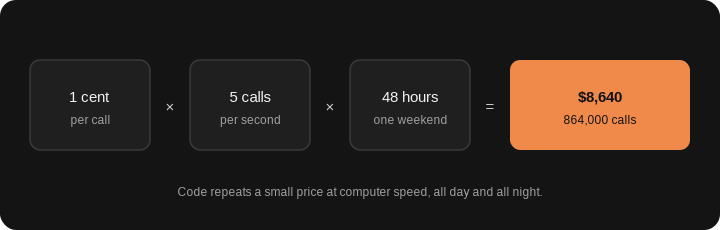
Where the comparison stops working: in a taxi, you can see the meter. In the cloud, the meter shows the cost late. AWS says that its budget data updates up to three times a day. Vercel checks spending every few minutes. When a number reaches you, the real total is already higher.
What the meter counts
| What you pay for | Typical unit | How it grows by surprise |
|---|---|---|
| AI API calls | Tokens (pieces of text) in and out | Loops, bots, very long prompts or answers |
| Serverless functions | Number of runs and how long each runs | Loops, slow calls that wait for a long time |
| Bandwidth (data sent to visitors) | Gigabytes sent out | Big files, videos, bots that download the same file |
| Storage | Gigabytes per month | Uploads and backups that nobody deletes |
| Servers and databases that always run | Hours of running | Something you tried once and forgot |
Two words from this table need more explanation.
Tokens. AI providers do not charge per question. They charge per token: a small piece of text, often part of a word. You pay for the tokens that you send. This is the input: your instructions, the user’s text, and the conversation so far. You also pay for the tokens that the model writes back (the output).
So a request with a 50-page document costs much more than a request with one sentence. Also, some chats send the full conversation with every message. Then each new message costs more than the one before.
Egress. Data that goes out of a cloud, to your visitors, is often called egress. On AWS, you pay for data sent out to the internet after a free monthly amount. Hosting platforms also bill for bandwidth or count it against your plan. A 3 MB file is very small. But if people download it a million times, that is about 3 terabytes.
How it goes wrong
Cause 1: A loop that calls a paid API
React is a popular library for building web pages from parts called components. Here is a common bug in AI-written React code:
const [result, setResult] = useState(null);

useEffect(() => {
  fetch("/api/summarize", { method: "POST", body: JSON.stringify({ text }) })
    .then((r) => r.json())
    .then((data) => setResult(data)); // saving the result re-renders the page
}); // ← no dependency list: runs after every render
In plain English:
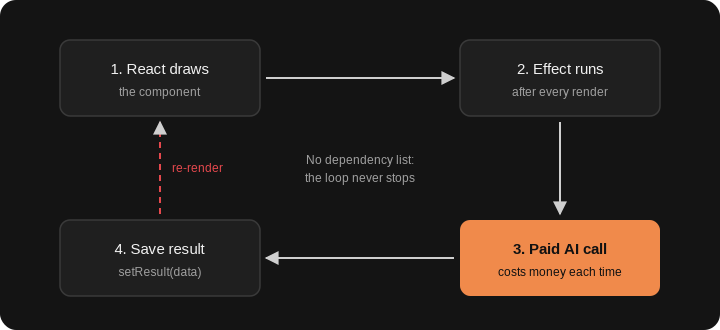
- Line 1: keep the summary in the component’s state. State is data that makes React draw the component again when it changes. This is a re-render.
- Lines 3–7: after React draws the component, ask the server for a summary. Then save the answer in state.
- Line 7:
useEffecthas no list of the things that it depends on. So React runs it after every render.
Saving the result causes a re-render. The re-render runs the effect. The effect gets a new summary and saves it, and that causes another re-render. Now every visitor’s open tab calls your paid AI API in a loop, until the visitor closes the tab. The fix is one line: a dependency list, }, [text]);. Then the effect runs only when the text changes.
The same pattern has other forms. A background job can fail and retry forever, with a call to the AI each time. An AI “agent” can call tools again and again with no limit on its steps.
Go deeper: The payment timed out. Did it go through? (Level 3) shows how to retry with limits.
Cause 2: An open door to an expensive feature
In the rate limiting lesson, you learned that bots look for endpoints that cost money. Imagine an /api/generate route with no login, no limits and no size checks. It gives free AI to anyone who finds it. Your page calls it only once per click, but that does not help. Anyone can call your API directly, without your page.
Cause 3: A leaked key
Your AI provider’s secret key can end up in your frontend code or in a public GitHub repository. Then strangers can use the key directly. They do not even need your app. You pay for every request that they make.
Cause 4: Bandwidth from a sudden rise in traffic
In February 2024, a developer reported a Netlify bill of about $104,000 for bandwidth. The bill was for a small static website (a site with only fixed files and no backend code). The developer described a large amount of traffic that downloaded one file again and again. Netlify’s CEO said publicly that the user would not have to pay. That was the company’s decision. It is not a rule that you can trust.
Cause 5: Something left running
A test database, a server from a tutorial, an old copy of your app on another platform: each one is small. But over months, the costs add up.
What good looks like
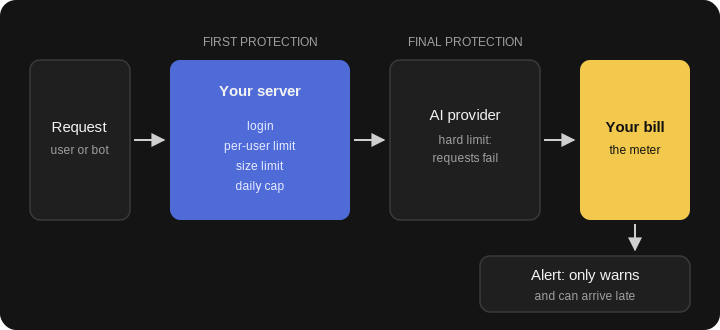
No single setting protects you. Use four layers. Each layer catches what the layer before it missed.
Layer 1: Know your cost per action
Before launch, calculate about how much one user action costs. For an AI feature, find two things. First, how many tokens does a typical request send and receive? Second, what does your model charge per token? Your provider’s pricing page has the prices. Every response from the AI API tells you how many tokens it used.
Then do the scary multiplication. Imagine that one summary costs your app 1 cent:
- 1,000 summaries a day, from real users: $10 a day. That is OK.
- A bug that calls it 5 times per second for a weekend: 5 × 3,600 seconds × 48 hours = 864,000 calls = $8,640.
That second number shows how an app that costs “a few dollars a month” can get a $10,000 bill.
Layer 2: Budgets, alerts and hard limits
Every serious provider lets you set an amount and get a warning. Some can also stop the spending. Learn the difference:
- An alert only tells you. The spending continues.
- A hard limit refuses more usage. That protects your money, but your feature stops until you raise the limit.
Here is what some popular services offer. Check their docs, because these features change:
| Service | What you can set |
|---|---|
| AWS Budgets | Email alerts when actual or forecast spending passes your amount. Optional actions can also run, such as stopping specific servers or blocking new resources. AWS warns that alerts can arrive after the money is spent. |
| Vercel Spend Management (paid plans) | A budget with notifications at 50%, 75% and 100%, a webhook, and an option to pause your production site at the budget. Vercel checks every few minutes, so the pause is not instant. |
| Netlify (credit-based plans) | The Free plan has a hard limit and never charges you. On paid plans, keep automatic credit top-ups (“auto recharge”) off for predictable costs. If you turn it on, your sites continue to run after your credits are used. |
| OpenAI | Spend alerts that only notify, and hard spend limits for your full organization or for one project. Over a hard limit, requests fail with a 429 error. OpenAI notes that the limit does not take effect instantly. |
| Anthropic | A monthly spend limit that you can set for your organization, plus separate limits per workspace. At the limit, requests fail until the limit resets or you raise it. |
Two practical rules:
- Set both. Set an alert at a level that makes you look. Set a hard limit at the level that would really hurt.
- Use separate keys or projects for each app, and for development and production. Then a bug in a test script cannot use up your production budget. You can also see which app spent what.
Layer 3: Protect every endpoint that costs money
The provider’s limit is your final protection. The first protection is your own server. For every route that calls a paid service:
- Require login. Limit how often each user can use the route, with the counter in your database.
- Limit the size of what goes in (prompt length, file size) and what comes out (
max_tokensfor AI models). - Cache answers that you already paid for. A cache is a saved copy that you can use again. If ten users want a summary of the same article, pay once.
- Never retry forever. Set a maximum number of attempts.
- Add a total cap and an off switch on the server.
Here is what the last point looks like:
app.post("/api/summarize", requireLogin, async (req, res) => {
  if (process.env.AI_ENABLED !== "true") return res.status(503).json({ error: "Summaries are paused." });
  if ((await aiCostTodayInCents()) >= 500) return res.status(503).json({ error: "Daily limit reached." });
  const msg = await anthropic.messages.create({ model: MODEL, max_tokens: 500, messages: buildMessages(req.body) });
  await recordAiCost(msg.usage); // tokens in and out, times your model's price
  res.json({ summary: msg.content[0].text });
});
In plain English:
- Line 2: an off switch. If the
AI_ENABLEDsetting is not"true", refuse politely. On many platforms, a change to an environment variable needs a new deploy. So some teams keep this switch in a database row. - Line 3: a daily cap for the full app. If today’s AI spending is already $5 (500 cents), stop for today. This catches loops and bots that get past the per-user limits.
- Line 4: call the model.
max_tokenslimits the length of the answer. - Line 5: record the cost of this call. The
usagefield in the response says how many input and output tokens the call used. - Line 6: send the summary back.
The status 503 means “not available for a short time”. That is honest, because the feature will come back.
Go deeper: Bots signed up 10,000 times overnight. Now what? (Level 2) covers limits per user and per IP address in detail.
Layer 4: Keep big files cheap
For bandwidth:
- Make images smaller and use modern formats. Do not send a 4 MB photo when a 200 KB photo looks the same.
- Put large files (videos, downloads, audio) in object storage (a service that stores files) behind a CDN, not in your app’s functions. A CDN is a network of servers that keeps copies of your files near your visitors. Compare the prices of storage providers for data sent out, because they are very different.
- A service like Cloudflare in front of your site can block large amounts of bad traffic before that traffic reaches the meter.
When the bill arrives anyway
- Stop the spending. Turn off the feature, pause the project, or lower the hard limit. If you think that a key leaked, rotate it now (replace it with a new key).
- Find the cause. Your provider’s usage page shows which service and when. Compare that time with your logs and your deploys.
- Fix it, and add a layer that would catch it next time.
- Contact support. Explain clearly what happened and what you changed. Providers sometimes reduce bills for honest mistakes or attacks, but that is their choice.
Test your own app
You need an app of your own for this part. No app yet? Start with Your first app in an afternoon, with an AI doing the typing. Built it in an AI app builder? Ask its AI to do each step below for you, or to add the missing part first (for example, a login).
- Find every meter. List every service that your app uses. For each service, open its usage or billing page and find what it charges for.
- Set alerts and limits today. On each service, set an alert at a small amount. Where possible, also set a hard limit. This takes ten minutes.
- Do the scary multiplication. For each paid feature, estimate the cost of one use. Multiply by 5 per second for 48 hours. Can your budget survive that number?
- Search for loops. Ask your AI: “Find every
useEffectwithout a dependency list, everywhile (true)loop, and every retry without a maximum in my code. Do any of them call a paid service?”
Takeaways
Key terms
- Usage-based pricing: you pay for how much you use, like a taxi meter
- Token: a small piece of text that AI APIs count to bill you, for both input and output
- Egress: data sent out of a cloud to the internet, often billed per gigabyte
- Budget alert: a warning when spending passes an amount. It does not stop anything.
- Hard spending limit: a cap that refuses more usage, which also stops your feature
Red flags
- A route that calls a paid AI API with no login, no per-user limit or no size limit
max_tokensmissing, or user input sent to the model with no length check- A
useEffectwith no dependency list that calls an API - Retries or agent loops with no maximum
- The same API key for development, testing and production
- No alert or limit on any provider account
Ask your AI
- “List every place my app calls a service that charges per use. For each one, show how it’s protected: login, per-user limit, size limit and a total cap.”
- “Estimate the cost of one request to my AI endpoint, using my prompt and typical input. Then estimate the worst case if a bot calls it 5 times per second for 48 hours.”
- “Add a server-side daily spending cap and an off switch to my AI features, and show a friendly message when they’re reached.”
Going deeper (optional, for readers who want more detail)
Denial of wallet. Some attacks do not try to take your site down. Their goal is to make your bill larger. People sometimes call this “denial of wallet”. Serverless and usage-priced services make this possible, because they continue to grow instead of slowing down. Rate limits, caps and hard limits are the defense.
Why billing data is late. Providers collect usage from many servers, add it up and calculate the price in groups. AWS’s documentation says that Budgets data updates up to three times a day. It also says that you can go over your amount before the notification arrives.
Vercel says that its spend checks run every few minutes. OpenAI says that recorded spend can go a little past a hard limit. Set limits below the amount that you can really afford.
Forecast alerts. AWS Budgets can send an alert on forecast spending: “at this rate, you’ll pass $100 this month”. This warns you earlier than an alert on actual spending, especially when costs grow slowly.
Cheaper AI requests. Limits are not the only tool. Send only the context that the model needs. Use a smaller model for simple tasks. For instructions that you send with every request, use your provider’s prompt caching (the provider keeps those instructions ready and charges less for them). Many providers also offer cheaper batch processing for work that does not need an instant answer.
Hidden meters. Some costs are easy to forget. Examples are data sent between cloud regions (data centers in different places), and logs (some monitoring services bill per gigabyte stored). Others are image optimization on hosting platforms, and build minutes. Every three months, read the full list of billed items on your platform’s pricing page.
References (10)
- Managing your costs with AWS Budgets: AWS documentation. Alerts on actual and forecast costs, data updated up to three times a day, and the warning that alerts can arrive after costs pass your threshold.
- Configuring budget actions: AWS documentation. Actions that apply policies or stop specific servers, automatically or after approval.
- Amazon EC2 On-Demand Pricing: AWS. The free monthly allowance for data sent out to the internet, and billing beyond it.
- Spend Management: Vercel documentation. Budgets, notifications at 50%, 75% and 100%, webhooks, pausing production deployments, and checks every few minutes.
- Credit-based pricing plans: Netlify documentation. The Free plan’s hard limit and the auto recharge option on paid plans.
- Spend limits: OpenAI documentation. Spend alerts that only notify, hard limits for organizations and projects,
429errors, and enforcement that isn’t instant. - Rate limits: Anthropic documentation. Monthly spend limits you can set for your organization, workspace limits, and what happens when a limit is reached.
- Netlify billing horror story: Netlify community forum. The February 2024 bandwidth bill reported by a developer, and Netlify’s statement that the user would not be charged.
- I am the OP of that $104K bill post: Netlify community forum. The developer’s own follow-up, describing repeated requests to a single MP3 file.
- useEffect: React documentation. An Effect with no dependency array runs again after every render, and an Effect that updates state can loop.