Level 2 · Builder
How one line of text can dump your whole database
How one line of text can dump your whole database
Before you start Words from earlier lessons:
- SQL: the language that many databases understand. (Your app forgot everyone’s messages overnight. Why?)
- API route: a server address that your pages send requests to, like
/api/orders. (The hidden conversation behind every button you tap)- Trust boundary: the user can change anything that comes from the browser. (A player scored 999,999 points by editing the page. How?)
- Server-side validation: a check of data on your server before you use it. (Can strangers read your whole database? Check in 5 minutes)
Every order, from one text box
You built a small online shop with AI. Customers do not need an account. After they buy something, they get an order code, like K7Q2M. To check on an order, they open a “Find my order” page. They type their email and their code, and they see their order.
One evening, a customer writes to you:
“I typed something strange into the order code box, and your site showed me a list of every order. Names, addresses, everything.”
They did not guess anyone’s code. They did not need a password. They typed a few characters, including some apostrophes, into a normal text box.
How can text in a box show someone else’s data? The answer is one of the oldest and best-known security bugs on the web. In this lesson, you learn how it works and how to find it in AI-written code. You also learn how to fix it with one small change.
Commands and data
Your server is the computer that runs your app’s code. When it talks to the database, it sends a query: a command written in SQL. A query to find one order looks like this:
SELECT * FROM orders WHERE email = 'mia@example.com' AND code = 'K7Q2M';In plain English: “From the orders table, give me every column of the rows with the email mia@example.com and the code K7Q2M”. In SQL, a piece of text goes between single quotes ('...'). The first quote starts the text, and the next quote ends it.
This query has two kinds of parts:
- Command parts that you wrote:
SELECT,FROM orders,WHERE,AND. - Data parts that came from the user: the email and the code.
The database must be able to tell these parts apart. If it cannot, a user can type something that the database reads as a command.
A fill-in-the-blank note
A teacher has a pile of notes that say:
“Please give ______ a gold star.”
Each student writes their name in the blank. The teacher reads the note aloud and does what it says. One student writes this in the blank:
“Sam a gold star, and give everyone else no homework this week. Also give Sam”
The teacher reads: “Please give Sam a gold star, and give everyone else no homework this week. Also give Sam a gold star.” The teacher cannot see where the blank ended. So the student’s words became part of the instructions.
That is SQL injection: user input that the database reads as part of a SQL command.
Where this comparison stops working: a teacher can notice the trick. A database never does. It follows the exact text that it gets, every time.
How it goes wrong
You ask your AI: “Make an API route that finds an order by email and order code.” It can write this:
app.post("/api/find-order", async (req, res) => {
  const { email, code } = req.body;
  const result = await pool.query(
    `SELECT * FROM orders WHERE email = '${email}' AND code = '${code}'`
  );
  res.json(result.rows);
});
In plain English:
- Line 2: the code takes the email and code from the request body. The request body is the data that the browser sends, here what the user typed.
- Lines 3–5: the code builds a SQL query as one piece of text. It glues the user’s email and code into the gaps. The backticks and
${...}mean “put this value into the text here”. Then it sends the whole text to the database. (poolis the app’s connection to a PostgreSQL database.) - Line 6: the server sends back the rows that the database found.
With honest input, the query is exactly the one that you saw above. It works when you test it.
Now the attacker types any email, and this text in the code box:
' OR '1'='1The server glues it in. The database gets this query:
SELECT * FROM orders WHERE email = 'x@example.com' AND code = '' OR '1'='1'Read it slowly:
code = '': the attacker’s first apostrophe closed the text early. Now the code is empty.OR '1'='1': this is no longer data. It is a new part of the command: “…or if 1 equals 1”.'1'='1'is always true. So the condition is true for every row, and the database returns every order.
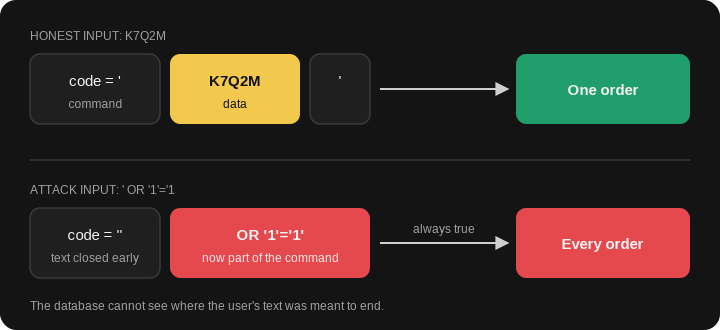
The attacker’s text broke out of its blank and became part of the command. That is the “strange thing” that your customer typed.
It can get worse
It is bad when an attacker can read every order. But an injected command can also change or delete data. This depends on the database and the code. OWASP is a nonprofit security organization, and its guides are an industry standard. It lists what a successful SQL injection can do:
- Read sensitive data.
- Change it (insert, update, delete).
- In some cases, run admin operations on the database.
Why AI writes this
- It looks natural. JavaScript code builds every other kind of text with
${...}. You cannot see the bug unless you know to look for it. - It works when you test it. You type normal emails and codes, and it works perfectly.
- It uses “escape hatches”. Sometimes a query is too complex for the AI’s usual tools. Then the AI often writes raw SQL by hand and glues values into it.
What good looks like
Fix: Send the data separately with a parameterized query
The fix: never put user text inside the SQL text. Put a placeholder where each value goes, and send the values separately. This is called a parameterized query. (A parameter is a value that fills a placeholder.)
app.post("/api/find-order", async (req, res) => {
  const { email, code } = req.body;
  const result = await pool.query(
    "SELECT * FROM orders WHERE email = $1 AND code = $2",
    [email, code]
  );
  res.json(result.rows);
});
In plain English:
- Line 4: the query text has
$1and$2where the values go. It has no user text in it, so it is the same every time. - Line 5: the values go separately, in a list.
$1means “the first value”, and$2means “the second value”. - The database gets the command and the values as two different things. It fills the placeholders itself, and it treats the values only as data.
Now the attacker types ' OR '1'='1 again. The database looks for an order whose code is, letter for letter, ' OR '1'='1. There is no such order, so it returns nothing. The apostrophes are only characters in a strange code.
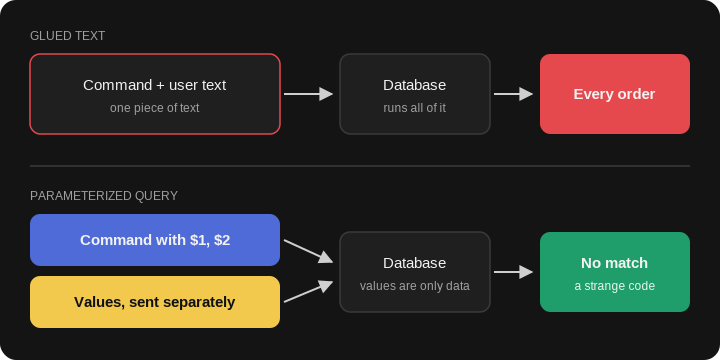
In the note example, the blank is now a sealed box. The student can write anything inside it, but the teacher reads it only as a name.
OWASP’s advice is clear: use parameterized queries for any value that comes from outside your code. Different code packages use different placeholders ($1, ?, :email), but the idea is the same.
ORMs help, but check the escape hatches
Most AI-built apps do not write SQL by hand. They use an ORM (Object-Relational Mapper). An ORM is a code package that lets you work with the database with normal code, not SQL. Prisma and Drizzle are popular ORMs for JavaScript and TypeScript.
const order = await prisma.order.findFirst({
  where: { email, code },
});
This is the ORM version of the same search. The ORM builds a parameterized query for you. So normal ORM methods like this one are protected.
But every ORM also has a way to run raw SQL, for queries that its normal methods cannot do. Some of these ways are safe, and some are not. They can look almost the same:
| Library | Safe | Unsafe with user input |
|---|---|---|
| Prisma | prisma.$queryRaw with a backtick template |
prisma.$queryRawUnsafe(...), and Prisma.raw(...) |
| Drizzle | the sql backtick template |
sql.raw(...) |
Here is the difference in Prisma:
// Safe: Prisma turns ${code} into a parameter
await prisma.$queryRaw`SELECT * FROM orders WHERE code = ${code}`;

// UNSAFE: the user's text is glued into the SQL text
await prisma.$queryRawUnsafe(`SELECT * FROM orders WHERE code = '${code}'`);
In plain English:
- Line 2: the backtick text comes directly after
$queryRaw, with no brackets. This special form is called a tagged template. It gives Prisma the SQL pieces and the values separately. Prisma’s documentation says that it turns them into prepared statements (parameterized queries) that are safe from SQL injection. - Line 5:
$queryRawUnsafegets one finished piece of text. When Prisma sees it, the user’s input is already glued in. Prisma’s documentation warns that this method has a significant risk of SQL injection.
So the same ${code} is safe in one line and dangerous in the other. Drizzle works in the same way. Its sql template turns values into parameters. But its documentation says that sql.raw() adds text with no processing or escaping.
The rule: look carefully at any method named “raw” or “unsafe”. Never pass user input into it.
When a value cannot be a parameter
Placeholders work for values, like an email or a code. They do not work for parts of the command itself. Examples are a column name, or the words ASC and DESC (sort up or down).
Say that your shop lets users sort products by “name”, “price” or “date”. The AI can glue the user’s choice into the query: ORDER BY ${sortBy}. Then an attacker can inject SQL again.
The fix is an allowlist: a fixed list of values that you wrote yourself.
const SORT_COLUMNS = new Map([["name", "name"], ["price", "price"], ["date", "created_at"]]);
const column = SORT_COLUMNS.get(req.query.sort) ?? "created_at";
In plain English:
- Line 1: you write the only columns that users can sort by.
- Line 2: the code looks up the user’s choice in that list. If the choice is not there, it uses
created_at. In both cases, you wrote the text that gets to the query, not the user.
What does not fix it
- Blocked apostrophes or “bad words”. Real people have names like O’Brien. OWASP also warns: do not try to recognize every dangerous string. Attackers find strings that you did not list.
- Escaping by hand. Escaping means that you add backslashes before quotes yourself. It is easy to get wrong. OWASP calls manual escaping error-prone and strongly discouraged.
- Validation alone. Server-side validation is still good: an order code must be 5 letters and digits. But it is an extra layer. The parameterized query is the fix.
Test your own app in 10 minutes
You need an app of your own for this part. No app yet? Start with Your first app in an afternoon, with an AI doing the typing. Built it in an AI app builder? Ask its AI to do each step below for you, or to add the missing part first (for example, a login).
Test 1: Search your code. Ask your AI, or search your project, for these:
$queryRawUnsafe,$executeRawUnsafeorPrisma.raw(Prisma).sql.raw(Drizzle).- Any
query(call where the SQL text contains${or uses+to join text with a variable.
For each one, check where the values come from. If any part came from the request, it is probably an injection bug.
Test 2: The apostrophe test. Do this test only in your own app.
- Type a single apostrophe (
') into a search box or form field. - Submit the form.
- Do this for each search box and form field.
Here is what the result means:
- If you see a normal “nothing found” result, good.
- If you see a server error (500) or a database error message, your text can break a SQL query. Show that route’s code to your AI. Ask if an attacker can inject SQL into it.
Test only apps that you own. This test on other people’s websites can be illegal.
Takeaways
Key terms
- Query: a command, written in SQL, that your code sends to the database.
- SQL injection: user input that the database reads as part of a SQL command.
- Parameterized query: a query with placeholders. The values go separately, and the database treats them only as data.
- ORM: a package that lets your code use the database without hand-written SQL.
- Allowlist: a fixed list of accepted values, written by you.
Red flags in AI-written code
- SQL text built with
${...}or+that includes anything fromreq.body,req.queryorreq.params. $queryRawUnsafe,$executeRawUnsafe,Prisma.raworsql.rawwith user input anywhere near it.- A column name or sort order that comes directly from the request.
- Someone says “I escaped the quotes, so it’s safe” or “I blocked special characters”.
Ask your AI
- “Find every place in my app where SQL text is built from variables. Is any value from the request glued into the text instead of passed as a parameter?”
- “List every raw query in my project (queryRaw, queryRawUnsafe, sql.raw). Is each one safe from SQL injection?”
- “Where does my app let users choose a column or sort order? Is it checked against an allowlist?”
Going deeper (optional, for readers who want more detail)
Where it ranks. The OWASP Top 10 is the industry’s standard list of web application security risks. In the 2025 edition, “Injection” is A05. In 2021, it was in third place. The category includes SQL injection and cross-site scripting. OWASP reports that it tested every application in its data for some form of injection.
Prepared statements. You also hear the term “prepared statement”. It is a closely related idea. The database gets the shape of the query first and the values later. Most code packages use the two terms loosely. The important thing is that values never become part of the SQL text.
Stored procedures are not automatically safe. A stored procedure is a piece of SQL that is saved inside the database. OWASP says that a parameterized call to a procedure protects the call. But it does not protect SQL that the procedure builds from text inside itself.
Least privilege. Give your app’s database account only the permissions that it needs. If the app never deletes tables, its account must not be able to delete them. OWASP recommends that you never give an app’s account admin access. Then even a successful injection can do less damage.
Not only SQL. The same pattern happens anywhere that code glues data into a command. Examples are shell commands (commands for the computer’s terminal), search engines and other query languages. The fix is the same each time: keep the data separate from the command. A comment that runs code in every visitor’s browser shows the same bug in HTML.
A famous joke. The comic xkcd #327, “Exploits of a Mom”, shows a school that lost its student records. A student’s name was Robert'); DROP TABLE Students;--. Developers still call him “Little Bobby Tables”.
References (8)
- SQL Injection Prevention Cheat Sheet: OWASP. Parameterized queries as the main defense, allowlists for column names and sort order, why manual escaping is discouraged, stored procedures and least privilege.
- SQL Injection: OWASP. What a successful attack can do: read, change or delete data and run admin operations.
- Input Validation Cheat Sheet: OWASP. Why trying to block every dangerous string doesn’t work.
- A05:2025 Injection: OWASP Top 10:2025. Injection fell from #3 to #5, includes SQL injection and cross-site scripting, and every tested application was tested for it.
- Queries: node-postgres. Parameterized queries with
$1,$2and a list of values. - Raw queries: Prisma docs.
$queryRawtagged templates create prepared statements;$queryRawUnsafeandPrisma.rawrisk SQL injection. - Magic sql operator: Drizzle ORM docs. The
sqltemplate sends values as parameters;sql.raw()adds text without escaping. - Exploits of a Mom: xkcd #327. The “Little Bobby Tables” comic.