Level 2 · Builder
Your error page showed your database details to everyone
- Error handling
- try/catch
- Async errors
- Not leaking internal details
- Error boundaries
- Fail-safe defaults
Your error page showed your database details to everyone
Before you start This lesson uses words from earlier lessons:
- Stack trace and logs: a stack trace shows where the code failed. Logs are the messages that your server writes while it runs. (The error message is telling you what’s wrong. Read it first)
- Status code: the number in a response that tells how the request went. A 4xx code means a problem with the request. A 5xx code means a problem on the server. (The app said “Saved!”. The note was never saved)
- Constraint: a rule that the database enforces, like “no two rows can have the same value here”. (You changed your name. Half the app still shows the old one)
- API endpoint: an address on your server, like
/api/bookings. Your app’s pages send requests to it. (The hidden conversation behind every button you tap)
A red box full of secrets
You built a booking app with AI for a small gym. Members log in and book a place in a yoga class.
One morning, a member clicks “Book” twice, because the page felt slow. A red box appears on the page:
Error: duplicate key value violates unique constraint "bookings_user_id_class_id_key"
    at createBooking (/srv/gym-app/src/bookings.js:14:5)
The member does not know what this means. Are they booked or not? They phone the gym.
Also, anyone who sees that box now knows some facts about your app:
- Which database you use. (Each database writes its errors in its own way.)
- There is a table called
bookings. - The table has columns called
user_idandclass_id. - Your code is in the folder
/srv/gym-app/src/.
Each fact is small. Together, they are a map of your app for an attacker.
Errors happen in every app: a slow database, a service that is down, a double click. You cannot prevent them all. But you decide what users see when an error happens. You also decide what you see. This lesson is about those two decisions.
One error, two readers
Every error has two readers, and they need very different things.
| The user | You, the developer | |
|---|---|---|
| Needs to know | What happened, in plain words, and what to do now | Everything: the stack trace, the request, the database message |
| Should see | “This class is full. Join the waiting list?” | The full error, in the server’s logs |
| Should never see | Table names, file paths, SQL, stack traces | (nothing is hidden from you) |
(SQL is the language that your code uses to talk to the database.)
Think of a restaurant. A pan catches fire in the kitchen. The waiter comes to your table and says: “I’m sorry, the fish is not available tonight. Can I offer you the chicken?” The waiter does not explain which burner failed. But the kitchen writes down exactly what happened. Then the cook can repair the burner tomorrow.
Where this comparison stops working: a waiter decides what to say at that moment. Your code cannot. You (or your AI) wrote every message that a user sees before the error happened. If nobody wrote a friendly message, the user gets the contents of the error. That is the red box above.
So this lesson has one rule:
Details go to the logs. Only you can read them. A short, useful message goes to the user. No internal details.
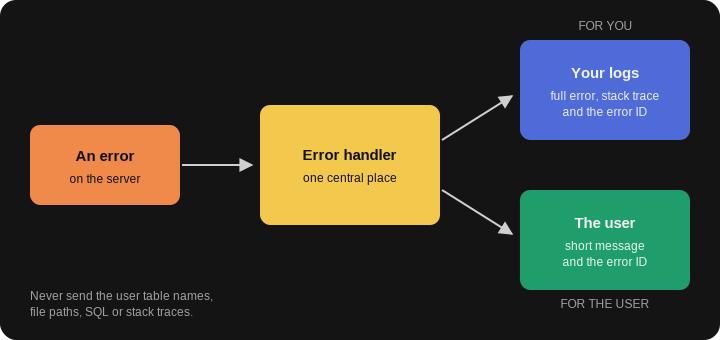
How errors travel through your code
To control what users see, you must know how an error moves.
A function is a named piece of code that does one job. When code finds a problem that it cannot handle, it throws an error. The code stops at that point. The error goes back to the function that called it. If that function does not handle the error, the error goes back one more step, and so on. The stack trace shows you this path, step by step.
To stop an error on its way, you catch it with try and catch:
try {
  const booking = await createBooking(userId, classId);
  showMessage("You're booked!");
} catch (err) {
  console.error(err);
  showMessage("We couldn't book that class. Please try again.");
}
In plain English:
- Lines 1–3: Try to create the booking. Then show “You’re booked!”.
- Line 4: If anything inside
trythrows, go directly here.errholds the error. - Line 5: Write the full error to the logs, for you.
- Line 6: Show the user a short message, for them.
If the booking fails, “You’re booked!” never shows. The code goes to catch before it reaches that line.
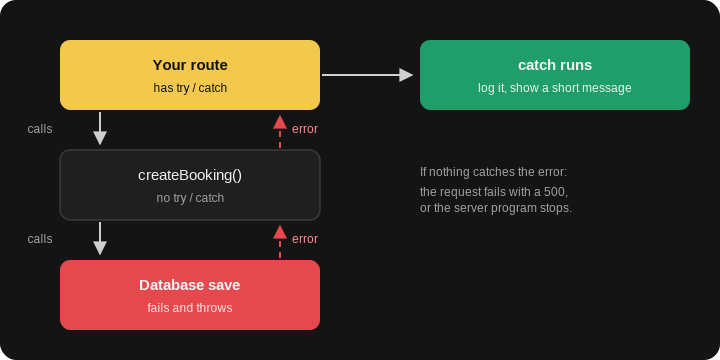
If nothing catches an error, the error reaches the top. On the server, the request fails with a 500, or the whole server program stops. In the browser, the action stops halfway. The error appears only in the Console (a panel in the browser’s developer tools).
Errors from slow work
Most errors in web apps come from slow work: a question to the database, a call to another service, a request. The keyword await means “wait for this slow work to finish”. If that work fails, await throws the error at that line. So try/catch catches it.
Two traps catch many people, and many AIs:
- A missing
await. Withoutawait, the code does not wait. It moves on and leaves thetryblock. The failure happens later, outside the block, and nothing catches it. Node.js is the program that runs your JavaScript server. By default, an error like this crashes the whole server program in Node.js. Then every user’s request fails, not only one. - Tools that do not throw. Some tools report problems without throwing. You saw this with
fetch(), the tool that sends requests from the browser. A 500 from the server does not makefetch()throw, so you must checkres.ok. The library (ready-made code) for Supabase, a popular database service, works in a similar way. It returns{ data, error }. If you never look aterror, a failed save looks like a success.
So “my code has a try/catch” is not enough. The error must really reach the catch.
How it goes wrong
Bug 1: Sending the raw error to the user
Here is the booking endpoint behind the red box. AI tools often write it like this. It uses Express, a popular package (ready-made code that you install) for building servers in Node.js.
app.post("/api/bookings", requireLogin, async (req, res) => {
  try {
    const booking = await db.booking.create({ data: { userId: req.user.id, classId: req.body.classId } });
    res.status(201).json(booking);
  } catch (err) {
    res.status(500).json({ error: err.message, stack: err.stack });
  }
});
In plain English:
- Lines 1–4: For a logged-in user, save a booking. Send it back with 201 Created.
- Lines 5–6: If the save fails, send back a 500 with the error’s own message and its stack trace.
The database did its job. A constraint says that one member can book a class only once, so the database refused the second click. The bug is on line 6. It gives the database’s message and the stack trace to the sender of the request. The page then shows what it gets.
AI tools write this because it helps while you build: you see errors directly on the page. In production (the live app with real users), it shows internal details to every user and every attacker. Database messages are especially useful to attackers. They help attackers plan attacks like SQL injection, where an attacker puts database commands into a form field.
Bug 2: Hiding the error completely
The opposite mistake looks calm. It is just as bad:
async function getMyBookings(userId) {
  try {
    return await db.booking.findMany({ where: { userId } });
  } catch (err) {
    return [];
  }
}
If the database is down, this function returns an empty list. The page shows “You have no bookings.” The member panics and books again, or thinks that the gym cancelled their class. And the catch block writes nothing to the logs, so you never find out either.
Swallowing an error means a catch block that is empty, or that returns [], null or false without logging. It turns a loud problem into a silent, confusing one.
Bug 3: Failing open
The gym adds paid video classes. Before a member can watch, the app checks their subscription with a billing service:
async function hasPaidPlan(userId) {
  try {
    const sub = await billing.getSubscription(userId);
    return sub.status === "active";
  } catch (err) {
    return true; // don't block paying members if billing is down
  }
}
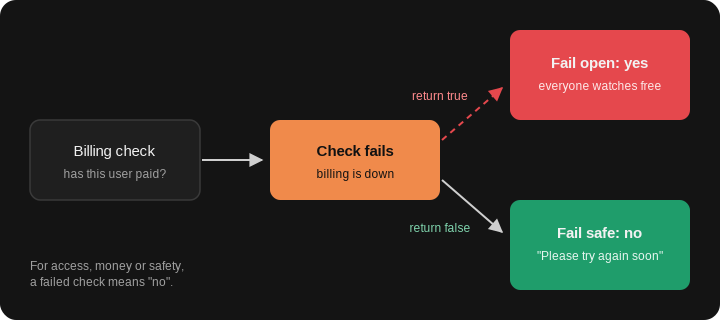
The comment sounds kind. But when the check fails, the answer is yes. If billing is down for an hour, everyone watches for free. If an attacker finds a way to make the check throw, they get in every time.
Failing open means that you let people through when a check fails. For anything about access, money or safety, it is the wrong default.
Bug 4: One broken piece blanks the whole page
Many AI-built apps draw their pages with React. React is a popular package for building the frontend (the part of the app in the browser). It builds pages from pieces called components: a header, a booking list, a chart. React’s documentation says this: by default, if an error happens while React draws the page, React removes its whole interface from the screen.
So one chart with a bug can make the whole page white.
What good looks like
Fix 1: One central error handler
Do not decide in every endpoint what to send. Send unexpected errors to one place. In Express, a route is the code for one endpoint. A function with four inputs, added after all your routes, is an error handler:
app.use((err, req, res, next) => {
  const errorId = crypto.randomUUID();
  console.error(`[${errorId}]`, req.method, req.path, err);
  res.status(500).json({
    error: "Something went wrong on our side. Please try again.",
    errorId,
  });
});
In plain English:
- Line 1: This function runs when a route fails with an error that nothing handled.
- Line 2: Make a random error ID, a code like
3f8a1c9e-.... - Line 3: Write the ID, the request and the full error to the logs, for you.
- Lines 4–7: Send the user a 500 with a short message and the same ID.
Say a member reports “I got error 3f8a1c9e”. You search your logs for that ID and find the exact stack trace. The user gets something useful. You get everything. An attacker gets nothing.
In Express 5, the current version, errors thrown inside async routes reach this handler automatically. Next.js (a popular tool for React apps) does a similar thing for you. Some parts of a page are drawn on the server. In production, when such a part fails, the browser gets only a generic message. The message has an ID called a digest that matches the server’s logs.
Go deeper: Your app was down for six hours and nobody noticed (Level 3) covers logs, and alerts for errors that real users get.
Fix 2: Handle the errors you expect
“Already booked” and “class full” are not surprises. They are normal situations, so they need normal answers. Check for them first, and reply with a clear 4xx message:
const existing = await db.booking.findFirst({
  where: { userId: req.user.id, classId: req.body.classId },
});
if (existing) {
  return res.status(409).json({ error: "You're already booked into this class." });
}
Now the double click gets 409 Conflict and a sentence that the member understands. The database constraint also stays in place. Two clicks can arrive at exactly the same moment. Then the constraint still stops the second booking, and the central handler sends the safe, generic message.
Here is a simple way to sort errors:
| Kind | Example | Status code | Message |
|---|---|---|---|
| The user can fix it | Empty form, class full, already booked | 4xx | Specific: say what and how to fix it |
| The user can’t fix it | Database down, bug in your code | 5xx | Generic, with an error ID |
Fix 3: Fail safe
When a check about access or money fails, treat the answer as no. This is a fail-safe default, also called failing closed:
} catch (err) {
  console.error("Billing check failed", userId, err);
  return false;
}
Then tell the user the honest truth: “We couldn’t check your plan right now. Please try again in a few minutes.” A short wait for some members is much better than free access for everyone.
The same idea applies everywhere. If you cannot confirm a payment, do not send the order.
Fix 4: Error boundaries in React
An error boundary is a React component that wraps other components. Something inside it can fail while React draws it. Then the boundary shows a fallback (a replacement message), not a blank page. Only the broken part changes.
In Next.js, you make one when you add a file called error.js next to a page. For example, app/bookings/error.js:
"use client";

export default function Error() {
  return <p>We couldn't load your bookings. Please refresh the page in a minute.</p>;
}
In plain English: if the bookings page fails while React draws it, show this message. The first line is necessary, because error boundaries run in the browser. The rest of the app, like the menu and the header, continues to work.
Error boundaries have limits. React’s documentation says that they do not catch errors in event handlers. An event handler is code that runs when the user clicks or types. Error boundaries also do not catch errors in code that runs later, like timers. For a “Cancel booking” button, put try/catch inside the click code. Then show a message yourself.
Test your own app
You need an app of your own for this part. No app yet? Start with Your first app in an afternoon, with an AI doing the typing. Built it in an AI app builder? Ask its AI to do each step below for you, or to add the missing part first (for example, a login).
- Break the database on purpose. On your laptop, change the database password in your
.envfile to a wrong value. Restart the app and use it. Do you see a friendly message, a blank page or a raw error? Put the correct password back after the test. - Read your error responses. Open the developer tools and click the Network tab. Cause an error: send an empty form, or do step 1. Click the failed request and open its Response. Look for stack traces, SQL, table names or file paths.
- Search your code. Search for
err.message,err.stackanderror: errnearres.jsonorres.send. Then search forcatchand read each block. Does it log the error? Does it returntrue,[]ornulland tell nobody? - Crash one component. For a short test, add
throw new Error("test")to one React component. Does the whole page go white, or only that part? Remove the line after the test.
Takeaways
Key terms
- Throw and catch: code throws an error when it cannot continue.
try/catchstops the error and lets you decide what happens next. - Swallowing an error: you catch an error and do nothing, so nobody learns that it happened.
- Error ID: a random code that the user sees and that your logs contain. It lets you match the two.
- Failing open and fail-safe default: failing open allows access when a check fails (bad). A fail-safe default denies it (good).
- Error boundary: a React component that shows a fallback message when the components inside it fail.
Red flags in AI-written code
- A response contains
err.messageorerr.stack. - A
catchblock is empty, or returns[],nullortruewithout logging. - A catch block for a permission, payment or login check contains
return trueor “allow”. - Code does
asyncwork withoutawait, or never checkserrorafter a Supabase call. - A React or Next.js app has no error boundary or
error.jsanywhere.
Ask your AI
- “Find every place where my app sends an error’s message or stack trace to the browser. Replace them with a central error handler that logs the details with an error ID and sends a generic message.”
- “List every catch block in my app. For each one, tell me whether it logs the error and what the user sees.”
- “Which checks in my app allow access if they fail? Change them so they deny access instead.”
- “Add error boundaries so one broken component can’t blank the whole page.”
Going deeper (optional, for readers who want more detail)
Express 4 and Express 5. Express 5 sends errors from async routes to your error handler automatically. Express 4 does not. In Express 4, a rejected promise in an async route stays unhandled. On current Node.js versions, an unhandled rejection crashes the process. On Express 4, wrap each async route in try/catch and call next(err), or upgrade. The built-in error handler of Express leaves out the stack trace when the environment variable NODE_ENV is production. But a custom handler that sends err.stack overrides that.
Unhandled rejections. The slow work behind await is a promise. A promise that fails is “rejected”. If nothing handles the rejection, Node.js (since version 15) treats it as an uncaught exception by default. It prints the stack trace and exits. You can listen for process.on("unhandledRejection", ...) and process.on("uncaughtException", ...). But the Node.js documentation warns that it is not safe to continue normally after an uncaught exception. Use these listeners to log the error. Then end the program yourself, for example with process.exit(1). This is necessary because one of these listeners stops Node.js from exiting on its own. Let your host restart the program.
Next.js error files. error.js covers one part of your app and must be a Client Component. To catch errors in the root layout, Next.js uses global-error.js. This file must include its own <html> and <body> tags. In production, errors from Server Components show a generic message and error.digest, an ID that matches the log on the server.
React without Next.js. React’s documentation says that error boundaries currently must be class components. You cannot write one as a function component. You do not have to write it yourself: the react-error-boundary package gives you a ready-made one.
Error reporting services. Many teams do not read logs by hand. They send errors to a service that groups them, counts how many users they affect and sends alerts. Sentry is a well-known example. The Level 3 lesson on logging and monitoring covers this.
A standard error format for APIs. RFC 9457, “Problem Details for HTTP APIs”, defines a common JSON shape for error responses. It has fields like type, title, status and detail. It is optional, but it helps when other developers use your API.
OWASP Top 10. The 2025 edition of the OWASP Top 10 added a new category, “A10:2025 Mishandling of Exceptional Conditions”. It covers failing open, error messages that show system details, and errors that leave things half-done. One example scenario is a database error that the user sees and that helps an attacker plan SQL injection. It recommends that you catch errors where they happen and have a global handler for anything missed.
References (10)
- Component: Catching rendering errors with an error boundary: React documentation. React removes its UI by default after a rendering error, what error boundaries don’t catch (event handlers, async code), class components only, and
react-error-boundary. - error.js: Next.js documentation.
error.jsmust be a Client Component, the generic production message witherror.digestto match server logs, andglobal-error.jswith its own<html>and<body>tags. - Error handling and Migrating to Express 5: Express documentation. Four-argument error handlers, Express 5 passing rejected promises from
asyncroutes to the error handler, and the built-in handler leaving out the stack trace whenNODE_ENVisproduction. - Command-line API: —unhandled-rejections and Process: Using ‘uncaughtException’ correctly: Node.js documentation. Unhandled rejections raised as uncaught exceptions by default since v15, and why it’s not safe to carry on after one.
- Window: fetch() method: MDN.
fetch()doesn’t reject on error status codes, so you must checkResponse.ok. - Handling errors in supabase-js: Supabase documentation. Every call returns
{ data, error }instead of throwing. - A10:2025 Mishandling of Exceptional Conditions: OWASP Top 10:2025. The new 2025 category, failing open, error messages that reveal system details, the SQL injection scenario, and catching errors where they happen plus a global handler.
- RFC 9457: Problem Details for HTTP APIs: IETF. The standard JSON error format with
type,title,statusanddetail.