Level 5 · Systems & architecture
The decisions your AI can't make for you
- Architecture trade-offs
- Build vs buy
- Data criticality
- Availability and downtime budgets
- RTO and RPO
- Monolith vs microservices
- Reversible decisions
- Decision records
The decisions your AI can’t make for you
Before you start This lesson uses a few words from earlier lessons:
- Backup and restore: a copy of your data that you can bring back after a disaster. It only counts if you tested the restore. (The AI deleted your production database. Now what?)
- Horizontal scaling: more copies of your app behind a load balancer (a server that spreads requests), instead of one bigger server. (Your app went viral. Will it survive?)
- Service and circuit breaker: a program your app calls over the network, and a switch that stops calls to it while it fails. (One slow service took your whole app down)
- Eventual consistency: copies of data that catch up a moment later, not at once. (When everything calls everything, everything breaks)
Two chats, two architectures
Maya is building an app for local bakeries to take pre-orders. On Monday she asks her AI: “Design a scalable architecture for my app. It needs to handle millions of users.”
She gets a detailed plan with eight services and Kafka between them. It also has a search engine, event sourcing for orders, and a database in three regions (data centers around the world).
On Tuesday, she starts a new chat and asks: “What’s the simplest way to build a pre-order app for my bakery customers?”
This time she gets one server, one Postgres database, Stripe (a payment service) for payments, and a hosting platform that deploys from GitHub.
Both answers are well written. Both sound confident. They cannot both be right for Maya.
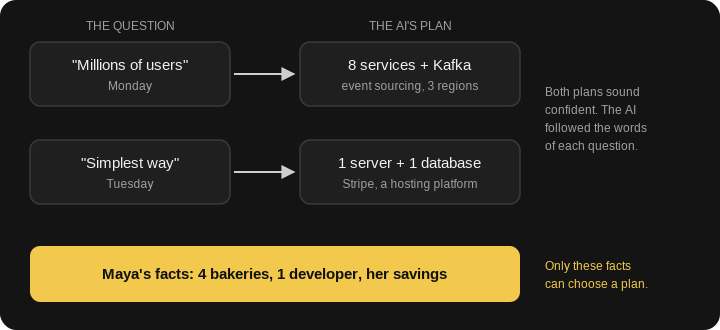
The uncomfortable truth: neither chat was wrong. Each chat answered the question it got. “Millions of users” moved the AI toward big-company patterns, and “simplest” moved it the other way. The AI does not know Maya’s facts. She has four bakeries, her savings as the budget, and a team of one. An hour of downtime on a Saturday morning means four angry bakeries.
Those facts decide the architecture, and only Maya has them. This last lesson is about the decisions that depend on your users, your money, your risk and your team. It shows how to make them well with an AI.
The mental model: every choice is a trade
Every architecture decision buys something and pays for it with something else. You saw this in every lesson of this level:
- A cache buys speed and pays with old data.
- Events buy independence between parts and pay with eventual consistency.
- Change data capture buys fresh copies and pays with one more system to run.
- Event sourcing buys a full history and pays with complexity, forever.
Think of your AI as an architect who knows every building material in the world and its price. It can tell you that steel is strong and expensive, and that wood is cheaper and warmer. It cannot tell you how many children you have, what your budget is, or whether you will move in two years. If you ask it to design “a great house” without those facts, you get a beautiful house for someone else.
Where the comparison stops working: a house is very hard to change after you build it. Software is easier to change, but not equally easy everywhere. To rename a button is easy. To move years of data out of a database, or to split one app into ten, is not. Part of your job is to know which decision is which.
Reversible and hard-to-reverse decisions
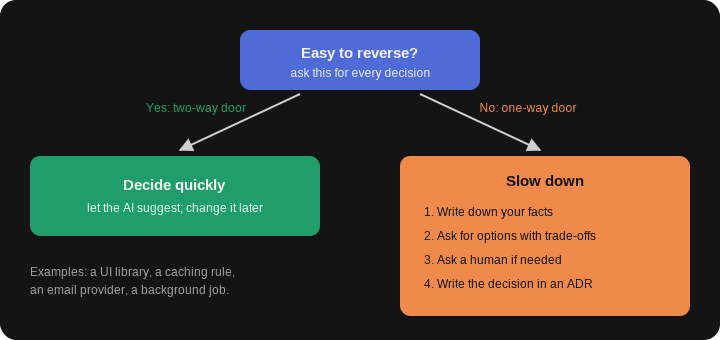
Amazon’s Jeff Bezos wrote about this in his 2016 letter to shareholders. He wrote that many decisions are reversible, like “two-way doors”, and can use a light-weight process. Amazon calls the opposite a one-way door. It is a decision that is very hard, or even impossible, to walk back through if you get it wrong.
| Usually easy to reverse | Usually hard to reverse |
|---|---|
| Which UI library (ready-made screen parts) to use | Your main database and how data is shaped |
| A caching rule | Splitting into many services |
| Which email provider sends your emails | What personal data you collect and where it’s stored |
| Adding a background job | Event sourcing as the source of truth |
Make two-way-door decisions quickly, and let your AI suggest them. Slow down for one-way doors, because that is where your facts matter most.
Six decisions that need your facts
1. Build or buy?
With AI, building feels free: ask for a login system or a payment flow, and code appears in a minute. But the code is the cheapest part. You also pay to run it forever: security fixes, rare cases, the bug at 2 a.m.
Martin Fowler, a well-known writer on software design, separates software into utility and strategic. Utility software supports things that every business needs, and does not make you different from competitors: buy it. Strategic software is what makes your product special: build it, and put your best effort there.
For most apps:
- Buy: login, payments, sending email, file storage, error monitoring
- Build: the thing your users come to you for
Before you buy, ask the business questions that your AI cannot answer: What does it cost at 10 times our size? Can we export our data if we leave? What happens to us if this company raises prices or shuts down?
2. Which data matters most?
Not all data needs the same care. Rank yours by the harm if you lose it or get it wrong:
- Money and promises: payments, balances, orders, bookings. If you lose or double these, real people get hurt. Use transactions, idempotency, tested backups, and maybe a history table.
- Things users created: posts, documents, photos. If you lose these, you lose trust. Back them up and test restores.
- Things you can build again: caches, search indexes, analytics copies. If you lose them, it is inconvenient. Eventual consistency is fine here.
This ranking tells you where to spend effort. Maya’s orders are level 1, so she uses a transaction and Stripe’s idempotency keys. Her bakery search box is level 3, so an hourly copy is fine.
Go deeper: A customer got charged twice. How? (Level 4) shows how transactions protect level-1 data.
3. What to protect first
You cannot fix every security risk on day one. Order the risks by how likely and how bad they are. For most AI-built apps, the top of the list is the same:
- Secrets out of the code and the browser
- An ownership check on every route that reads or changes data
- Verified webhooks (messages that a service like Stripe sends to your app) and server-side prices for anything with money
- Backups that you have actually restored
- Rate limits on sign-up, login and anything that costs you money
What comes next depends on you. A children’s app, a health app and a bakery app have very different worst cases. Write down yours: “What’s the worst thing that could happen with our data, and to whom?”
4. How much downtime is acceptable?
“It should never go down” is not a real answer, because every extra bit of reliability costs more. People usually write reliability as availability: the share of time your app works. Here is what each level allows:
| Availability | Downtime per year | Per 30-day month |
|---|---|---|
| 99% | about 3.65 days | about 7.2 hours |
| 99.9% | about 8.8 hours | about 43 minutes |
| 99.99% | about 53 minutes | about 4.3 minutes |
Google’s Site Reliability Engineering book, by the team that keeps Google’s services running, argues that 100% is the wrong target. Users often cannot tell very high levels apart, because their own phone or network fails more often. Also, each extra “nine” can cost much more than the one before.
For disasters, two more numbers matter. AWS defines them like this:
- Recovery time objective (RTO): the longest acceptable time from when the service breaks to when it is back.
- Recovery point objective (RPO): the most data you can accept to lose, measured as time since the last recovery point.
AWS notes that the organization sets these numbers, not the technology. A recovery plan that costs more than the failure itself is usually not worth it. So ask: What does an hour of downtime cost us, and when does it hurt most?
For Maya, Saturday mornings matter and Tuesday nights do not. Daily backups and a one-hour RTO are enough. A bank would answer very differently.
5. Monolith or microservices? Default to a monolith
A monolith is one app: one codebase (one set of code), deployed as one unit, usually with one database. Microservices split the app into many small services. Each one deploys on its own, has its own data, and talks to the others over the network.
Microservices let large teams deploy their parts without a wait for each other, and let busy parts grow separately. They pay with almost everything in this level:
- network calls that fail and need circuit breakers
- data spread across services that needs outboxes and events
- eventual consistency
- bugs that cross five services and five sets of logs
Fowler’s advice is called “monolith first”. He saw that almost all successful microservice stories started as a monolith that grew too big and was split. Systems built as microservices from the start often got into serious trouble. Good boundaries between services are hard to see early, and code is much harder to move between services than inside one app.
So the default is one well-organized app. Give each area (orders, payments, users) clear folders or modules. Let those areas talk through clear functions, and do not let one area read another area’s tables directly. If one part really needs to become its own service one day, those clean lines make it possible.
Go deeper: Your app went viral. Will it survive? (Level 4) shows how far one app can grow before you need to split it.
6. When to ask a human expert
Your AI is a brilliant assistant, but it can be confident and wrong. Pay for a human (a security reviewer, a senior engineer for an afternoon, a lawyer or an accountant) when:
- The decision is hard to reverse: a big data migration, your core data model, a hard-to-leave vendor (a company that sells you a service)
- The data is regulated or sensitive: health records, children’s data, payment card details
- Money or legal duties are involved: taxes, refunds, contracts, privacy laws
- Someone else could be harmed: a security breach, or features that affect people’s safety or money
- You cannot judge the answer: if you cannot tell whether the AI is right, you are guessing
An hour of an expert’s time is cheap compared with a wrong one-way door.
How it goes wrong
- The AI decided, and nobody noticed. The database, the hosting and the login library were chosen in the first prompt and never questioned. Months later, nobody knows why.
- Big-company architecture for a small app. Kafka, Kubernetes (a system that runs many programs across a group of machines) and ten services for 50 users. Every lesson in this level becomes your daily problem, with none of the benefits.
- Leading questions. “Design a scalable architecture” gets you complexity. “Is microservices the right choice?” gets you agreement. The AI tends to follow the words of your question.
- Decisions that are lost in the next chat. In March, you decided “one database, no microservices”. In May, a new AI session does not know this, and it starts to split things up.
What good looks like: a decision process
- Write down your facts first. Include users today and in a year, budget, team size and skills, and deadline. Also include the worst case for your data and the cost of an hour of downtime.
- Ask for options, not an answer. “Here are my facts. Give me two or three options, what each costs us, and what would make you change your recommendation.”
- Sort by door. Decide two-way doors quickly. Slow down for one-way doors.
- Pick the simplest option that meets your real needs, not imagined ones.
- Write it down. Michael Nygard’s architecture decision record (ADR) is a short file for each important decision. It has a title, the context, the decision, its status and its consequences, good and bad:
# 003: One app and one Postgres database
Status: Accepted, 2026-03-02
Context: 1 developer, 4 bakeries, launch in 6 weeks.
Decision: A single app on a hosting platform. No microservices.
Consequences: Fast to build. Revisit when a second team joins.
Keep these files in your repository (your project’s folder in Git). Tell your AI to read them before it suggests big changes. Now the decision stays known in the next chat, for the next developer, and in your own memory.
Test it yourself
- Write your fact sheet. Use one page: users, budget, team, deadline, worst-case data loss, cost of downtime.
- Find the decisions that the AI made. Ask: “List every major technology choice in this project: database, hosting, login, payments, background jobs. For each, what are the main alternatives?” Mark the ones that you never really chose.
- Rank your data into the three levels above. Check that level 1 has transactions and tested backups.
- Price your downtime. Pick a target from the availability table, and write your RTO and RPO. Check that your backups can actually meet them.
- Write your first ADR for the most important decision that you already made.
What you’ve learned
You started this course with a browser and an AI chat. Here is the path that you walked.
Level 1: Foundations. How the web works from end to end: requests, servers, databases, and where your code and data live. You learned why you cannot trust the browser and how to undo a mistake. Key lessons:
- You pressed Enter. What happened in the next second?
- A player scored 999,999 points by editing the page. How?
- Your app forgot everyone’s messages overnight. Why?
- The AI broke your working app. Here’s your undo button
Level 2: Builder. Features that are safe and correct, and the security holes that AI often leaves. Key lessons:
- Change one number in the URL, see everyone’s invoices
- How one line of text can dump your whole database
- Your API key leaked, and strangers are spending your money
- The AI deleted your production database. Now what?
Level 3: Shipping. How to run an app for real users: test it, deploy it safely, know when it breaks, and control costs. Key lessons:
- Why you should never test on your real users
- The AI fixed one bug and quietly broke three others
- Your app was down for six hours and nobody noticed
- The payment timed out. Did it go through?
Level 4: Reliability & scale. How to stay fast and correct under real load and real money. Key lessons:
- Fast with 100 users, frozen at 10,000. The missing index
- A customer got charged twice. How?
- Fast, but showing yesterday’s data
- Your app went viral. Will it survive?
Level 5: Systems & architecture. How bigger systems stay reliable when many parts talk to each other, and the trade-offs behind each pattern. Key lessons:
- One slow service took your whole app down
- When everything calls everything, everything breaks
- The order was saved, but the email never went out
- Your search results are an hour out of date. Why?
- What if your database remembered everything that ever happened?
- Two people typed in the same document at once. Who wins?
Your AI can write the code for every one of these. But it cannot know your users, your money, your risks and your team. That part is yours now, and you are ready for it.
Takeaways
Key terms
- Trade-off: you buy one quality (speed, safety, flexibility) and pay with another (money, complexity, fresh data)
- Two-way and one-way doors: decisions that are easy to reverse, and decisions that are not
- Utility vs strategic software: what every business needs (buy it) vs what makes you different (build it)
- Availability: the share of time your app works, often written in “nines”
- RTO and RPO: the longest acceptable downtime, and the most data you can accept to lose
- Monolith and microservices: one app deployed as a unit, vs many small services deployed separately
- Architecture decision record (ADR): a short file that records one decision, the reason for it, and its consequences
Red flags
- An architecture plan that never asked how many users, how much money or how many developers you have
- Microservices, Kafka or Kubernetes for a small team and a small app
- Login, payments or encryption that you build yourself
- “It must never go down”, with no cost attached
- No written record of why you made the big choices
- A one-way-door decision made in a single chat, in five minutes
Ask your AI
- “Before you suggest an architecture, ask me about my users, budget, team, deadline and how bad downtime or data loss would be. Then give me two or three options with their trade-offs.”
- “Which decisions in this plan would be hard to reverse later? For each, what would we lose by choosing the simpler option now?”
- “Write an architecture decision record for this choice, including the negative consequences.”
Going deeper (optional, for readers who want more detail)
Error budgets. Google’s SRE book turns an availability target into a budget. If the target is 99.9%, the remaining 0.1% is an “error budget” that the team can spend. While budget is left, the team can ship new features quickly. When the budget is used up, releases slow down until reliability improves. So “reliability vs new features” is no longer an argument. It is a number that both sides share.
Measuring availability. The SRE book notes that Google often measures availability as the share of successful requests, not uptime. Large distributed services are rarely completely down. For a small app, the share of successful requests from your monitoring is usually more honest than “was the server running”.
Time changes the answer. AWS points out that the impact of downtime can depend on timing. A payroll system that fails just before payday is much worse than one that fails just after. Maya’s Saturday mornings are the same idea. Your targets can follow the busy times of your users.
The modular monolith. A monolith with strict internal boundaries is often called a modular monolith. Each module owns its own tables. Other modules use its functions, and do not query those tables directly. This keeps most of the simplicity of a monolith, and you can still split it later.
Superseding decisions. In Nygard’s format, when a decision changes, you do not delete the old ADR. You mark it “superseded” and link to the new one. So the history of your thinking stays visible, a small version of the idea from event sourcing.
References (7)
- MonolithFirst: Martin Fowler, 2015. Successful microservice systems usually started as a monolith; systems built as microservices from scratch often ended in serious trouble; boundaries are hard to get right early.
- UtilityVsStrategicDichotomy: Martin Fowler, 2010. Utility vs strategic software, and buying the former while building the latter.
- Embracing Risk: Google, Site Reliability Engineering book. 100% is the wrong target, users can’t tell very high availability levels apart, each extra nine costs much more, 99.99% allows about 52.56 minutes a year, request-based availability, and error budgets.
- Business Continuity Plan (BCP): AWS whitepaper, Disaster Recovery of Workloads on AWS. Definitions of RTO and RPO, set by the organization, time-dependent impact, and not spending more on recovery than the failure costs.
- 2016 Letter to Shareholders: Amazon. Many decisions are reversible “two-way doors” that can use a light-weight process.
- 2024 Letter to Shareholders: Amazon (Andy Jassy). Amazon’s two-way and one-way door decisions, and a one-way door as one that is very hard or impossible to walk back through.
- Documenting Architecture Decisions: Michael Nygard, Cognitect, 2011. The architecture decision record format: title, context, decision, status and consequences, and superseding old decisions.