Level 4 · Reliability & scale
Fast, but showing yesterday's data
- Caching
- Cache hit and miss
- Browser cache
- CDN cache
- Server cache
- Cache-Control
- Cache invalidation
- Stale data
- Shared vs private caches
- Redis
Fast, but showing yesterday’s data
Before you start This lesson uses a few words from earlier lessons:
- Header: extra information sent with a request or response, like
Content-Type: text/html. (Every website is a conversation. Here’s how it goes)- CDN: servers in many countries that keep copies of your files close to visitors. (From your laptop to a real website in one push)
- Session: the server’s record that a browser belongs to a logged-in user. (Never store a password. Here’s what to store instead)
- Memory: fast, short-term storage that is wiped when a program stops. (Your app restarted and all the likes vanished)
The price that wouldn’t change
The home page of your online shop lists 200 products and takes almost a second to load. You ask your AI: “Make the home page faster.” It works. Now the page loads almost instantly.
The next morning, you start a sale and lower the price of a jacket from $80 to $60. The home page still says $80. You refresh. Still $80. A customer writes: “Your ad says $60, your site says $80.” Then a second email arrives, and this one is worse:
“Why does your site say ‘Hi, Sam’ at the top? My name isn’t Sam.”
The same change caused both problems. To make the page fast, the AI told browsers and the CDN to keep a copy for a whole day. Your customers see yesterday’s page. And one of those copies was made while Sam was logged in.
This lesson shows where those copies live, how long they stay, and how to stay fast without old or private data.
The mental model: a saved answer
When your server builds a page, it asks the database, runs code and makes HTML from the result. If the next visitor asks for the same page, the answer is often the same, so that work is wasted.
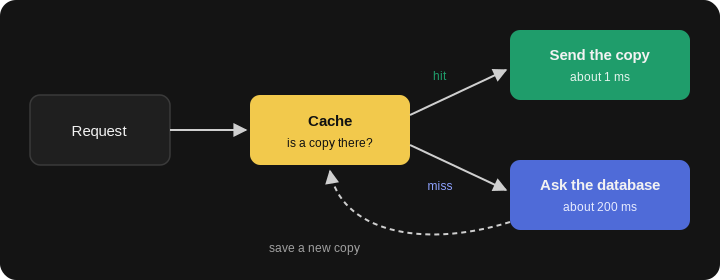
A cache is a saved copy of an answer, kept in a place that is faster to reach. “Caching” means to save and reuse those copies.
Think of a teacher whom students ask “When is the exam?” fifty times a day. After the third time, the teacher writes the date on the board. Now students read the board and stop asking. The board is a cache.
Where the comparison stops working: if the exam moves, the teacher remembers to change the board. A cache doesn’t know that the real answer changed. It shows the old answer until something removes it or it expires.
A cache hit means that the copy was there and you used it. A cache miss means that there was no copy (or it expired). So you did the real work and usually saved a new copy. The share of requests that are hits is the hit rate.
Why it matters: a little arithmetic
Imagine that a database query (a request for data) for your product list takes 200 ms (milliseconds). A read of a saved copy takes 1 ms. Your home page gets 1,000 requests per second.
- No cache: every request waits 200 ms, and your database runs 1,000 queries per second.
- Cache with a 95% hit rate: 950 requests take 1 ms. 50 requests miss and take about 200 ms. The average is about 11 ms, and your database runs only 50 queries per second.
That is 20 times less work for the database. This is why AI tools add caching so often.
The cost is stale data: data that has changed in the real source while the cache still holds the old version. Copies that you can still use are fresh. Every cache is a trade between speed and freshness.
Three places a copy can live
A request can go through three caches on its way from the browser to your database:
| Cache | Where it lives | Who shares it | Who can clear it |
|---|---|---|---|
| Browser cache | Inside each visitor’s browser | Only that one user | Mostly only the user. You can’t reliably reach it. |
| CDN cache | On the CDN’s servers in many cities | Every visitor near that server | You, from the CDN’s dashboard or API (called a purge) |
| Server cache | In your server’s memory, or a store like Redis | Every user of your app | You, from your code |
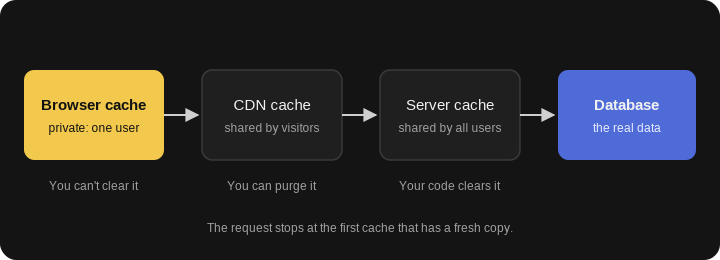
A cache that one person uses, like the browser cache, is called a private cache. A cache that gives the same copy to many people, like a CDN, is called a shared cache. This difference explains the “Hi, Sam” email.
Browsers and CDNs follow the Cache-Control header
Your server uses the Cache-Control header to tell browsers and CDNs what to do with a response. The header contains one or more instructions, called directives:
| Directive | Meaning |
|---|---|
max-age=N |
The copy is fresh for N seconds. Until then, it can be reused without asking your server. |
s-maxage=N |
Same, but only for shared caches like CDNs. Browsers ignore it. |
public |
Shared caches may store it. |
private |
Only the user’s own browser may store it. Never a CDN. |
no-cache |
Caches may store it, but must check with your server before every reuse. |
no-store |
Nobody may store it at all. |
immutable |
The file will never change while fresh, so don’t even check on reload. |
Be careful with no-cache. It sounds like “don’t cache”, but it means “check first”. The directive for “don’t store this anywhere” is no-store.
For example, look at Cache-Control: public, max-age=0, s-maxage=60 on a home page. Browsers must check with your server every time. But the CDN may give out the same copy for 60 seconds. A price change shows within about a minute. Your server builds the page about once a minute per CDN location, not once per visitor.
With no Cache-Control header, browsers may still guess how long to keep a response. So always set the header on purpose.
CDNs also have their own default rules. For example, Cloudflare doesn’t cache HTML or JSON by default. A cookie is a small piece of data that the browser stores and sends back. Cloudflare also doesn’t cache responses that set a cookie or say private or no-store. But one “cache everything” rule in the dashboard can change that.
The server cache, and Redis
The third place is inside your backend. The simplest version is a variable in the memory of your server. But your hosting platform can run several copies of your code. Then each copy has its own memory and its own cache. Also, a memory cache that never removes old entries can grow until your server runs out of memory.
Go deeper: Your server crashes every few days, like clockwork (Level 4) shows how a growing cache can crash a server.
So most apps use Redis: a separate, very fast data store that keeps its data in memory. Every copy of your app talks to the same Redis, so they all share one cache. Redis saves each value under a name called a key, like products:all. Each key can have a TTL (time to live): a number of seconds after which Redis deletes the key automatically.
Here is a server cache for the product list, with the official Redis package for Node.js:
app.get("/api/products", async (req, res) => {
  const saved = await redis.get("products:all");
  if (saved) return res.json(JSON.parse(saved)); // hit

  const products = await db.product.findMany(); // miss: ask the database
  await redis.setEx("products:all", 60, JSON.stringify(products)); // TTL: 60 s
  res.json(products);
});
In plain English:
- Lines 2–3: Look in Redis under
products:all. If a copy is there, change the saved text back into data and send it. It skips the database. - Lines 5–7: If not, ask the database. Save the result in Redis with a TTL of 60 seconds, so it is never more than a minute old. Then send it.
How it goes wrong
Bug 1: Copies you can’t take back
In the shop story, the AI added this header to every page:
Cache-Control: public, max-age=8640086,400 seconds is one day. Any browser that loaded the page can show that copy for 24 hours without asking your server. Any CDN can give it to everyone near it.
You can purge the CDN. But you cannot reliably clear a visitor’s browser cache.
A Clear-Site-Data: "cache" response header can ask a browser to clear what it saved from your site. But the browser only sees that header when it sends your server a request. A browser that reuses its saved page sends no request. So in practice, you can’t control that copy. It stays until it expires, or until the user reloads or clears their history.
Cache invalidation means to make a copy match the real data again. You can wait for the copy to expire (TTLs and max-age do this). Or you can remove it when the real data changes. That only works for caches you control: your server cache and your CDN.
For browsers, there is a third way: cache busting. Build tools (programs that prepare your code for production) add a short code to each file name. They calculate it from the file’s contents, like app.3f9a1c.js.
When the contents change, the name changes too (app.8b20d4.js), and the HTML points to the new name. The browser has never seen that name, so it downloads the file. It never uses the old copy again. That is why these files can stay in a cache for a year. But the HTML page that points to them must be checked every time.
Bug 2: Someone else’s page
Here is how “Hi, Sam” happened. The home page shows the name of the logged-in user. The header said public, so the CDN could store the page. By chance, the CDN stored Sam’s page, and then gave it to everyone else.
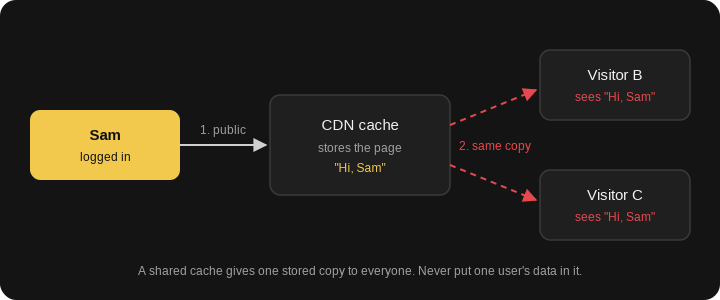
Never put per-user data in a shared cache. Big companies make this mistake too.
Steam is a big video game store. On Christmas Day 2015, during an attack on Steam, a new caching setting went live. It wrongly cached pages for logged-in users. Valve, the company behind Steam, said that other users may have seen store pages for about 34,000 users. Some pages could include a billing address, an email address and purchase history.
The same bug happens in your own server cache when the key forgets who the data is for:
app.get("/api/dashboard", requireLogin, async (req, res) => {
  const saved = await redis.get("dashboard"); // same key for every user!
  if (saved) return res.json(JSON.parse(saved));
  const data = await buildDashboard(req.user.id);
  await redis.set("dashboard", JSON.stringify(data)); // and no TTL
  res.json(data);
});
The login check runs, and the code builds the right user’s dashboard. But it saves it under one key, dashboard. So every later user gets the first user’s dashboard, and the copy never expires.
The rule: the cache key must include everything that changes the answer. If the answer depends on the user, the key needs the user ID: dashboard:17. If it depends on the language, the key also needs the language.
Bug 3: Each copy of your app remembers something different
Your app runs as four copies, and each copy caches products in its own memory. An admin changes a price, and your code clears the cache, but only in the copy that handled the admin’s request. Users refresh and see $60, then $80, then $60, depending on which copy answers. A shared cache like Redis prevents this.
What good looks like
Choose a header for every kind of response
| What it is | Header | Why |
|---|---|---|
| Built files with a content code in the name | public, max-age=31536000, immutable |
New version means new name |
| HTML pages the same for everyone | public, max-age=0, s-maxage=60 (or short) |
Browsers check; the CDN takes most of the requests |
| Anything that depends on who is logged in | private, no-cache |
Never in a shared cache |
| Very sensitive data | no-store |
Never stored at all |
Hosting platforms usually set the first row for you when they build your app. The other rows depend on your code, so check them.
Remove the copy when the data changes
app.put("/api/products/:id", requireAdmin, async (req, res) => {
  const product = await saveNewPrice(req.params.id, req.body.price);
  await redis.del("products:all"); // throw away the old list
  res.json(product);
});
The code saves the new price in the database. Then it deletes the cached product list. The next request is a miss: it reads the new price and saves a fresh copy. The 60-second TTL stays as a backup, in case the code ever misses a delete.
Ask “how old is OK?” for each piece of data
Before you cache anything, ask: if this is 60 seconds old, what is the harm?
- For a product description, almost no harm.
- For a price on the home page, a little. Cache it for a short time and remove it on change.
- For a price at checkout, a balance or a permission, real harm. If checkout reads the price from the cache, a customer can pay $60 after the sale ended.
Use the cache to show data. Use the database to make decisions.
What changes at scale
With few users, a cache is a nice extra. With many users, your database may only survive because of the cache. Sometimes the hit rate drops suddenly. For example, Redis restarts empty, or many keys expire at the same time. Then all the requests go to your database at once.
Go deeper: Your cache expired and the database collapsed (Level 4) covers caching strategies, TTL choices and what happens when a popular copy expires.
Go deeper: Fast in the US, painfully slow in India (Level 4) explains why CDN copies close to users make pages so much faster.
Test your own app
You need an app of your own for this part. No app yet? Start with Your first app in an afternoon, with an AI doing the typing. Built it in an AI app builder? Ask its AI to do each step below for you, or to add the missing part first (for example, a login).
- Read your headers. Open your live app, then open developer tools (F12 on Windows, Cmd+Option+I on Mac).
- Click the Network tab and reload the page.
- Click your HTML page, a JavaScript file and an API request that returns user data. Find
Cache-Controlunder Headers. Compare each value with the table above. - See the browser cache. Reload again and look at the Size column. It shows when a file came from the cache.
- Select Disable cache to see what a first-time visitor gets. This works only while developer tools are open.
- Ask the CDN. Look for a cache status header: Cloudflare sends
cf-cache-statusand Vercel sendsx-vercel-cache.HITmeans that the CDN answered without your server. If a page that shows a user’s name getsHIT, fix it now. - The two-account test. Log in as User A in a normal window and as User B in a private window. Open the same pages in both, several times. If B ever sees A’s data, a shared cache leaks it.
Takeaways
Key terms
- Cache: a saved copy of an answer, kept in a place that is faster to reach
- Stale data: a copy that no longer matches the real data
- Private vs shared cache: for one user (the browser) vs for many users (a CDN, your server cache)
- Cache-Control: the header that tells browsers and CDNs whether to keep a copy, and for how long
- Cache invalidation: making copies match the real data again, by expiry or removal
- Cache busting: new names for changed files, so old copies are never used
- Redis: a fast in-memory store that all copies of your app can share
- TTL: how many seconds a copy lives before it is deleted
Red flags in AI-written code
Cache-Control: publicor a longmax-ageon HTML or on anything that shows user datano-cacheused when the author clearly meant “never store this” (no-store)- A cache key with no user ID for data that depends on the user
- A cache with no TTL, or a cache in a plain variable in an app with several copies
- Checkout, payments or permission checks that read from a cache
- A CDN rule that caches every page, in an app with logins
Ask your AI
- “List every Cache-Control header my app sends and every CDN cache rule. For each, could it ever store a response that contains one user’s data?”
- “Find every place my server reads from or writes to a cache. Show me the key, the TTL, and what code removes the copy when the data changes.”
- “Which decisions in my app (prices at checkout, balances, permissions) read from a cache instead of the database?”
Going deeper (optional, for readers who want more detail)
A check without a new download. When a copy is stale, a browser doesn’t always download the whole thing again.
The original response can have an ETag header (a version code for that response). Then the browser sends that version code back in the If-None-Match header, for example "33a64df5". It asks: is this version still current? If nothing changed, the server replies 304 Not Modified with no body, and the browser reuses its copy. no-cache causes this check on every reuse, so it costs much less than it sounds.
Heuristic caching. Without Cache-Control, browsers may reuse a response based on its Last-Modified date. MDN gives an example. A page that last changed a year ago may be reused for about 10% of that time, roughly 0.1 year, without asking the server. This is an old behavior, so always send an explicit header.
Platforms change your headers. Sometimes Cache-Control is the only cache header. Then Vercel’s CDN uses s-maxage itself and removes it before the response gets to the browser. Vercel also supports CDN-Cache-Control and Vercel-CDN-Cache-Control, to set CDN rules separately from browser rules. Other platforms have their own rules, so check their docs.
Cookies don’t make a response private. MDN warns that a cookie on the request is not a reliable sign that the response is personal. Mark personal responses with private yourself.
When Redis is full. You can set a memory limit (maxmemory). When Redis reaches it, Redis removes keys with the policy you choose.
For a pure cache, the Redis docs suggest allkeys-lru (remove the least recently used keys) as a good default. With the noeviction policy, Redis refuses new writes instead. Redis can also save data to disk. But when you use it as a cache, treat everything in it as data you can lose: the database holds the truth.
References (8)
- Cache-Control header: MDN. Meaning of
max-age,s-maxage,public,private,no-cache,no-storeandimmutable, and the warning about personal data in shared caches. - HTTP caching: MDN. Private vs shared caches, heuristic caching, fresh and stale, ETag and 304, cache busting with versioned file names, cookies not making a response private, and
Clear-Site-Datafor browser caches. - Default cache behavior: Cloudflare. HTML and JSON not cached by default; responses with
Set-Cookie,privateorno-storenot cached. - Cache-Control headers: Vercel. How Vercel’s CDN uses
s-maxageandCDN-Cache-Control. - Response headers: Vercel. The
x-vercel-cacheheader and itsHIT,MISSandSTALEvalues. - Key eviction: Redis. Redis as a cache,
maxmemoryand eviction policies such asallkeys-lru. - Cloudflare cache responses: Cloudflare. The
cf-cache-statusheader and whatHITandMISSmean. - Update on Christmas Issues: Valve. The 2015 caching incident in which store pages for about 34,000 users may have been shown to other users.