Level 5 · Systems & architecture
Your search results are an hour out of date. Why?
- Change data capture (CDC)
- Write-ahead log (WAL)
- Logical decoding
- Replication slots
- Debezium
- Derived data
Your search results are an hour out of date. Why?
Before you start This lesson uses a few words from earlier lessons:
- Cache and cache invalidation: a saved copy of data in a faster place, and the work to make that copy match the real data again. (Fast, but showing yesterday’s data)
- Transaction: a group of database changes that succeed or fail together. (A customer got charged twice. How?)
- Event and message broker: a message that says “this happened”, and a service that delivers events to every program that wants them. (When everything calls everything, everything breaks)
- Transactional outbox: an event saved in an outbox table, in the same transaction as the data change. A separate program sends it later. (The order was saved, but the email never went out)
The shoe that sold out an hour ago
You run an online shoe shop. The search box is fast and smart: it finds “trail runer” even with the typo. For this, the AI set up a separate search service: a program built only to search text. It keeps its own copy of your products, organized for fast search. That copy is called a search index.
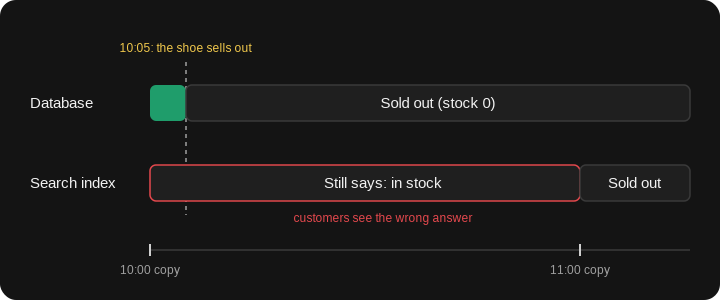
On Saturday morning, your best trail shoe sells out at 10:05. Your database knows: the stock is 0. But customers still search “trail shoe”, see it at the top, click it, and get a page that says “Out of stock”. One of them writes: “Why does your search show things you don’t have?”
At 11:00, the problem stops by itself. At 11:30 it happens again with a different shoe.
The AI’s code has this job:
// Runs at the start of every hour
cron.schedule("0 * * * *", async () => {
  const products = await db.product.findMany();
  await search.replaceAll(products);
});
cron.schedule (from the node-cron package, a library you install) runs a function on a timetable. "0 * * * *" means “at minute 0 of every hour”. Each hour, the job copies every product from the database into the search index. (search is a placeholder for your search service’s library, here and below.)
So the search index is a photo of your products, taken once an hour. It can be up to an hour old. That is the whole bug. This lesson shows how to make the copy follow the database within seconds, and what that costs.
One truth, many copies
Your database is the source of truth: the place that holds the real, current answer. As an app grows, it often keeps copies of that data in other places, each shaped for one job:
- A search index, for fast text search
- A cache, for fast reads
- An analytics database (often called a data warehouse), for big reports like “sales per country per month”. These reports are too slow to run on your main database.
- Other services in your system that need to know about orders, users or products
These copies are called derived data: data that you can build again at any time from the source of truth. The hard question is always the same: when the source changes, how does the copy find out?
There are three common answers.
Answer 1: Copy everything again, on a timetable
This is the hourly job above. It is called a batch job, because it moves data in large groups, not one change at a time. It is easy to write and understand, but its costs grow with your app:
- Old data. The copy is up to one full interval behind. Hourly means up to an hour. Nightly means up to a day.
- Load. A copy of 500 products is a small job. A copy of 5 million rows every hour makes your database do a lot of work for a few changes.
- Missed deletes. A common “smarter” version copies only the rows that changed since the last run. It uses an
updatedAtcolumn for this. But a deleted row is gone, so it never shows as “changed”. It stays in search forever.
Answer 2: Update the copy from your own code
The next idea: update the search index in the same API route that saves the change. This is a dual write: your code writes the same fact to two places. You met its main problem in The order was saved, but the email never went out. If the database write succeeds and the search write fails, the copies disagree, and nothing fixes it.
Also, dual writes only catch changes that go through that code. Admin scripts, migrations (scripts that change your tables) and a new route skip the search update. So does a teammate who fixes data in the database console (where you type SQL into the database).
Answer 3: Ask the database what changed
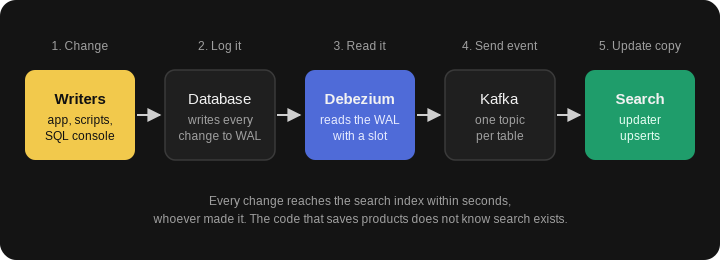
The database already sees every change, from every writer. What if you could subscribe to that? That is change data capture, or CDC. A CDC tool reads every insert, update and delete from the database itself. It sends each change, in order, to the systems that keep copies.
The write-ahead log: the database’s diary
When you save a row in PostgreSQL (“Postgres”), Postgres first writes a short note about the change to a separate file. This file only grows at the end. The note says, for example, “in table products, row 42, stock changed to 0”. The change counts as saved when this note is safely on disk. Postgres updates the real table files later.
This file is the write-ahead log, or WAL. “Write-ahead” means that Postgres writes the note before the real change. Say the server crashes while it updates the table files. On restart, Postgres reads the WAL and does again the changes that did not reach the tables. So no saved change is lost.
Think of a shop’s till roll. It prints every sale, in order, as it happens. At the end of the day, the shelves show what is left, but the roll shows everything that happened.
Where the comparison stops working: a shop keeps a till roll forever. Postgres deletes old WAL files when it no longer needs them, unless something asks it to keep them. This matters later.
The key idea: the WAL already contains every change, in the order it happened. CDC does not add a new record of changes. It reads the record that is already there.
How a program reads the WAL
The WAL uses an internal format, made for the database, not for other programs. These Postgres parts make it readable:
- Logical decoding turns WAL entries into clear descriptions like “row inserted into
productswith these values”. Before PostgreSQL 19, you must turn it on with the settingwal_level = logical. From version 19, it can also turn on by itself when someone creates the first logical replication slot. - An output plugin decides the format. Postgres includes one called
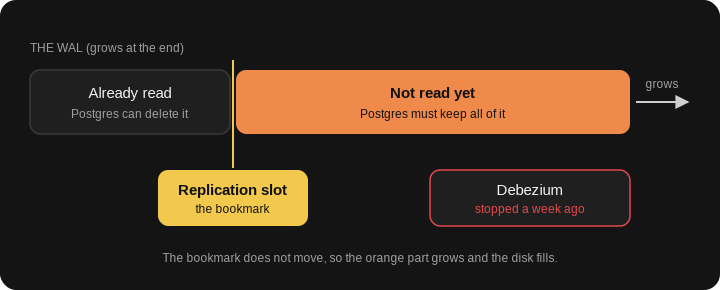
pgoutput. - A replication slot is a named bookmark for one reader. It remembers how far that reader got, survives crashes, and tells Postgres: don’t delete any WAL that this reader has not seen yet.
Postgres’s own logical replication feature uses these parts to copy chosen tables to another Postgres database, in the same order as on the original.
To send changes to something that is not Postgres, like a search service, most teams use a CDC tool.
Debezium: changes as events
Debezium is a popular open-source CDC tool. It has connectors (plug-ins that read one kind of database) for many databases, including PostgreSQL, MySQL, MongoDB, SQL Server and Oracle. Its PostgreSQL connector works like this:
- Snapshot. The first time it connects, it reads the current contents of the tables. So the copies start complete.
- Stream. Then it reads new changes through logical decoding, with its own replication slot.
- Publish. It turns each change into an event and sends it to Apache Kafka, a popular message broker. By default, each table gets its own Kafka topic (a named stream of events), such as
shop.public.products. Without Kafka, Debezium Server can send events to other brokers.
A change event looks like this (shortened):
{
  "op": "u",
  "before": { "id": 42, "name": "Trail shoe", "stock": 3 },
  "after":  { "id": 42, "name": "Trail shoe", "stock": 0 },
  "source": { "table": "products", "lsn": 24023128 }
}opis the kind of change. It iscfor create (insert),ufor update,dfor delete, andrfor a row read during the first snapshot.beforeandafterare the row before and after the change. By default, Postgres gives only the primary key inbefore. For a full old row, like here, you need a table setting (see Going deeper).sourcesays where the change came from.lsnis the position of the change in the WAL.
Now the search updater reacts to each event, with no timetable:
// Called once for every event on the products topic
async function onProductChange({ op, before, after }) {
  if (op === "d") return search.remove(before.id);
  await search.upsert(after.id, { name: after.name, inStock: after.stock > 0 });
}
If someone deleted a product, remove it from search. If not, upsert it: insert it if it is new, or overwrite it if it exists. A shoe that sells out at 10:05 leaves the “in stock” results seconds later, not at 11:00.
The code that saves products does not know that search exists. Every writer changes the database, the WAL records each change, and the search index follows.
What CDC is good for
- Search indexes that stay close to the database
- Cache invalidation: remove a cached copy as soon as its row changes
- Analytics: stream changes into a data warehouse, instead of a full copy every night
- The outbox relay: Debezium can read new outbox rows from the WAL and publish them, so nothing polls the outbox table. It includes a ready-made outbox event router.
How it goes wrong
CDC removes the old data problem, but it has costs. Think about them before you add CDC.
Cost 1: One more system to run, and a disk that can fill up
A batch job is one function. CDC usually means Debezium, Kafka Connect (the system that Debezium runs inside) and Kafka. You must run, watch and upgrade all of them.
The biggest danger is the replication slot. It tells Postgres to keep the WAL until the reader has seen it. If Debezium stops and nobody notices, Postgres keeps all WAL from that moment on, and the disk slowly fills. The Postgres docs warn that in extreme cases, an unused slot can even force the database to shut down. A slot left behind by a test from months ago does the same.
Cost 2: Your table shape becomes a promise
Before CDC, only your app read your tables. Now the search updater reads after.stock. If someone renames stock to quantity, the updater breaks, but your app works. Postgres’s logical replication does not copy changes to the table shape either. Its docs say that you must keep schema changes (changes to the shape of tables) in sync by hand.
Treat CDC readers like users of a public API (a contract that other programs rely on). Change tables in safe steps: add the new column, update every reader, then remove the old column.
Go deeper: You renamed one column and the live app crashed (Level 2) shows how to change tables in safe steps.
Cost 3: Order and duplicates
Changes to the same row arrive in order, because Debezium uses the row’s primary key as the event’s key. Kafka keeps events with the same key in order. But Debezium can read changes to different rows or tables in a different order than they happened. Say your search updater needs a product and its category together. For a short time, it can see one without the other.
Also, after a crash, the same change can arrive twice. The Postgres docs say that clients must be ready for this. So readers must be idempotent: if a reader handles an event twice, the effect must be the same as once. “Set product 42 to these values” is safe. “Add 1 to the sale count” is not.
Cost 4: It copies everything, including secrets
By default, CDC sends every column of every captured table into Kafka. This includes email addresses and password hashes (scrambled passwords). In Kafka, more programs and people can read them. Debezium can capture only chosen tables (table.include.list) and leave out columns (column.exclude.list). Use both.
Cost 5: It’s fast, not instant
The copy is still a little behind. This is eventual consistency: the copy will match soon, but not at the same moment. For search results, that is fine. To decide whether to sell the last pair of shoes, always ask the database.
What good looks like: choose by how fresh the copy must be
The right answer depends on how old the copy can be, and how big your app is.
| Situation | Good choice |
|---|---|
| Small app, a few thousand rows | Maybe no copy at all: Postgres has built-in full text search |
| Copy can be an hour or a day old (reports) | A batch job is simple and fine |
| Copy should be seconds behind, few code paths | Update it from a background job via the outbox |
| Copy should be seconds behind, many writers, several copies | CDC |
The first row matters most. Every copy can get out of date, so first ask whether you need a second copy at all. If you use CDC:
- Set alerts on replication slots that hold a lot of WAL. Drop slots that you no longer use.
- Capture only the tables and columns that you need.
- Make every reader idempotent. Test it: send the same event twice.
- Keep a way to build the copy again from nothing, such as Debezium’s snapshot. One day the copy will drift anyway.
Go deeper: What if your database remembered everything that ever happened? (Level 5) takes the idea of “the log is the truth” much further.
Test it yourself
- List your copies. For each copy, write down how changes reach it. Ask your AI: “Where does my app keep copies of database data: search, caches, analytics, other services?”
- Time the delay. Change a product name. Time how long each copy takes to show it.
- Delete something. Delete a test product. Check that it disappears from every copy. Missed deletes are the most common gap.
- If you use Postgres CDC, check your slots in the database console:
SELECT slot_name, active,
  pg_size_pretty(pg_wal_lsn_diff(pg_current_wal_lsn(), restart_lsn)) AS wal_held
FROM pg_replication_slots;
This query lists every replication slot, if a reader is connected now (active), and how much WAL each slot keeps. A slot with active = false and a large, growing wal_held will soon become a disk problem.
Takeaways
Key terms
- Source of truth and derived data: the place with the real answer, and copies that you can build again from it
- Batch job: a copy of data in large groups, on a timetable
- Dual write: your code writes the same fact to two places, which can disagree
- Change data capture (CDC): read every change from the database itself and send it to the copies
- Write-ahead log (WAL): the database’s log of every change, written before the table files change
- Logical decoding: turns WAL entries into readable changes
- Replication slot: a reader’s bookmark; Postgres keeps all WAL after it
- Debezium: an open-source CDC tool that turns database changes into events
Which step broke?
- Copy is always up to an hour behind → a batch job on a timetable
- Copy misses changes made outside the app → dual writes in your code
- Deleted items never leave search → sync by
updatedAt - Database disk continues to grow → an inactive replication slot
- Updater crashes after a migration → a renamed column that it still reads
- Counts in a copy are too high after a restart → a reader that is not idempotent
Ask your AI
- “List every place my app keeps a copy of database data, how each copy is updated, and the longest it can be out of date.”
- “Does any code update a search index or cache right after a database write? What happens if the second write fails, or if data is changed outside this code?”
- “If we used change data capture, which tables and columns would we capture, which would we exclude, and how would we monitor the replication slot?”
Going deeper (optional, for readers who want more detail)
Physical vs logical replication. Postgres can copy data in two ways. Physical replication copies the WAL byte for byte to an identical standby server (a second server that is ready to take over). Read replicas (copies of the database for reads only) usually work this way. Logical replication decodes the WAL into row changes, based on the identity of each row (usually its primary key). So the reader can be a different Postgres version, a subset of tables, or a system that is not Postgres, through a tool like Debezium.
What before contains. For updates and deletes, the table’s REPLICA IDENTITY setting decides how much of the old row appears in before. By default it is only the primary key. REPLICA IDENTITY FULL logs the whole old row, which makes the WAL larger.
Quiet tables in a busy database. A replication slot covers a whole database. Say Debezium captures only a quiet table while other tables are busy. Then the slot may not move forward for a long time, and WAL builds up. Debezium’s docs suggest heartbeat events (heartbeat.interval.ms), small regular events that keep the slot moving.
Other ways to capture changes. Before log-based tools, teams used database triggers (code that the database runs on each change) to copy each change into a “changes” table. Other teams used queries that polled for rows with a newer updatedAt. Triggers add work to every write. Polling cannot see deletes and adds load. Debezium’s docs give two reasons to read the log instead: it captures deletes, and it does not need polling.
CDC and the outbox together. Debezium’s outbox event router reads inserts into an outbox table. It sends each one to a topic named after the row’s aggregatetype column. Your app writes business data and the outbox row in one transaction, and CDC does the sending. This gives you the safety of the outbox and the speed of the log.
References (8)
- Write-Ahead Logging (WAL): PostgreSQL docs. Changes are logged before data files are written, and the log is replayed after a crash.
- Logical Decoding Concepts: PostgreSQL docs. Logical decoding, output plugins, replication slots, the warning that unused slots keep WAL and can force a shutdown in extreme cases, and possible repeated changes after a crash.
- Logical Replication: Restrictions: PostgreSQL docs. Schema changes are not replicated and must be kept in sync by hand.
- Outbox Event Router: Debezium docs. Debezium’s ready-made support for publishing outbox rows, routed by the
aggregatetypecolumn. - Full Text Search: Introduction: PostgreSQL docs. Postgres’s built-in text search.
- Debezium connector for PostgreSQL: Debezium docs. Initial snapshot,
pgoutput, replication slots, one topic per table, event fields andopvalues, table and column filters, heartbeats. - Debezium Features: Debezium docs. Supported databases, Kafka Connect and Debezium Server, and why log-based CDC captures deletes without polling.
- Introduction to Apache Kafka: Apache Kafka. Events with the same key go to the same partition and are read in the order they were written.