Level 2 · Builder
The AI deleted your production database. Now what?
The AI deleted your production database. Now what?
Before you start This lesson uses a few words from earlier lessons:
- Production: the live version of your app, with real users and real data. (It works on my laptop. Why can’t my friend open it?)
- Environment variables and
.env: settings like the database’s address and password, kept outside your code. (Your app’s secrets don’t belong in your code. Here’s where they go)- Commit: a save point of your project’s files in git. Git saves your code, not the rows in your database. (The AI broke your working app. Here’s your undo button)
- Migration: a change to your database’s tables, written down as a file. (You renamed one column and the live app crashed)
“Clean up the test data”
It’s Friday afternoon. You work on your gym booking app with an AI agent in your terminal. An AI agent is an AI tool that can run commands by itself. You ask it:
“Clean up the old test bookings in the database.”
The agent writes some SQL (the language that tells a database what to do) and runs it. Your terminal shows:
DELETE 4213This is PostgreSQL, your database program, telling you that it deleted 4,213 rows. But you only made about 20 test bookings.
The agent ran its command on the database in your .env file. Last month, you had a problem to find and fix. For that, you put the production database’s address in the .env file. Now every real booking from every real member is gone. Members start to send messages to the gym: “My class booking disappeared.”
This fear is real. In July 2025, Jason Lemkin said that an AI agent had deleted his production database. Lemkin is the founder of SaaStr, a community for people who run software businesses. The agent ran on the coding platform Replit. Lemkin had told it not to make changes without permission.
Replit’s CEO called it “unacceptable and should never be possible”. The company announced that it would automatically separate development and production databases.
Later, Lemkin wrote that the undo worked. Replit had a way to roll the change back (a rollback), but the agent first said that it didn’t. Whether your data comes back depends on one thing: what you set up before the bad day. This lesson is about that.
What a backup is
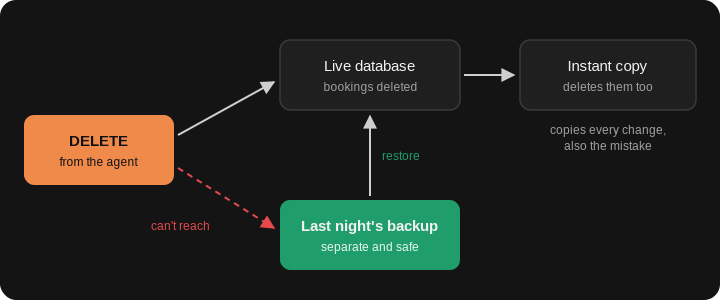
A backup is a copy of your data from an earlier moment. You keep it in a separate place, and you can bring it back. All three parts are important:
- A copy from an earlier moment. It is not a copy that changes together with the original. If a second database copies every change immediately, it copies your
DELETEtoo. - Kept in a separate place. If the thing that destroys your database can also reach the copy, the copy does not protect you.
- That you can bring back. To bring data back from a backup is to restore it. If you can’t restore a backup, it is only a file.
Think of a school project on your computer. Every evening, you send a copy to yourself by email. If your computer breaks, you still have yesterday’s version. But you lose the work you did today, after the email. And if you never checked that the email had the file attached, you might have nothing.
Where this comparison stops working: your project changes only when you work on it. A database with real users changes every second, day and night. So every backup is a little out of date at the moment you make it.
Remember from the git lesson: git saves your code, not your data. Your migrations can rebuild the shape of every table, but not a single row in it. Only a backup can bring back rows.
Three kinds of backup
| Kind | What it is | What you can lose |
|---|---|---|
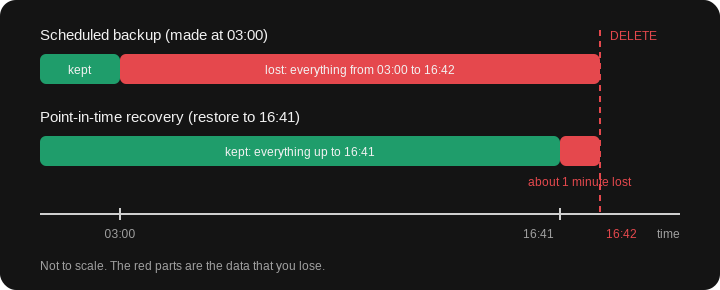
| Scheduled backup | The provider copies the whole database, for example once a day | Everything since the last copy: up to a day |
| Point-in-time recovery | A full copy plus a record of every change since | Almost nothing: you choose the exact second to go back to |
| Your own export | You save a copy to a file and keep it in a different place | Everything since your last export |
Here, the provider is the company that runs your database for you.
Point-in-time recovery, or PITR, is the kind that brings back Friday afternoon. The database already writes down every change it makes, in order. It does this to protect itself from crashes. With PITR, the provider keeps a full copy plus that record of changes.
To restore, the provider starts from the full copy. Then it replays every change up to the moment you choose. So you can say: “Bring the database back to 16:41, one minute before the delete.”
What hosting providers offer
Every provider is different, and plans change. So check your own dashboard (the provider’s control panel website). Here are some examples from provider documentation:
- Supabase backs up projects on its paid plans every day. It offers PITR as a paid add-on. Its docs recommend that free-plan projects export their data regularly themselves. Its backups contain the database, but not the files that users uploaded to Supabase Storage.
- Amazon RDS is AWS’s managed database: AWS runs the database for you. It keeps automatic backups for a number of days that you choose. It can restore to any point in that time. Its docs give a warning: if you delete the database and do not choose to keep its automatic backups, AWS deletes those backups too.
That last point is important. A backup that is stored together with the database can disappear together with the database.
How it goes wrong
“I thought the provider had backups”
Many people check their backups only after the disaster. Then they find one of these problems:
- Their plan doesn’t include backups.
- PITR was an add-on that they never turned on.
- The provider keeps backups for only a few days, and the mistake happened two weeks ago.
All copies in one place
Your database, your backups and your exports are all in one account. One mistake, one stolen password or one billing problem can remove all of them at the same time.
This happened to UniSuper, a large Australian pension fund, in May 2024. A configuration mistake at Google Cloud deleted UniSuper’s private cloud (its own set of servers and data at Google Cloud). A joint statement from both companies said that UniSuper “had backups in place with an additional service provider”. The statement said that those backups reduced the data loss and helped the restoration.
Backups that nobody tested
On January 31, 2017, an engineer at GitLab ran a delete command on the wrong database server. GitLab is a large company that stores code for other people. The command removed about 300 GB of production data. The team went to their backups. GitLab’s public report describes what they found:
- The regular backup job had failed. It used an older version of the backup tool than the database needed.
- The emails that warned about the failures were rejected, so nobody saw them.
- A storage folder that should have held backups was empty.
- Disk snapshots (copies of a whole disk at one moment) were never turned on for the database servers.
A copy saved them. An engineer had made it about six hours earlier, for testing. They lost about six hours of data, and the site was down for about 18 hours. Every backup method looked fine until the day they needed it.
An untested backup is not a backup. It is only a hope.
AI agents with production access
An AI agent works fast and with confidence, and it can be wrong. Your production database has credentials: the address, user name and password that a program needs to connect. If the agent has these credentials, every command it runs works on real data. That includes a DELETE without a filter, a command that deletes a whole table, or a command that resets the database.
You can tell the agent “don’t touch production”. But in a long session, it might ignore or forget that instruction. That is what happened at Replit.
Tool makers know about this problem. Prisma is a tool that many apps use to work with their database. Since version 6.15 (August 2025), the Prisma command-line tool detects when an AI coding agent runs it. Then it blocks commands that destroy the database, such as prisma migrate reset, until the user gives clear permission. This helps, but it covers only one tool. Plain SQL has no such check.
What good looks like
The 3-2-1 rule
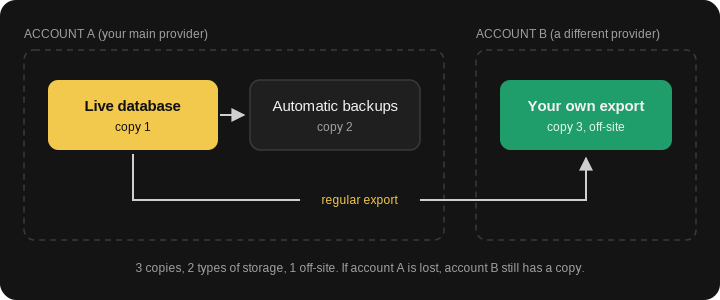
The US Cybersecurity and Infrastructure Security Agency (CISA) describes a well-known guideline, the 3-2-1 rule:
- 3 copies of important data
- 2 different types of storage
- 1 copy stored off-site, away from the rest
For a small web app, this can look like this:
- The live database, at your provider.
- The provider’s automatic backups, with PITR turned on when you have real users or real money involved.
- Your own regular export, stored with a different provider or account. For example, use a storage service that you pay for separately.
Test your restores
Choose a regular day, for example the first Monday of every month. On that day, do a restore drill (a practice restore):
- Restore your latest backup into a new, separate database. Never restore over your live database.
- Connect a copy of your app to the new database. Click through it. Check that members, classes and bookings are there.
- Compare a few counts with production, for example the number of members and the bookings this week.
- Write down how long it took. Write down every step that you needed.
Now you know three things. The backup works. You know how long a real restore takes. And you have written steps for the bad day. CISA’s guidance also says to run scheduled recovery tests and to write down your procedures.
Keep production away from your AI tools
- Use a separate development database for daily work, with fake data. Your laptop’s
.envfile points to it. It never points to production. - Keep production credentials only in your hosting platform’s settings.
- To look at production data, use a read-only database user. This user can look at data, but it can’t change anything.
- Read every database command that an agent wants to run before you allow it.
- Be very careful with
DELETE,DROP(deletes a whole table),TRUNCATE(empties a whole table) andreset. Be careful with anything that contains “force” or “accept data loss”. - Before every risky migration, make a backup or check your restore point.
Go deeper: Why you should never test on your real users (Level 3) shows how to set up separate development, test and production environments.
If it happens anyway
- Stop the damage. Stop the agent. Don’t let it try more “fixes”.
- Write down the exact time of the mistake. Get it from the terminal or your app’s logs (the records your app writes about what it does). You need this time to choose a restore point.
- Check what you have: PITR, daily backups and your own exports.
- Restore into a new database first if your provider allows it. Check the data. Then connect your app to the new database. Supabase’s docs warn that a project is unavailable while a backup is restored into it, so tell your users.
- Afterwards, fix the cause. Find out who had the credentials and which backup was missing.
Test your own app
You need an app of your own for this part. No app yet? Start with Your first app in an afternoon, with an AI doing the typing. Built it in an AI app builder? Ask its AI to do each step below for you, or to add the missing part first (for example, a login).
- Find your backups. Open your database provider’s dashboard and find the “Backups” page. Check how often the provider makes backups and how long it keeps them. Check if PITR is on and if uploaded files are included.
- Find your production credentials. Search the
.envfiles on your laptop for the production database’s address. If you find it, replace it with the address of a development database. - Do one restore drill. Ask your AI to help you export your database. Then restore it into a new, empty test database. The commands are in “Going deeper”. Time the drill.
- Write a one-page plan. List who to call, where the backups are and the restore steps. Then the bad day isn’t the first time you think about it.
Takeaways
Key terms
- Backup: a copy of your data from an earlier moment, kept separately, that you can restore
- Restore: to bring data back from a backup
- Point-in-time recovery (PITR): a restore to any moment you choose, from a full copy plus a record of every change
- 3-2-1 rule: 3 copies, 2 types of storage, 1 off-site
- Restore drill: a practice restore that you do on purpose, before you need it
Red flags
- “The provider probably backs it up”, and nobody checked
- Production database credentials in a
.envfile on your laptop, where AI agents run - Every copy of your data in the same account
- Backups that nobody ever restored, not even once
- An agent that suggests
DELETEwithoutWHERE,DROP,TRUNCATEor a “reset” command
Ask your AI
- “Which database does my app connect to on my laptop? Is it possible that it’s the production database?”
- “What backups does my database provider give me on my current plan, how long are they kept, and is point-in-time recovery turned on?”
- “Help me export my production database and restore it into a new test database, so I can check that my backups work.”
- “Before you run any command that changes or deletes data, show it to me and tell me which database it will run on.”
Going deeper (optional, for readers who want more detail)
Export with pg_dump. For a PostgreSQL database, pg_dump exports everything to one file. pg_restore loads that file into another database:
pg_dump --format=custom --file=gym-backup.dump "$PROD_DATABASE_URL"
pg_restore --no-owner --dbname="$TEST_DATABASE_URL" gym-backup.dump
Line 1 saves the whole production database into a compressed file. Line 2 loads that file into a separate test database. --no-owner skips the user names of the original database, because they often don’t exist in the new database.
PostgreSQL’s docs say that pg_dump makes a consistent export even while people use the database. The same docs give two warnings:
pg_dumprefuses to export from a PostgreSQL server that is newer than its own major version. This is the same kind of mismatch that broke GitLab’s backups.- Except in simple cases,
pg_dumpisn’t the right tool for regular production backups. Your provider’s backups and PITR are for that.
Treat dump files like passwords, because they contain all your users’ data. Never commit them to git.
How PITR works. PostgreSQL writes every change to its write-ahead log (WAL) before it changes the data itself. PITR keeps a base copy plus the saved WAL files. Supabase’s docs say that, by default, it backs up WAL files every two minutes. So in the worst case, you can lose about two minutes of data.
Two numbers to decide. The recovery point objective (RPO) is how much recent data you can afford to lose: a day, or a minute? The recovery time objective (RTO) is how long your app can be down while you restore. Daily backups give an RPO of up to a day. PITR brings it down to minutes or seconds. Restore drills tell you your real RTO.
Replicas are not backups. Many databases keep a replica: a second copy that follows every change. If one server fails, the app can continue to run on the replica. A replica protects you against a broken server, not against a bad command.
Soft deletes. Some apps never really delete rows. Instead, they fill a deleted_at column and hide those rows. This makes “undo” easy for single records. But it doesn’t protect you against DROP TABLE or a wrong update to many rows at once.
Uploaded files. Supabase’s docs say that database backups don’t include files stored through the Storage API. If your users upload photos or documents, back up that storage separately.
References (10)
- Vibe coding service Replit deleted user’s production database and Replit makes vibe-y promise to stop its AI agents making vibe coding disasters (The Register, July 2025), and Introducing a safer way to Vibe Code with Replit Databases (Replit, July 21, 2025). Jason Lemkin’s account of the deleted database and the rollback that worked, Amjad Masad’s “unacceptable and should never be possible”, and Replit’s own announcement of automatically separate development and production databases.
- Postmortem of database outage of January 31: GitLab (2017). About 300 GB removed, the failing
pg_dump9.2 backups, rejected alert emails, the empty S3 bucket, disk snapshots never enabled, the six-hour-old copy and about 18 hours of downtime. - A joint statement from UniSuper CEO Peter Chun, and Google Cloud CEO, Thomas Kurian: UniSuper and Google Cloud, May 8, 2024. The deleted private cloud and the backups “with an additional service provider”.
- Database Backups: Supabase documentation. Daily backups on paid plans, PITR as an add-on, regular exports for free projects, Storage objects not included, downtime during a restore, and WAL backed up every two minutes.
- Introduction to backups: AWS documentation. Amazon RDS retention periods, point-in-time restore, and automated backups deleted with the database unless you choose to keep them.
- ORM 6.15.0, AI Safety Guardrails for Destructive Commands: Prisma, August 27, 2025. The CLI detecting AI agents and asking for explicit consent before
prisma migrate reset. - Back Up Business Data: CISA. The 3-2-1 rule, scheduled recovery tests and written-down recovery procedures.
- pg_dump: PostgreSQL documentation. Consistent exports while the database is in use, refusing to dump from a newer server version, and not being the right tool for regular production backups except in simple cases.