Level 4 · Reliability & scale
Your app went viral. Will it survive?
- Vertical scaling
- Horizontal scaling
- Load balancers
- Stateless servers
- Database connections
- Connection pooling
- Premature scaling
Your app went viral. Will it survive?
Before you start This lesson uses a few words from earlier lessons:
- Instance and load balancer: an instance is one running copy of your app. A load balancer spreads incoming requests across the instances. (How one server handles thousands of users at once)
- Index: a sorted list that the database keeps, so it can find rows without reading the whole table. (Fast with 100 users, frozen at 10,000. The missing index)
- Cache: a saved copy of an answer, so the real work does not have to happen again. (Fast, but showing yesterday’s data)
- Background job: slow work done outside the user’s request, with a queue and a worker. (Sign-up takes 10 seconds because of one email)
Ten minutes on the front page
Your recipe app normally has about 50 users at the same time. On Tuesday morning, someone posts it on a big news site. Within twenty minutes, 5,000 people try to open it.
You are not worried at first. Your app runs on serverless functions (code that the hosting platform starts for each request). Your hosting platform’s docs say that functions scale automatically based on demand. More visitors means more instances. That part works.
Then the error alerts start. The home page shows “Something went wrong”. Your logs fill with one line, again and again:
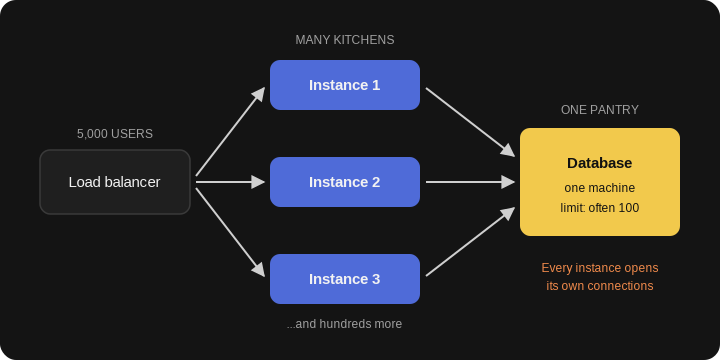
sorry, too many clients alreadyThat is an error from your PostgreSQL database. The functions scaled. The database did not. Every new instance tried to open its own connection, and the database ran out of room.
An hour later, the post drops off the front page, and the traffic (the number of requests that arrive) falls. Everything works again. Most of those 5,000 people saw an error and never came back.
This lesson explains what “scaling” really means and why the database usually breaks first. It shows what to fix before the spike. It also covers the opposite mistake, which costs many more apps than spikes do: you build for millions of users when you have forty.
The mental model: one pantry, many kitchens
Picture a restaurant that suddenly gets ten times more customers. There are two ways to cook more food:
- Make the kitchen bigger: a bigger stove, a faster cook. This is vertical scaling, also called “scaling up”. It means a bigger machine, with more CPU (processing power) and more memory.
- Open more kitchens: several identical kitchens, each with its own cook. This is horizontal scaling, or “scaling out”. It means more instances of your app. A host at the door sends each new customer to a kitchen with room. That host is the load balancer.
Where this comparison stops working: in this restaurant, every kitchen gets its ingredients from one shared pantry. That pantry is your database. More kitchens do not make the pantry bigger. They put more cooks in front of the same door. This happened on Tuesday.
Vertical vs horizontal
| Vertical (bigger machine) | Horizontal (more machines) | |
|---|---|---|
| Code changes needed | None | The app must be stateless (see below) |
| Limit | The biggest machine you can rent | Very high for app servers |
| If one machine dies | Everything is down | The others continue to serve |
| Changing size | Often needs a restart | Add or remove instances while running |
| Best for | Databases, especially at first | App servers and functions |
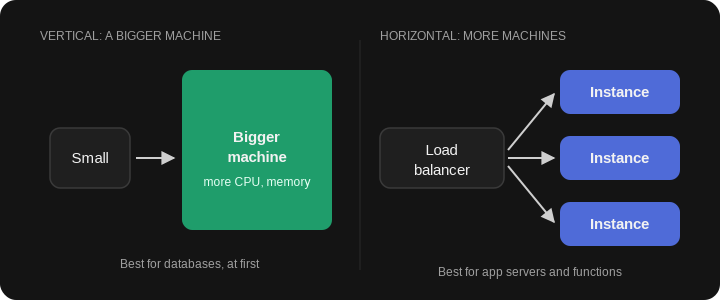
Serverless platforms scale your functions horizontally for you. That is why the functions survived the spike. But your database is usually one machine, scaled vertically. All the extra instances wait at its door.
What a load balancer does
A load balancer receives every request and passes it to one of your instances. It can take turns (called round-robin) or pick the least busy instance. It also runs health checks. Every few seconds, it asks each instance a question like “are you OK?”. If an instance does not answer correctly, the load balancer stops sending requests to it.
Hosting platforms and serverless providers include a load balancer, so you rarely build one. But you must write your app so that it does not matter which instance gets a request.
Stateless servers
An app is stateless when nothing important lives only in one instance’s memory. Any instance can handle any request, because everything it needs is in a shared place.
You saw why in How one server handles thousands of users at once. Imagine three instances. A session, a counter or a cache in a variable then exists three times, with three different values. Users get logged out at random, rate limits (caps on how many requests one user can make) triple, and caches disagree.
| Data | Not in an instance’s memory. Put it here instead: |
|---|---|
| Sessions | The database, Redis, or a signed cookie |
| Caches | Redis, or the CDN |
| Rate-limit counters | Redis |
| Uploaded files | File storage, such as S3 or R2 |
| Slow work | A queue, handled by a background job |
Some load balancers offer sticky sessions: they send each user to the same instance every time. This hides the problem, but only until that instance restarts or the platform removes it. Fix the state instead.
How it goes wrong
Problem 1: The database runs out of connections
Your app talks to PostgreSQL over a connection: an open line between your code and the database. Connections are expensive:
- One new connection needs several network round trips (a message there and the answer back), plus a login check.
- PostgreSQL starts a separate process (a running program) on the database server for each connection. Each process uses memory.
So every database has a limit. PostgreSQL’s setting is called max_connections, and its default is typically 100. Managed databases set their own limit, usually based on the size of the plan.
The AI often writes this for a serverless function:
export async function GET() {
  const client = new Client({ connectionString: process.env.DATABASE_URL });
  await client.connect(); // a brand-new connection on every request
  const { rows } = await client.query("SELECT id, title FROM recipes LIMIT 20");
  return Response.json(rows); // ...and it is never closed
}
In plain English:
- Lines 2–3: open a new database connection on every request.
- Line 4: run one quick query.
- Line 5: reply, but do not close the connection. It stays open until the instance stops or the database drops it.
With 50 visitors, nobody notices. With 5,000, the platform starts hundreds of instances. Each request opens another connection, and the database reaches its limit. After that, new requests fail with “sorry, too many clients already”.
Good code can also fall into this trap. A connection pool (a small set of open connections that requests share) of 10 inside each instance sounds modest. But with 50 instances, it is 500 connections.
Problem 2: Slow queries hold connections for too long
Connections in use ≈ requests per second × seconds each request holds a connection
A query that takes 20 ms and runs 50 times per second keeps about 1 connection busy (50 × 0.02). Without an index, the same query can take 2 seconds. Then it keeps about 100 connections busy (50 × 2). One slow query uses your whole limit.
When the connections run out, every request waits in line, even the fast ones. Requests start to time out (fail because they waited too long). Users click again, which adds more requests. This is how a slightly slow page turns into a full outage (a time when the app is down) under load.
That is why faster queries are a scaling fix. Some things hold connections longer than needed. Examples are missing indexes, too many rows in one request, and N+1 queries (one extra query for each item in a list).
Problem 3: State hiding in memory
The app ran on one instance for months. During the spike, the platform runs twenty. Suddenly:
- Users get logged out between clicks, because sessions lived in memory.
- The login rate limit of 5 attempts becomes up to 100, because each instance counts on its own.
- An admin updates a price, but most visitors still see the old price. Only one instance’s in-memory cache was cleared.
None of these bugs existed with one instance. None of them show up when you test on your laptop.
Problem 4: Scaling too early
You ask the AI to “make it scalable”. It suggests three changes:
- Split your app into eight separate services.
- Run them on Kubernetes, a system that runs and manages many programs across a group of machines.
- Copy your database to three continents.
You have 40 users.
This is premature scaling, and it has real costs:
- Money: groups of machines, extra databases and always-on servers cost money every month, even if nobody uses them.
- Time: you spend hours on infrastructure (the servers and services that run your app). You do not spend those hours on the product that your 40 users want.
- Reliability: more parts means more things that can break. It also means more places to look when something goes wrong, and more settings that the AI can get wrong.
Most apps that fail do not fail because they could not handle the traffic. They fail because nobody came. Build for the load that you have, and prepare for 10 times that load. Measure before you add complexity.
What good looks like
Step 1: Make each request cheaper
Before you add anything, make every request do less work. This helps every user, costs little, and is often enough:
- Add missing indexes, so queries take milliseconds, not seconds.
- Fix N+1 queries, so one page runs a few queries, not hundreds. (One page, 500 database queries)
- Paginate (send results one page at a time), so no request loads thousands of rows. (Your app tried to load 50,000 rows at once)
- Cache data that many people read and few people change, in Redis or at the CDN.
- Move slow work to background jobs, so requests do not hold connections while they wait for email or AI services.
Step 2: Pool connections, and use a pooler with serverless
A connection pool keeps a few connections open and lends them to requests. Create the pool once per instance, outside the request handler (the function that runs for each request):
const pool = new Pool({ connectionString: process.env.DATABASE_URL }); // once per instance
attachDatabasePool(pool); // Vercel helper: closes idle connections before the instance sleeps

export async function GET() {
  const { rows } = await pool.query("SELECT id, title FROM recipes LIMIT 20");
  return Response.json(rows);
}
In plain English:
- Line 1: create the pool when the instance starts, not on every request.
- Line 2: on Vercel,
attachDatabasePoolfrom@vercel/functionscloses idle connections before the platform pauses an instance. So the number of idle connections does not grow. - Lines 4–7: each request borrows a connection, runs its query, and gives the connection back.
That fixes one instance. With hundreds of serverless instances, you also need a connection pooler: a separate service between your app and the database. It accepts thousands of connections from your instances, but uses only a few real database connections. It lends one out for each transaction (a group of database changes that succeed or fail together).
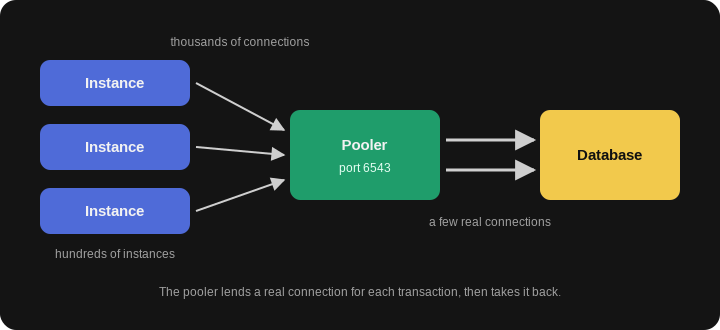
Supabase includes a pooler. Here are two of the connection options in its docs. A port is the number that selects which service on a server receives the connection.
| Connection | Port | Use it for |
|---|---|---|
| Direct connection | 5432 | Always-on servers, such as a virtual machine or a long-running container. It uses IPv6, unless you add Supabase’s IPv4 add-on |
| Pooler, transaction mode | 6543 | Serverless and edge functions, which open many short-lived connections |
Edge functions run in many places near users. IPv4 and IPv6 are the two versions of internet addresses.
Transaction mode has one catch. In this mode, Supabase’s shared pooler does not support prepared statements. These are queries that the database saves and uses again on one connection. So you turn them off in the settings of your database library. Outside Supabase, PgBouncer is a widely used standalone pooler.
Step 3: Keep instances stateless
Check the table in the mental model. Sessions, caches, counters, files and slow work all belong in shared places. Then you can add, remove or restart any instance at any moment, and nobody notices.
Step 4: Scale the database up, then out
When the database itself is busy, even after Step 1:
- Scale up first. Move to a bigger database plan. It needs no code changes. For a database, it is usually the right move for a long time.
- Add read replicas. A read replica is a read-only copy of the database that follows the main one. Send heavy reads, like reports and search, to the replica. All writes still go to the main database, and a replica can be slightly behind.
- Split the data, last. Sharding splits your data across several databases, for example by customer. It is powerful. But it makes every query, migration (a change to the database structure) and backup harder. Very few apps need it.
Step 5: Protect yourself during a spike
- Rate limits stop one bot or one bug from using all your capacity. (Bots signed up 10,000 times overnight. Now what?)
- CDN caching for public pages means a spike on your home page never reaches your database. (Fast in the US, painfully slow in India)
- Spending limits stop automatic scaling from causing a surprise bill. (You woke up to a $10,000 cloud bill. What happened?)
Go deeper: One slow service took your whole app down (Level 5) shows how to fail safely when one part of your system is overloaded.
Test your own app
You need an app of your own for this part. No app yet? Start with Your first app in an afternoon, with an AI doing the typing. Built it in an AI app builder? Ask its AI to do each step below for you, or to add the missing part first (for example, a login).
-
Know your limit. In your database’s SQL editor, run the query below. The first line shows the connection limit. The second line shows how many connections are open now.
SHOW max_connections; SELECT count(*) FROM pg_stat_activity; -
Check your connection string. If your app runs on serverless functions and uses Supabase, look at
DATABASE_URL. Does it use the pooler on port 6543? Check it in your hosting platform’s environment variables, not only in your.envfile. -
Find connections created per request. Ask your AI: “Find every place where a database client or pool is created. Is any of them inside a request handler?”
-
Load test, but not in production. A load test sends many simulated users to your app at once. Use a load-testing tool such as k6 against your staging environment (a copy of your app for tests). Raise the number of simulated users step by step. Watch the number of database connections and the slowest queries. Find your breaking point before your users do.
-
The restart test. Restart your app, or run two instances, and use it normally. Do you get logged out? Do counters reset? If so, some state lives in memory.
Takeaways
Key terms
- Vertical scaling: a bigger machine
- Horizontal scaling: more machines or instances behind a load balancer
- Health check: the load balancer’s regular “are you OK?” request to each instance
- Stateless: nothing important lives only in one instance’s memory
- Connection pool / pooler: a few database connections used again and again, inside one instance / shared by many instances
- Read replica: a read-only copy of the database that takes some of the reads
- Premature scaling: building for load you do not have, and paying for it now
Red flags in AI-written code
- A database client or pool created inside a request handler
- Serverless functions that connect straight to the database’s direct port, not to a pooler
- Sessions, caches, counters or files kept in variables or on the instance’s own disk
- “Scale” plans with microservices (many small separate services), Kubernetes or sharding for an app with few users
- No idea what the connection limit is, or how many connections are in use
Ask your AI
- “Where does my app create database connections? Show me how many connections it could open with 100 instances running.”
- “List everything my app keeps in memory or on local disk that would break with more than one instance.”
- “Find my three slowest queries and suggest indexes or caching for each.”
- “My app has [N] users. What’s the simplest setup that would handle 10 times that? Don’t suggest anything I don’t need yet.”
Going deeper (optional, for readers who want more detail)
Little’s law. The “connections in use” rule is a form of Little’s law from queueing theory (the math of waiting lines). The law says this: the average number of items in a system equals the arrival rate times the average time that an item spends inside. It works for connections, open requests, and people in a shop.
Why PostgreSQL connections are heavy. PostgreSQL’s documentation describes a supervisor process. This process starts (“forks”) a new server process for each connection. That is why a higher max_connections is not free: PostgreSQL also sizes some of its shared memory based on it. A higher limit is a short-term patch. A pooler is the real fix.
Pooler modes. In session mode, a client keeps one real connection for as long as it is connected. In transaction mode, it borrows one only for the length of each transaction. So a few real connections serve many clients. Supabase’s docs note a limit of transaction mode. Some features depend on the memory of one connection, such as prepared statements and temporary tables. These features do not work across transactions in transaction mode.
Read-your-own-writes. With read replicas, a user can save a comment and then not see it. The reason is that the page read from a replica that was not up to date yet. A common fix is this: for a few seconds after a user writes something, send that user’s reads to the main database.
Autoscaling is not instant. New instances take time to start. This delay is called a cold start. Platforms also limit how fast they add capacity. So during a sudden spike, users can see slow responses or errors for a short time before new instances are ready. Fast requests help here too.
Other shared limits. The database is the most common bottleneck (the one part that limits the whole system), but not the only one. Email services, payment providers and AI APIs all have their own rate limits, and a spike can hit them too. Background jobs with a concurrency limit (a maximum number of jobs at the same time) protect both you and them.
References (6)
- Connections and authentication: max_connections: PostgreSQL documentation. The default limit of 100 connections and its effect on shared memory.
- Architectural fundamentals: PostgreSQL documentation. A new server process is started for each connection.
- ERROR 53300: Too many connections: Bytebase. The “sorry, too many clients already” error and its common causes.
- Connect to your database: Supabase. Direct connections on port 5432 (IPv6 unless you add the IPv4 add-on), the transaction-mode pooler on port 6543 for serverless functions, and turning off prepared statements.
- Connection pooling with Vercel Functions: Vercel. Serverless instances hitting connection limits, creating the pool once, and
attachDatabasePool. - Vercel Functions limits: Vercel. Functions scale automatically based on demand.