Level 5 · Systems & architecture
The order was saved, but the email never went out
- Dual writes
- Transactional outbox
- Message relay
- Polling publisher
- At-least-once delivery
- Idempotent consumers
- Change data capture
The order was saved, but the email never went out
Before you start This lesson uses a few words from earlier lessons:
- Transaction: a group of database changes that succeed or fail together. It ends in
COMMIT(save) orROLLBACK(undo). (A customer got charged twice. How?)- Event and message broker: a message that reports something that happened, and the system that stores and delivers such messages. (When everything calls everything, everything breaks)
- Idempotent consumer: a service that does the work only once, however many times the same event arrives. (When everything calls everything, everything breaks)
- Worker: code that runs outside any user’s request and does work in the background. (Sign-up takes 10 seconds because of one email)
The order that nobody else heard about
A customer writes to you on Monday:
“I paid on Friday. The charge is on my card, and I can see the order in my account. But I never got a confirmation email, and nothing has shipped.”
You look. The order is in your database, and it is paid. But the email service has no record of it. The warehouse service packs a box when it hears about a new order. It has no record of this order either.
You search the logs (your app’s record of what it did) for Friday. The app saved the order at 14:02:07. At 14:02:07, a deploy (putting new code live) restarted your server.
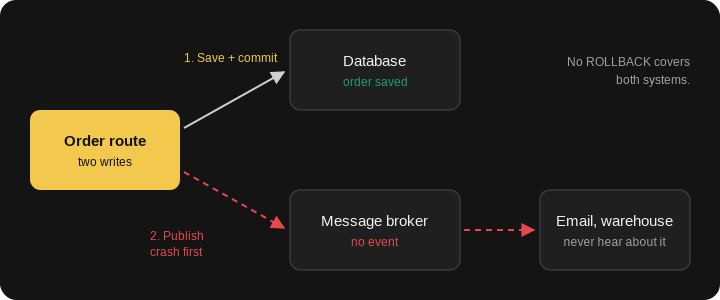
Your order route saves the order first. Then it publishes an order.placed event to your message broker. The save ran, but the restart came before the publish. The event was never sent, and nothing in your system remembered it.
This happens rarely. It needs a crash, a deploy or a short broker outage in a gap of a few milliseconds. But with enough orders, it happens every week. Each time, a customer pays and gets nothing. This lesson is about that gap.
The mental model: two systems, no shared undo
The order route writes to two separate systems: your database and your message broker. A dual write is when you write the same change to two systems that cannot share a transaction.
A transaction only covers your own database. No ROLLBACK can take back a message that went to a broker. It also cannot take back an email sent through an email API, or a job added to a separate queue service. So in either order, there is a moment when one write has happened and the other has not. If anything stops your code in that moment, the systems disagree.
| You do | What can go wrong in the gap | Result |
|---|---|---|
| Save, then send | A crash, deploy or broker outage after the save | The order exists, and the event never goes out: a lost message |
| Send, then save | The save fails or rolls back after the send | Other services react to an order that doesn’t exist: a ghost message |
Think of a shop assistant who writes each sale in the sales book, then phones the warehouse. Sometimes the phone line is dead, or the assistant’s shift ends between the two steps. Then the book says “sold” and the warehouse knows nothing.
The fix in the shop: write a note for the warehouse in an “outgoing” column. Write it on the same page of the sales book, at the same moment. Every few minutes, a runner looks through the book. The runner delivers every note without a tick, and then ticks it. If something stops the runner before the tick, the runner delivers that note again on the next round. So the warehouse checks: “Did I already pack order 1042?”
Where the comparison stops working: in a paper book, the sale and the note are not all-or-nothing. In a database transaction, they are. That is why the software version is reliable.
How it goes wrong
Bug 1: Send after commit
This is the code from the story:
const order = await db.order.create({ data: orderData });
// a crash, a deploy or a broker outage here: the event is never sent
await broker.publish("order.placed", { orderId: order.id });
res.status(201).json(order);
In plain English: save the order (the database commits it at once), then publish the event. If the process (the running program) stops between those lines, the order is saved and the event is gone. (broker is a placeholder for your message broker’s client library, and orderData for the order details.)
A retry of the publish helps when the broker is unreachable for a second. It does not help when your server stops. The retry was only in the memory of a process that no longer exists.
Bug 2: Send before commit
You ask your AI to fix it, and it moves the publish inside the transaction:
await db.$transaction(async (tx) => {
  const order = await tx.order.create({ data: orderData });
  await broker.publish("order.placed", { orderId: order.id }); // sent now...
  await tx.product.update({ where: { id: productId }, data: { stock: { decrement: 1 } } }); // ...this can still fail
});
In plain English: inside a transaction, save the order, publish the event, then reduce the stock.
The event leaves at line 3. If line 4 fails, or the commit fails, the database rolls back the order. The email service now sends a receipt for an order that doesn’t exist. The warehouse looks for an order ID that it cannot find. The rollback cannot unsend the message.
This version has a second problem that you saw before. The transaction holds locks (it blocks other changes to the same rows) while it waits for the network. Do not put network calls inside transactions.
Bug 3: The same gap, with other names
The gap is not only about message brokers. These actions have the same problem:
- Save the order, then call an email API directly
- Save the user, then add a welcome job to a queue service that has its own storage
- Save a payment, then update a search index (data built for fast search) or a cache (a fast copy of data) elsewhere
One action can change your database and something outside it. Each time this happens, ask: what if the process stops between the two?
What good looks like: the transactional outbox
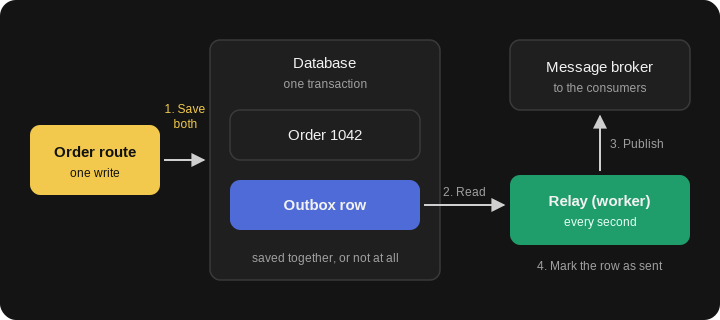
The fix is to change two writes into one. Do not send the message. Instead, write it into your own database, in the same transaction as the order. A separate process sends it later. This is the transactional outbox pattern.
It has two parts:
- An outbox table: messages that wait to be sent, stored in the same database as your data.
- A message relay: a worker that reads new rows from the outbox, publishes them to the broker, and marks them as sent.
Step 1: The outbox table
CREATE TABLE outbox (
  id         bigserial PRIMARY KEY,     -- a growing number: also the sending order
  event_id   uuid NOT NULL UNIQUE,      -- stays the same however often it's sent
  topic      text NOT NULL,             -- for example 'order.placed'
  payload    jsonb NOT NULL,            -- the event's data, stored as JSON
  created_at timestamptz NOT NULL DEFAULT now(),
  sent_at    timestamptz                -- empty until the relay has published it
);
Each row is one event that waits to go out. bigserial tells the PostgreSQL database to number the rows 1, 2, 3… automatically. jsonb stores JSON data.
Step 2: Write the order and the event together
const order = await db.$transaction(async (tx) => {
  const order = await tx.order.create({ data: orderData });
  await tx.outbox.create({ data: {
    eventId: crypto.randomUUID(), topic: "order.placed", payload: { orderId: order.id },
  } });
  return order;
});
In plain English: in one transaction, save the order and save an outbox row that describes the event. Nothing goes over the network.
Now look at every failure again:
- The server crashes before the commit: neither the order nor the outbox row exists. The customer sees an error and tries again. Nothing is half-done.
- The server crashes after the commit: both exist. The event is not sent yet, but it is written in the database, so the relay will send it.
- The transaction rolls back: both disappear. There is no ghost message.
The order and its event now succeed or fail together.
Step 3: The relay
async function relayOnce() {
  const rows = await db.outbox.findMany({ where: { sentAt: null }, orderBy: { id: "asc" }, take: 100 });
  for (const row of rows) {
    await broker.publish(row.topic, { eventId: row.eventId, ...row.payload });
    await db.outbox.update({ where: { id: row.id }, data: { sentAt: new Date() } });
  }
}
while (true) { await relayOnce().catch(console.error); await sleep(1000); } // in a worker
In plain English:
- Line 2: find up to 100 rows that are not sent, oldest first.
- Lines 3–5: publish each one to the broker, then mark it as sent.
- Line 8: do this every second, forever, in a worker, not in a route. If a round fails, log the error and try again next round.
(sleep is a small helper that you write. It waits that many milliseconds. db.outbox is the Prisma model, the code object for the table above. broker is still a placeholder.)
If the broker is down, publish throws an error, and the rows stay unsent. The next round tries again. While your database is safe, no event is lost. This simple version asks the table for new rows on a timer. It is called a polling publisher.
The relay runs as a separate worker that is always on. A serverless platform runs your code only when a request comes in. On such a platform, you can run the relay as a scheduled job instead, with a longer delay between rounds.
The catch: at least once, never “exactly once”
Look at lines 4 and 5 again. Say the relay crashes after the publish but before it marks the row as sent. After the restart, it publishes the same row again. The outbox gives you at-least-once delivery: never lost, sometimes twice.
So consumers must be idempotent, as in the event-driven lesson. They record each eventId they handled, and skip the ones they have seen. That is why the app creates the event ID once, inside the transaction, and stores it in the row. Every publish of that row carries the same ID. This is the same rule as for idempotency keys: one ID per operation, not per attempt.
Go deeper: When everything calls everything, everything breaks (Level 5) shows the idempotent consumer code.
Keep it healthy
- Order: one relay that sends rows in
idorder keeps events almost in the order they were written. It is not exact. The database gives each row itsidat insert time. So two transactions at the same time can commit in a different order than their ids. Several relays in parallel can mix the order, and some brokers can change the order too. So consumers still should not depend on it. - Clean up: delete or archive sent rows after a few days, so the table does not grow forever.
- Watch the backlog: the number of unsent rows, and the age of the oldest one, tell you if the relay works. If the oldest unsent row is more than a few minutes old, send an alert. Nothing is lost, but nothing goes out.
Polling, or reading the database’s own log
Polling is simple, but it queries the table every second. Also, an event can wait up to a second before the relay sends it.
You can find new outbox rows in another way. Many databases write every change to a log before they change the real data. PostgreSQL calls this the write-ahead log (WAL). A tool can read that log and publish each new outbox row as soon as it is committed, with no polling. Change data capture (CDC) is when you read a database’s change log to react to changes. Debezium is one open-source tool that does this, and it has a built-in outbox feature.
Go deeper: Your search results are an hour out of date. Why? (Level 5) explains change data capture and the write-ahead log.
Do you need it?
The outbox adds a table, a worker to run and watch, and a short delay. It is worth it when a lost or ghost message costs real money or trust: orders, payments, shipping and account changes. For analytics, the loss of a rare event does not matter. There, a plain publish after the commit can be fine.
Sometimes you already have an outbox without the name. Your job queue may store its jobs as rows in the same database. If you add the job in the same transaction as the order, the job and the order commit together.
Test your own app
You need an app of your own for this part. No app yet? Start with Your first app in an afternoon, with an AI doing the typing. Built it in an AI app builder? Ask its AI to do each step below for you, or to add the missing part first (for example, a login).
Do these tests in staging (a test copy of your app).
- Find your dual writes. Ask your AI: “List every place where my code saves to the database, then sends a message, calls an API or adds a job.”
- Crash in the gap. In the old code, add
throw new Error("test")right after the save, for a short time. Place an order. The order exists, and the event does not. With the outbox, crash the server right after the commit. The event should still go out when the relay runs. - Stop the broker. Turn off the broker, or point the relay at a wrong address. Place five orders. Checkout should still work, and five rows should wait in the outbox. Turn the broker back on. The relay should publish all five.
- Send one row twice. Find a row that the relay already sent, and set its
sent_atback to empty. Let the relay send it again. The customer should still get one email. - Check the backlog query. Run it and add it to your monitoring:
SELECT count(*), min(created_at) FROM outbox WHERE sent_at IS NULL;Takeaways
Key terms
- Dual write: one change written to two systems that cannot share a transaction
- Lost message / ghost message: saved but never sent / sent but never saved
- Transactional outbox: the message is saved in an outbox table, in the same transaction as the data
- Message relay: a worker that publishes outbox rows to the broker and marks them as sent
- Polling publisher: a relay that checks the outbox table on a timer
- Write-ahead log (WAL): the log where PostgreSQL records every change before it applies it
- Change data capture (CDC): reading the database’s change log to react to changes
Red flags in AI-written code
createorupdate, thenpublish,send,enqueueor an API call, with no recovery if the process stops between them- A publish or API call inside a database transaction
- “We retry the publish, so it’s safe” (retries in memory stop when the process stops)
- An outbox relay with no monitoring of unsent rows
- A new event ID that the relay makes on each publish, instead of an ID stored in the row
- Consumers that assume each event arrives exactly once
Which step broke?
- Order saved, no event, nothing in the outbox → the code does not write to the outbox in the same transaction
- Rows in the outbox, never sent → the relay is stopped or cannot reach the broker
- Event sent twice, customer got two emails → the consumer is not idempotent
- Event for an order that doesn’t exist → something publishes before the commit
Ask your AI
- “Find every dual write in my code: a database save followed by a message, an API call or a job in another system. What happens if the server stops between the two?”
- “Add a transactional outbox for [this event]: the table, the write to it in the same transaction, and a relay worker. Show what happens if the relay crashes after publishing.”
- “Write a monitoring query and an alert for unsent outbox rows older than five minutes.”
Going deeper (optional, for readers who want more detail)
Why not one transaction across both systems? A protocol called two-phase commit (2PC) can coordinate a transaction across several systems. microservices.io notes that it is usually not an option. Many databases and message brokers do not support it, and it makes your service depend closely on both. The outbox gives the same safety with only the transaction of your own database.
Several relays at once. One relay is a single point of failure. But if two relays read the same rows, they send everything twice. In PostgreSQL, SELECT ... FOR UPDATE SKIP LOCKED lets each relay lock a batch of rows. Each relay skips rows that another relay already locked. The PostgreSQL docs say SKIP LOCKED suits many consumers that read a queue-like table, not general work. Parallel relays can send events out of order. So many teams group events by a key, such as the order ID, and keep one sender per key.
The inbox. The consumer side often gets its own table too: the processed_events table from the event-driven lesson. Some people call it an inbox. It records which incoming events were already handled, and the consumer writes it in the same transaction as the work.
Debezium’s outbox router. Debezium is a change data capture tool. Its outbox event router turns new outbox rows into messages on Kafka topics. Its default outbox table has columns such as id, aggregatetype, aggregateid, type and payload. It uses aggregatetype to build the topic name. It uses aggregateid as the message key, which keeps events for the same order in order.
Outboxes in NoSQL databases. microservices.io notes that in a NoSQL database (a database without SQL tables), the outbox can be a property of each record. AWS’s guide shows a version on DynamoDB. The app stores the event in the same item, and DynamoDB’s built-in change stream captures it. A small function reads the stream and sends the event on, so it does the relay’s job.
An alternative: event sourcing. You can store only the events, and work out the current state from them. Then you do not save the current state and an event, so there is only one write.
Go deeper: What if your database remembered everything that ever happened? (Level 5)
References (6)
- Pattern: Transactional outbox: microservices.io (Chris Richardson). The problem of updating a database and sending a message atomically, why 2PC is usually not an option, the outbox table and message relay, duplicate publishing, and idempotent consumers.
- Pattern: Transaction log tailing: microservices.io (Chris Richardson). Publishing outbox rows by reading the database’s transaction log, such as the PostgreSQL WAL, as an alternative to polling.
- Transactional outbox pattern: AWS Prescriptive Guidance. The dual-write problem, failures after the commit and sends before a rollback, the outbox table written in the same transaction, duplicate messages, ordering, and the CDC version with DynamoDB.
- Outbox Event Router: Debezium documentation. Capturing outbox inserts and routing them to Kafka topics, and the default outbox columns.
- Write-Ahead Logging (WAL): PostgreSQL documentation. Changes are written to the log before the data files.
- SELECT: PostgreSQL documentation.
FOR UPDATE SKIP LOCKEDfor many consumers reading a queue-like table.