Level 5 · Systems & architecture
Two people typed in the same document at once. Who wins?
Two people typed in the same document at once. Who wins?
Before you start This lesson uses a few words from earlier lessons:
- Lost update: two people read the same value, and one save overwrites the other without any error. (A customer got charged twice. How?)
- WebSocket: a connection that stays open, so the server and browser can both send messages at any moment. (How chat apps update without you refreshing)
- Eventual consistency: copies of data that catch up a moment later, not at once. (When everything calls everything, everything breaks)
- Event sourcing: store every change, in order, not only the latest state. (What if your database remembered everything that ever happened?)
The paragraph that disappeared
You built a shared notes app for study groups. It has a big text box and a Save button. When you click Save, the app sends the whole note to the server, and the server stores it.
Alice and Bob open the group’s note at 7:00. It says:
Exam on Friday. Bring a calculator.At 7:02, Alice adds a line, “Chapter 4 is not on the exam”, and saves. At 7:03, Bob changes “Friday” to “Friday at 9:00” in his copy and saves.
The note now says exactly what Bob’s screen said: the exam time, but no Chapter 4 line. Alice’s work is gone. Nobody saw an error. On Thursday night, half the group studies Chapter 4 for nothing.
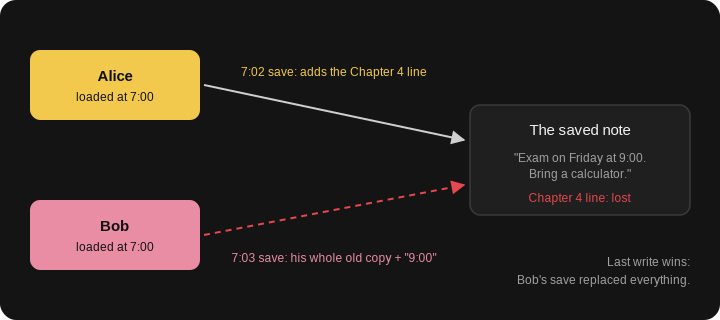
So who wins when two people type in the same document? In your app: the person who clicked Save last. This lesson shows why that is a bad rule. It shows the two smart ideas that real editors use instead. It also shows why you should almost never build either one yourself.
Why “last write wins” loses work
Your app uses a rule called last write wins (LWW): when two versions collide, the version saved last replaces the other completely.
Bob loaded his copy at 7:00, before Alice’s change. When he saved at 7:03, he did not send “fix one word”. He sent “the note is now this”: his whole old copy plus his change. That is the lost update that you met with database rows, now with a document.
LWW is not always wrong. For one field, such as the display name on a profile, the latest value is usually the right one. It is wrong when the value is big and people change different parts of it, like a document.
The simple fixes, and where they stop
Before you try anything clever, there are two simple options:
- Lock the document. While Alice edits, Bob can only read. There are no conflicts, but also no work together.
- Detect the conflict and ask. Give each note a version number. A save succeeds only if the version did not change after you loaded it:
UPDATE notes SET body = $1, version = version + 1
WHERE id = $2 AND version = $3;
-- 0 rows updated: someone saved first. Reload and try again.
Bob’s save says “I loaded version 7”. Alice’s save already made it version 8, so no row matches. Nothing is overwritten, and the app tells Bob to reload. This is enough for many apps: wikis, settings pages, product descriptions.
But it is not what people expect from Google Docs. There, both people type at the same time, and they see each other’s letters appear. Nobody gets a “please reload” message. For that, the app must send each keystroke as a small change and combine the changes from different people. That is where the real problem starts.
The real problem: positions move
Send changes, not whole documents. A change is something like “insert s at position 3”. The position is how many characters come before it, counted from 0.
The document says cat. At the same moment:
- Bob types
Theat the start: insert “The ” at position 0. His screen showsThe cat. - Alice types
sat the end: insert “s” at position 3. Her screen showscats.
Each change goes to the other person. Alice applies Bob’s change to cats and gets The cats. That is correct.
Bob applies Alice’s change, “insert s at position 3”, to The cat:
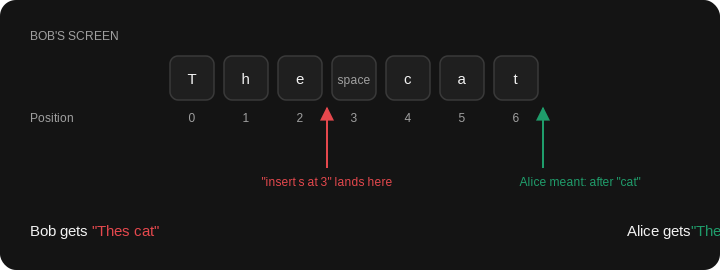
Alice meant “after cat”. But on Bob’s screen, Bob’s four new characters moved cat to the right. So position 3 now points to a different place. Alice sees The cats, Bob sees Thes cat, and they will never agree again.
The goal of collaborative editing is convergence: when everyone has received every change, everyone sees the same document. There are two well-known ways to get there.
Idea 1: Operational transformation (OT)
Operational transformation (OT) fixes the position before it applies a change. When a change arrives, OT adjusts it against the changes that happened at the same time, which it did not know about. This adjustment is called a transform.
In our example, Bob’s side knows that Bob inserted 4 characters at position 0, before position 3. So OT transforms Alice’s change from “insert s at 3” to “insert s at 7”. Bob’s screen becomes The cats. Both screens match.
Rules like this exist for every pair of operation types: insert vs insert, insert vs delete, and delete vs delete. In rich text (text with formatting, like bold), there is also formatting vs all of those. Each rule is small. But to get all of them right, in every order, is very hard.
OT systems usually use a central server. Every change goes through it, and the server puts all changes into one official order. Each browser transforms incoming changes against its own changes that the server has not confirmed yet.
Google Docs is the best-known example. In a 2010 series about its new editor, Google explained that it uses OT to merge the changes of its editors. It uses OT together with a protocol (a set of rules for messages) between each browser and Google’s servers. Google wrote that with a correct OT implementation, everyone sees the same version when all changes have arrived. The older editor, they wrote, compared whole document versions instead. That method often could not tell how two people’s changes were meant to fit together.
OT in short: changes are positions plus a clever adjustment step, and a server keeps the official order.
Idea 2: CRDTs
A CRDT (conflict-free replicated data type) uses a different method. It removes the problem, so there is nothing to fix later.
The problem was that positions move. So a text CRDT does not use positions. It gives every character a permanent, unique ID, for example the author’s ID plus a counter. Say Alice typed cat. Its letters get the IDs alice-1, alice-2 and alice-3. Changes then point at IDs, not numbers:
- Alice’s change: insert “s” after the character
t(IDalice-3) - Bob’s change: insert “The ” at the very start
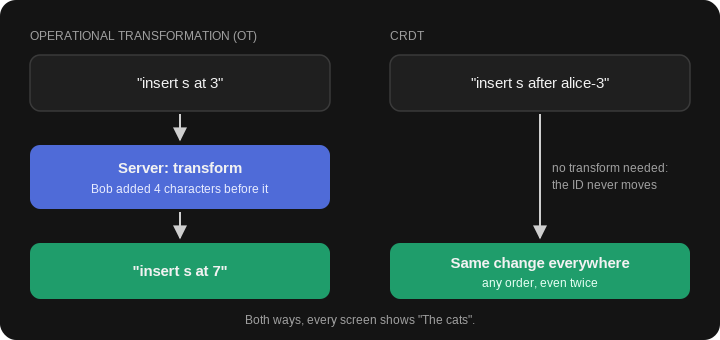
When Bob’s device applies Alice’s change, it looks for alice-3. That t is still the same t, wherever Bob’s typing moved it. So s goes after it, and both people get The cats. No adjustment is necessary.
What if two people insert after the same character at the same time? The CRDT has a fixed rule to break the tie, for example “compare the authors’ IDs”. Every device uses the same rule, so every device picks the same order.
This gives the key property. You can apply CRDT changes in any order, and even more than once, and every copy still ends up the same. The Yjs documentation describes its updates in these terms: you can apply them in any order and multiple times.
Because order does not matter, CRDTs do not need a central server to decide it. Devices can edit offline for hours and still converge. They can exchange changes through a server, or directly with each other (peer-to-peer).
CRDTs in short: every piece of data gets a permanent identity, so changes merge the same way everywhere, in any order.
How it goes wrong: the trade-offs
Neither idea is free. Here is how they compare:
| OT | CRDTs | |
|---|---|---|
| Who decides the order? | A central server | Nobody needs to |
| Offline editing for hours | Hard | Designed for it |
| Peer-to-peer (no server) | Hard | Possible |
| Extra data stored | Little: the document stays plain text | IDs for every piece of text, and some trace of deleted text |
| Main difficulty | Transformation rules for every pair of operations | Keeping that extra data small and fast |
Some products mix ideas. Figma, the design tool, wrote in 2019 that it chose not to use OT. OT was more complex than its problem needed. Instead, Figma’s system was inspired by CRDTs, but it is not a true CRDT. Figma’s server is the central authority. So Figma could leave out some of the extra work that a fully decentralized CRDT (one with no central server) needs.
“Conflict-free” doesn’t mean “what you meant”
A CRDT guarantees that everyone sees the same document. It does not guarantee that the document is sensible. Say the note says red. Alice selects it and types blue. At the same time, Bob selects it and types green. Both deleted red, and both inserts stay.
Everyone converges on something like bluegreen. It is consistent, but it is still wrong. Humans must fix it. So show people where others are typing. Also keep a version history, so people can undo mistakes.
The bugs you’ll actually hit
- Building it yourself. If you ask “make my editor collaborative”, the AI can write its own OT or merge logic. It will work in a demo with two tabs. It will fail in rare cases that you will not see until users lose text.
- No authorization (a check of who may do what) on the sync server. The editor syncs perfectly, but anyone who guesses a document’s ID can connect and read or change it. Every collaboration server needs the same ownership check as any API route.
- Saving only in memory. The sync server holds documents in memory and restarts during a deploy (when you put new code live). Store documents in your database too.
- Mixing models. The text syncs through the library, but a normal form saves the title with LWW. Now some fields merge and others overwrite.
Go deeper: Change one number in the URL, see everyone’s invoices (Level 2) covers the authorization check that every connection still needs.
What good looks like: use a library, own the edges
The practical answer for almost everyone: do not write OT or a CRDT yourself. Use a library. Two well-known open-source libraries are:
- Yjs: a CRDT library to build collaborative apps. It works over any network, including WebSocket and WebRTC (a way for browsers to connect to each other directly). It does not need a central source of truth. It has ready-made connections to popular text editors such as ProseMirror, Tiptap, Quill, CodeMirror and Monaco.
- Automerge: a CRDT library for “local-first” apps, where each device keeps its own copy and works offline. It merges changes made at the same time without a central server. It keeps a history of changes, so you can look at and compare old versions.
Here are two copies of a Yjs document that sync, in the browser or in Node (JavaScript outside the browser):
const alice = new Y.Doc();
const bob = new Y.Doc();
alice.on("update", (u) => Y.applyUpdate(bob, u)); // send Alice's changes to Bob
bob.on("update", (u) => Y.applyUpdate(alice, u)); // and Bob's to Alice

alice.getText("note").insert(0, "cat");
bob.getText("note").insert(0, "The ");
Each document is a Y.Doc. getText("note") gives a shared piece of text, and insert(index, text) edits it. When a document changes, it sends an update event with a small binary (not human-readable) description of the change. Here, the code passes it straight to the other document. In a real app, you send it over a WebSocket to your server and other users. You never write merge logic, because the library does it.
Your job is the parts that no library can decide for you:
- Choose by what your users need. Do people really edit at the same time? If not, a version number and “please reload” is much simpler. Do they need to work offline? If yes, prefer CRDTs.
- Keep a server, even with CRDTs. Use it to check who may open each document, store documents in your database, and keep backups. “No central server needed” is a capability, not a requirement.
- Plan for size. CRDT documents carry extra data. Test with your biggest real document, not a short demo.
- Add the human parts: other people’s cursors, undo, and version history.
Go deeper: How chat apps update without you refreshing (Level 4) explains the WebSocket connections that carry these changes.
Test it yourself
- The two-tab test. Open the same document in two browser windows, logged in as two users. Type in both at once, in the same sentence. Does every letter stay? Do both windows end up the same?
- The old-copy test. Load a document in both windows. Edit and save in window 1. Then edit and save in window 2 without a reload. Is the change from window 1 still there?
- The offline test. In the developer tools of one window, open the Network tab and set it to Offline. If your editor’s connection stays open anyway, turn off Wi-Fi on that computer. Type there, type in the other window too, then go back online. What happens?
- The stranger test. Log in as a third user who is not invited. Try to open or connect to the document by its ID.
Takeaways
Key terms
- Last write wins (LWW): the version saved last replaces the other, and the other’s changes are lost
- Convergence: when all changes arrive, everyone sees the same document
- Operational transformation (OT): adjust each change against the changes made at the same time, usually with a central server that sets the order
- CRDT: a data type where every piece has a permanent identity, so changes merge the same way in any order, without a central server
- Peer-to-peer: devices exchange changes directly, without a server in the middle
- Yjs and Automerge: popular open-source CRDT libraries
Which step broke?
- A user’s whole edit disappeared → saving whole documents with last write wins
- Letters go to the wrong place → changes based on positions, with no transform
- Two screens show different text forever → home-made merge logic
- Anyone with the link can edit → no authorization on the sync server
- Documents disappear after a deploy → the sync server kept them only in memory
- Text merged into nonsense like “bluegreen” → this is how CRDTs work; add cursors and history
Ask your AI
- “When two users edit the same record or document in my app at the same time, what exactly happens? Walk me through it step by step.”
- “Should my app use a version check, OT or a CRDT library like Yjs? Ask me about offline use, how many people edit at once and document size before you answer.”
- “Show me where my collaboration server checks that the connecting user is allowed to open this document, and where documents are saved to the database.”
Going deeper (optional, for readers who want more detail)
Deleted text in CRDTs. Say Bob deletes t while Alice inserts s after it. Alice’s change still says “after alice-3”. So a CRDT cannot forget deleted characters at once. Many CRDTs keep a marker for deleted content, often called a tombstone, and clean up when it is safe. This is part of why CRDT documents are larger than the plain text.
Why OT is so hard to get right. With two users and only inserts, the rules are short. Add deletes, rich text formatting, tables and undo, and the number of combinations grows quickly. Google’s 2010 post noted that its OT logic had to handle all the ways its insert, delete and formatting operations could interact. Most OT systems avoid the hardest cases: one server decides the order.
Not only text. CRDTs also exist for lists, maps (key-value objects), counters and sets. Yjs offers shared types such as maps and arrays, as well as text. For a single value, like a title, many CRDTs use “last write wins” for that one field. That is fine for a small value.
State vectors. When two Yjs documents connect again after a time offline, they do not need to send everything. Each document can describe what it already has (a “state vector”). The other sends only the missing changes with Y.encodeStateAsUpdate(doc, stateVector).
How this connects to event sourcing. OT and CRDT systems are, in a way, logs of small changes that everyone replays. Automerge uses this directly: it keeps the change history, so you can view old versions, compare them and create branches.
References (9)
- What’s different about the new Google Docs: Working together, even apart: Google Drive Blog, September 2010. The old editor compared whole document versions, which couldn’t always merge changes the way editors meant; the new one stores a list of changes.
- What’s different about the new Google Docs: Conflict resolution: Google Drive Blog, September 2010. Google Docs uses operational transformation to merge editors’ changes, the guarantee that editors converge when OT is implemented correctly, and OT handling every way its insert, delete and style operations interact.
- What’s different about the new Google Docs: Making collaboration fast: Google Drive Blog, September 2010. The collaboration protocol between each browser and Google’s servers, with the server keeping one official order of changes.
- How Figma’s multiplayer technology works: Figma, October 2019. Figma decided against OT, and its system is inspired by CRDTs but isn’t a true CRDT, with Figma’s server as the central authority.
- About CRDTs: crdt.tech. What a CRDT is: copies updated independently and without coordination can always be merged into a consistent state.
- Yjs: Introduction: Yjs docs. Yjs is a CRDT for collaborative apps, network-agnostic, needs no central source of truth, and has editor bindings for ProseMirror, Tiptap, Monaco, Quill and CodeMirror.
- Yjs: Document Updates: Yjs docs. The
updateevent,Y.applyUpdate,Y.encodeStateAsUpdate, and updates that can be applied in any order and multiple times. - Yjs: Y.Text: Yjs docs.
getTextandinsert(index, content). - Welcome to Automerge: Automerge docs. Automerge as a CRDT library that merges concurrent changes without a central server, works offline, and keeps change history.