Level 1 · Foundations
Your app forgot everyone's messages overnight. Why?
Your app forgot everyone’s messages overnight. Why?
Before you start This lesson uses words from earlier lessons.
- Server: a computer that waits for requests and answers them. (You pressed Enter. What happened in the next second?)
- Backend: the part of your app that runs on your server. (A player scored 999,999 points by editing the page. How?)
- Endpoint: one address on your server that does one job, like
POST /api/messages. (The hidden conversation behind every button you tap)- JSON: a text format for data, like
{ "author": "Mia" }. (The hidden conversation behind every button you tap)It also uses two words that a later lesson teaches in full:
- Hosting: a company runs your app on its computers, which are on the internet all day. (It works on my laptop. Why can’t my friend open it?)
- Deploying: you send a new version of your app to the hosting company, and it starts that version.
The messages that disappeared
You build a “class wall” with an AI, as in Your first app in an afternoon, with an AI doing the typing. Your classmates can post short messages, and everyone in the class can read them. It’s like a group chat on a web page.
The AI saves every message in a file called messages.json. You test it. You post a message and reload the page. The message is still there. It works!
You share the link with your class. Then two strange things happen.
On Monday, Leo sends you a message: “I posted something and it said ‘sent’. Now it’s gone.”
On Tuesday, you ask the AI to change the page’s background color. You put the new version online. Every message that anyone ever posted is gone.
There’s no error message. Nothing crashed. The data disappeared.
Many people save data to a file first. It works while you test alone. This lesson explains why it breaks with real users, and what to use instead.
Where should the messages live?
Your class wall needs a place to keep messages, so that they’re still there next week. Each user’s browser has only its own copy of the page. So the messages must live on the server, in the backend.
The AI’s first idea is a JSON file. Here’s the endpoint that saves a new message:
app.post("/api/messages", async (req, res) => {
  const text = await fs.readFile("messages.json", "utf8");
  const messages = JSON.parse(text);
  messages.push({ author: req.body.author, text: req.body.text });
  await fs.writeFile("messages.json", JSON.stringify(messages));
  res.json({ ok: true });
});
In plain English:
- Line 1: when someone posts a new message, run this code. The
=>arrow starts a function: a set of steps that runs later.reqholds the request, andresis used to send the response.asyncmarks a function that must wait for slow work, like reading a file. - Line 2: read the whole
messages.jsonfile as text.fs(short for “file system”) is a built-in tool to read and write files.awaitmeans “wait here until the file is read”. - Line 3: turn that text into a list of messages.
- Line 4: add the new message to the end of the list.
- Line 5: turn the list back into text, and write it over the whole file.
- Line 6: answer “OK, sent”.
With one user, this works.
In short: your app needs a place on the server to keep data that lasts. Most people try a JSON file first: read the whole file, change it, write it all back.
How it goes wrong
Problem 1: Two people at the same time
Leo and Mia post at the same moment. The file already has 2 messages. Here’s what the server does, step by step:
| Step | Leo’s request | Mia’s request |
|---|---|---|
| 1 | Reads the file: 2 messages | |
| 2 | Reads the file: 2 messages | |
| 3 | Adds his message: now 3 | |
| 4 | Adds her message: now 3 | |
| 5 | Writes his 3 messages to the file | |
| 6 | Writes her 3 messages to the file |
Look at step 6. Mia’s request read the list in step 2, before Leo’s message existed. When her request writes the file, it replaces Leo’s version. The file now has the 2 old messages and Mia’s message. Leo’s message is gone. And the app told both of them “sent”.
Think of a list of names on the class whiteboard. Two students each copy the list onto paper and add their own name. Then each student cleans the board and writes the list from their paper. The student who writes second removes the other student’s name.
This kind of bug is called a race condition. The result depends on which request finishes first, like a race. You never see it while you test alone, because you never post twice at the same moment.
Go deeper: A customer got charged twice. How? (Level 4) shows race conditions with real money.
In short: when two requests read and write the same file at once, one request can remove the other’s change. This is a race condition.
Problem 2: The file disappears
Your classmates can’t reach your laptop from their homes. So your app must run on a computer that is on the internet all day. Companies that run apps on their computers for you are called hosting companies. This service is called hosting.
When you change your app, you send the new version to the hosting company, and it starts that version. This step is called deploying. You did it when you first shared the link, and again on Tuesday for the new color.
On your laptop, messages.json stays where it is. But hosting companies treat files differently. Many of them work like this:
- Every time you deploy, your app starts from a fresh, clean copy of your code.
- Every time your app restarts, it starts from that clean copy too. Some companies restart apps on their own from time to time.
- The company throws away the files that your app wrote while it ran.
- Some companies don’t let your app write files at all. The only exception is a temporary folder that the company empties.
On Tuesday, you deployed the new color. Your app got a fresh copy of your code. The messages.json file in that copy came from your laptop, so it didn’t have your classmates’ messages. Those messages were in the old copy, and the company threw the old copy away.
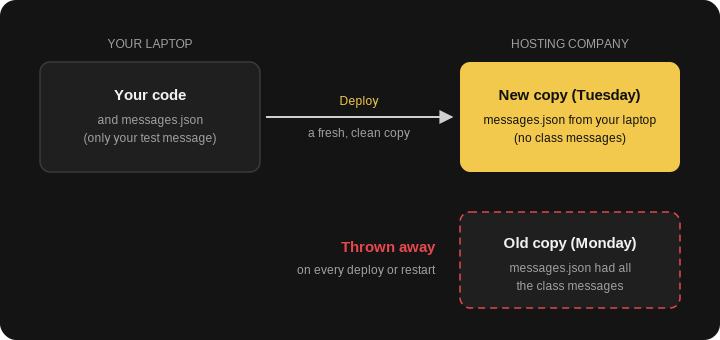
Data that stays after restarts and deploys is called persistent. Your JSON file was not persistent.
In short: many hosting companies start your app from a clean copy on every deploy or restart. The files that your app wrote are lost. That data was not persistent.
Problem 3: To find one thing, the app reads everything
Now say that your class wall becomes popular. The whole school uses it, and the file grows to a million messages.
You want a page that shows only Mia’s messages. With a file, your app has to do two things:
- Read the whole file, all million messages.
- Check the messages one by one: “Is this Mia’s? Is this Mia’s?”
And it does this every time anyone opens that page. Think of a huge book with no index at the back. To find every page about volcanoes, you must read the whole book. With 20 messages, nobody notices. With a million, your app gets slow.
In short: to find anything in a file, the app must read all of it, on every request. This gets slower as the file grows.
What good looks like: a database
What a database is
A database is a program that has one job: to keep data safe and find it again quickly.
Think of a school library. You don’t keep every book in your school bag. You ask the librarian. The librarian uses the catalogue to find the book on the right shelf. The library stays open when you go home.
Your app works with a database in a similar way:
- Usually, the database runs on its own server, separate from your app.
- Your backend sends the database requests: “save this message”, “give me Mia’s messages”.
- The database answers.
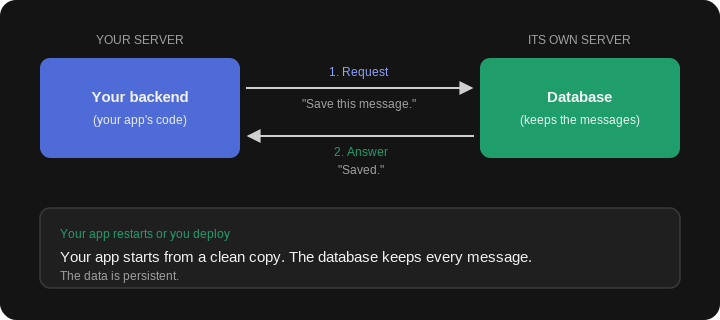
Here’s how a database fixes each problem:
| Problem | How a database fixes it |
|---|---|
| Two people at once | A new message never rewrites the others. Many requests can save at the same time. |
| The file disappears | The database lives outside your app, so it keeps its data when your app restarts or you deploy. A crash in the middle of a save also doesn’t leave half-saved data. |
| Finding one thing | The database keeps extra lists, like the index at the back of a book. With them, it can find things without reading everything. |
Where this comparison stops working: a librarian can guess what you mean. A database can’t. You have to ask it in its own language, in exactly the right way.
Go deeper: Fast with 100 users, frozen at 10,000. The missing index (Level 4) explains the database’s “index at the back of the book”.
In short: a database is a program that stores data safely and finds it fast. It usually runs separately from your app, so your data is persistent.
Tables and rows
Most databases that you’ll use put data into tables. A table looks a lot like a spreadsheet. Here’s a table called messages:
| id | author | text | posted_at |
|---|---|---|---|
| 1 | Leo | Who has the maths homework? | Monday 08:15 |
| 2 | Mia | Page 42, exercises 1 to 5 | Monday 08:17 |
| 3 | Sam | Thanks Mia! | Monday 08:20 |
- A table holds one kind of thing. This table holds messages. Another table can hold players, or scores.
- Each row is one item: here, one message.
- Each column is one detail about every item: who wrote it, what it says, when.
- The
idcolumn holds a number that the database gives each row. With it, the database can tell the rows apart.
Where this comparison stops working: in a spreadsheet, you can type anything anywhere. Databases like PostgreSQL (a popular database) are strict. Each column holds one kind of value. If the id column is for numbers, the database refuses to save the word “banana” there. This rule protects your data from mistakes.
Go deeper: You changed your name. Half the app still shows the old one (Level 2) shows how to design tables and connect them to each other.
In short: a table holds one kind of thing. Each row is one item. Each column is one detail about it.
Talking to a database
Many databases understand a language called SQL. People say it as “S-Q-L” or “sequel”. Here’s how your backend can save Leo’s message and then find Mia’s messages:
INSERT INTO messages (author, text)
VALUES ('Leo', 'Who has the maths homework?');

SELECT * FROM messages WHERE author = 'Mia';
In plain English:
- Lines 1–2: add a new row to the
messagestable, with Leo as the author and his question as the text. The database fills in theiditself. - Line 4: give me every column (
*means “all”) of every row inmessageswhere the author is Mia.
In SQL, text goes in single quotes. In JSON, text goes in double quotes.
The app doesn’t read the whole file, and it doesn’t write it all back. Your app says what it wants, and the database does the careful work. Often the AI uses tools that write SQL for you. But it helps to recognize SQL when you see it.
In short: your backend talks to the database in a language like SQL: “add this row”, “find these rows”.
When a JSON file is fine
Your app can read a JSON file when the data is part of your code and doesn’t change while the app runs. For example:
- The 10 questions in your quiz game
- A list of countries for a drop-down menu
- Your app’s settings
The problems start when your app writes to a file while it runs, especially data from users.
In short: read-only data that comes with your code can live in a JSON file. Data that users create belongs in a database.
Try it yourself
Experiment 1: Play the race
You need a friend and three sheets of paper. One sheet is the big sheet.
- Write two names on the big sheet. This is your “file”.
- You and your friend each copy the list onto your own sheet at the same time.
- Each of you adds your own name to your sheet.
- You go first. Cross out the big sheet and write your list on it.
- Your friend goes second. They cross out the big sheet and write their list on it.
Count the names. One name is missing. The same thing happened to Leo’s message.
Experiment 2: Design a table
Pick something that you want to build: a game leaderboard, a book club list, a list of football matches.
Draw its table on paper or in any spreadsheet app:
- Decide what one row is. Is it one player? One book? One match?
- Decide what columns each row needs. Start with
id. - Fill in three example rows.
You’ve designed your first database table.
Takeaways
Key terms
- Database: a program that stores data safely and finds it quickly.
- Table: a set of rows that hold one kind of thing, like messages.
- Row: one item in a table, like one message.
- Persistent: data that stays after restarts and deploys.
- Race condition: a bug where the result depends on which request finishes first.
- Deploying: putting a new version of your app online.
- SQL: a language that many databases understand.
Red flags in AI-written code
- The app saves user data into a
.jsonfile withwriteFile(the command that writes a file) or something similar. - The app does “read the whole file, change it, write it back” for every request.
- Data lives only in a list in the server’s code. The app loses it on every restart.
- Everything works when you test alone, but data goes missing with real users.
Ask your AI
- “Where does my app save its data? Will that data survive a restart and a deploy on my hosting company?”
- “Does my app write user data to any files? If so, help me move it to a database.”
- “Explain the tables in my database. What is one row in each table?”
Going deeper (optional, for readers who want more detail)
Why data in a list in your code is lost too. If your backend keeps data in a list inside its code, the data lives in the computer’s memory. The computer clears the memory when the program stops. Your app restarted and all the likes vanished explains memory and disk.
Many copies of your app. On many hosting platforms, several copies of your app can run at once, so that they can serve more visitors. Each copy has its own files. A message that one copy saved to a file is invisible to the other copies. On Vercel, your backend code runs as small programs called functions. Vercel’s documentation says that other copies of a function can’t read the files one copy wrote. These files also don’t last after that copy stops.
SQLite is a database in a file. SQLite is a real database that keeps everything in one file on your disk. It handles crashes and many readers safely. But some hosting platforms throw away files, and then they throw away its file too. Vercel’s documentation says that a file-based database like SQLite can’t keep your data in its functions.
Databases don’t fix every race. Adding new rows is safe. But “read a number, add 1, write it back” can still go wrong. This happens if two requests do it at the same time, even in a database. A customer got charged twice. How? covers transactions, the tool that fixes this.
Don’t put user text directly into SQL. The SQL example above has the text typed in. Real code must never join a user’s text into SQL. If it does, users can add their own commands. How one line of text can dump your whole database explains the safe way.
Other kinds of databases. Not every database uses tables. Some store data as JSON-like documents instead. SQL or NoSQL? The AI chose for you. Was it right? compares them. Popular table-based databases include PostgreSQL, MySQL and SQLite. Supabase is a service that many AI tools use. It gives every project a full PostgreSQL database.
References (6)
- Dynos (App Containers): Heroku Dev Center. Each copy of an app starts from a fresh copy of the deployed code, and files it writes are thrown away when it stops or restarts, including automatic restarts.
- Runtimes: Vercel Docs. Functions have a read-only filesystem with a writable
/tmpthat other copies can’t read and that doesn’t last, so a file-based database like SQLite can’t keep data there. - Concepts: PostgreSQL Documentation. Tables are made of rows, and each column has a specific data type.
- Write-Ahead Logging (WAL): PostgreSQL Documentation. How PostgreSQL recovers its data after a crash.
- Atomic Commit In SQLite: SQLite. How SQLite keeps its file safe if the program crashes or the power fails in the middle of saving.
- Database: Supabase Docs. Every Supabase project gets a full Postgres database.