Level 2 · Builder
The app said "Saved!". The note was never saved
The app said “Saved!”. The note was never saved
Before you start
- Method and path: the first line of a request, like
GET /games. The method says what to do. The path says where. (Every website is a conversation. Here’s how it goes)- Headers and body: headers are
Name: valuelines of extra details on a request or response. The body is the main content. (Every website is a conversation. Here’s how it goes)- Status code: the three-digit number in a response that says how it went. The first digit gives the group: 2xx worked, 3xx look elsewhere (a redirect), 4xx request problem, 5xx server problem. (Every website is a conversation. Here’s how it goes)
- API endpoint and JSON: an address on your server that your pages send requests to, like
/api/notes. The data usually travels in a text format called JSON. (The hidden conversation behind every button you tap)
“Saved!” (but it wasn’t)
You built a notes app with AI. You type a note and press Save. A green message appears: “Saved!”
A week later, a user writes to you: “I wrote ten notes yesterday. Today, three of them are gone.”
You test it. Everything works. After days of searching, you find the cause: sometimes the database is busy, and the save fails. Your server knows it failed. The page still says “Saved!”.
How can the page be wrong? The server answered with the status code 200, which means “it worked”. It put the word “error” in a place the page never looked.
Maybe you don’t know exactly what 200 means, or why the page believed it. That’s normal. By the end of this lesson, you will know. You will also be able to find the AI-written code that gets it wrong.
Five methods, two promises
You’ve met GET and POST. Real apps use five methods. Each method with a path reads like a short sentence: DELETE /api/notes/42 means “Delete note 42.”
| Method | Meaning | Example |
|---|---|---|
| GET | Read something. Don’t change anything. | GET /api/notes → list my notes |
| POST | Create something new, or start an action. | POST /api/notes → add a new note |
| PUT | Replace something completely. | PUT /api/notes/42 → replace note 42 with this new version |
| PATCH | Change part of something. | PATCH /api/notes/42 → change only the title of note 42 |
| DELETE | Remove something. | DELETE /api/notes/42 → delete note 42 |
The same path can do different things with different methods. One more fact: an HTML form can only send GET or POST. Your app’s JavaScript can send any method with a built-in function called fetch(). If you don’t tell fetch() which method to use, it sends GET.
Two promises: “safe” and “idempotent”
The official HTTP rules (a document called RFC 9110) give some methods two important properties.
A method is safe if it only reads. It must not change anything on the server. GET is safe. POST, PUT, PATCH and DELETE are not.
A method is idempotent if the same request sent twice has the same effect as one request. Think of a lift (elevator) button. Press “floor 3” once or five times, and the lift still goes to floor 3 once. That’s idempotent.
Now think of a pizza order. Order twice, and two pizzas arrive. That’s not idempotent.
- GET, PUT and DELETE are idempotent. If you delete note 42 twice, note 42 is still deleted, once.
- POST is not. If you send “add this note” twice, you usually get two notes.
- PATCH is not always idempotent. It depends on what the change is.
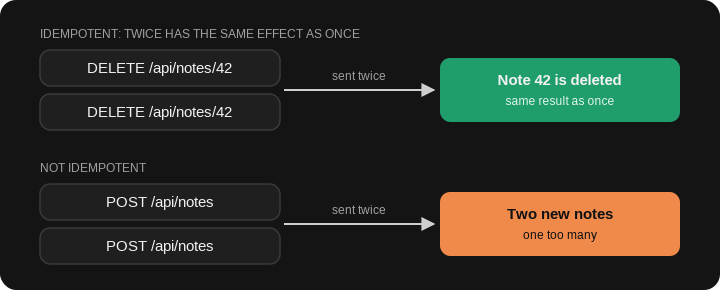
Why does this matter? Sometimes a request fails halfway, for example when a phone loses signal. Then the request is sent again. A repeated GET or DELETE does no harm. A repeated POST can create a double order or a double payment.
Go deeper: The payment timed out. Did it go through? (Level 3) shows how to make retries safe.
Where the lift comparison stops working: a lift’s button is built to work that way. HTTP methods are only labels. Nothing forces your server to follow them. If your code deletes data on a GET request, the server will do it. You’ll see why that’s dangerous later in this lesson.
The status codes that matter
You know the four groups: 2xx, 3xx, 4xx and 5xx. Inside each group, the exact number tells you much more.
| Code | Name | Meaning, and when your app sends it |
|---|---|---|
| 200 | OK | It worked. A successful GET, or any success with a result. |
| 201 | Created | It worked, and something new exists. After a POST creates a note. |
| 204 | No Content | It worked, nothing to send back. After a successful DELETE. |
| 301 | Moved Permanently | This has a new address, forever. |
| 302 | Found | This is at another address, for now. Like sending a user to the login page. |
| 400 | Bad Request | The request is broken or missing data. |
| 401 | Unauthorized | I don’t know who you are. Log in first. |
| 403 | Forbidden | I know who you are, and you’re not allowed. |
| 404 | Not Found | Nothing here: no note with that ID, or a wrong path. |
| 409 | Conflict | This clashes with existing data, like signing up with an email that’s taken. |
| 422 | Unprocessable Content | I can read the request, but the data isn’t valid, like an email field that says “hello”. |
| 429 | Too Many Requests | Slow down, like 500 login attempts in a minute. |
| 500 | Internal Server Error | Something broke in the server’s code. |
| 502 | Bad Gateway | A server in the middle got a bad answer from the server behind it, for example because your app crashed. |
| 503 | Service Unavailable | I can’t handle this right now. Try later. |
For a redirect, the new address travels in a header. You’ll see that header in the next section.
The name 401 Unauthorized confuses everyone. It really means “not logged in”. The code for “logged in, but not allowed” is 403.
Go deeper: Change one number in the URL, see everyone’s invoices (Level 2) explains the difference between “who are you?” and “are you allowed?”.
400 or 422? Some apps use 400 for every bad input. Others keep 422 for requests they can read but that have invalid values. Both are fine if you use the same choice everywhere.
Go deeper: Bots signed up 10,000 times overnight. Now what? (Level 2) covers when and how to send 429.
Headers you’ll see in your own app
Headers are like the writing on an envelope. They give details that tell the other side how to handle the message. Your app’s code will use these headers most:
| Header | Found in | What it says |
|---|---|---|
Content-Type |
Both | What kind of data the body is. application/json means JSON. |
Authorization |
Request | Proof of who is asking, such as a secret key |
Cookie |
Request | Small pieces of data the browser saved for this website and sends back automatically |
Set-Cookie |
Response | The server asking the browser to save a cookie |
Location |
Response | Where to go next: the new address after a redirect, or the address of something a 201 has created |
Retry-After |
Response | How long to wait before trying again, often sent with 429 or 503 |
Go deeper: Never store a password. Here’s what to store instead (Level 2) shows how cookies keep you logged in.
How it goes wrong
Bug 1: Every answer is “200 OK”
Here is the code behind our notes app. You asked the AI for “an API endpoint to save a note”:
app.post("/api/notes", async (req, res) => {
  try {
    const note = await db.note.create({ data: { text: req.body.text } });
    res.json(note);
  } catch (err) {
    res.json({ error: "Could not save" });
  }
});
In plain English:
- Line 1: When a POST request arrives at
/api/notes… - Lines 2–4: …try to save the note in the database, and send it back as JSON.
- Lines 5–7: If the save fails, send back
{ "error": "Could not save" }.
Look at line 6. It sends an error message, but it never sets a status code. When you don’t set one, the server sends 200 OK. So from the outside, a failed save and a successful save look the same. Only the words inside the body are different.
Now the page’s code:
await fetch("/api/notes", {
  method: "POST",
  headers: { "Content-Type": "application/json" },
  body: JSON.stringify({ text }),
});
showMessage("Saved!");
In plain English: send the note to the server as JSON, then show “Saved!”.
The page never looks at the response at all. And many people don’t expect this. fetch() does not fail when the server answers with 404 or 500. It only fails when no answer comes back at all, for example when the network is down. A 500 is still an answer. So fetch() returns normally, and the page shows “Saved!”.
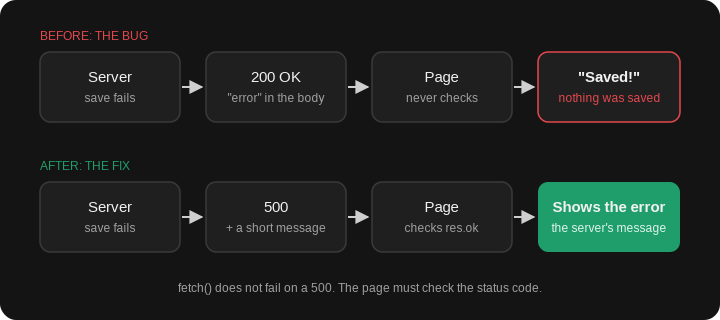
Two small mistakes, one on each side, and users lose notes without knowing it.
Bug 2: A GET request that deletes
You ask the AI for a delete link next to each note. It writes this:
app.get("/notes/:id/delete", async (req, res) => {
  await db.note.delete({ where: { id: req.params.id } });
  res.redirect("/notes");
});
In plain English: when someone opens the address /notes/42/delete, delete note 42. Then send them back to the list of notes.
It works when you click it. But it breaks the promise that GET is safe, and other programs rely on that promise:
- Search engines follow the links they find.
- Some browsers and tools load links before you click them, to make pages feel faster.
Any of these programs can open your “delete” address, and your data is gone. Nobody clicked anything.
Bug 3: Codes that lie
An empty form crashes the code and returns 500. It should be a 400 with a clear message. A missing note returns 200 with nothing in it. It should be a 404. Wrong codes make problems much harder to find, for you and for your AI.
What good looks like
Fix 1: Send honest status codes
Here is the inside of the same app.post("/api/notes", ...) endpoint, fixed:
if (!req.body.text) return res.status(400).json({ error: "Note text is required" });
try {
  const note = await db.note.create({ data: { text: req.body.text } });
  res.status(201).json(note);
} catch (err) {
  console.error(err);
  res.status(500).json({ error: "Could not save the note. Please try again." });
}
What changed:
- Line 1: if the note is empty, reply 400 with a message the user can act on. This is the user’s mistake, not a crash.
- Line 4: on success, reply 201, because something new was created.
- Lines 6–7: on failure, write the real error to the server’s logs. Then reply 500 with a short, friendly message.
Do not send the raw error to the browser. It can show details about your system.
Go deeper: Your error page showed your database details to everyone (Level 2) covers error messages that help users without leaking details.
Fix 2: Check the response on the page
const res = await fetch("/api/notes", {
  // ... same method, headers and body as before
});
if (!res.ok) {
  const data = await res.json();
  return showMessage(data.error);
}
showMessage("Saved!");
res.ok is true only when the status code is in the 200s. Now the page shows “Saved!” only when the server said it worked. In all other cases, it shows the server’s message.
Fix 3: Match the method to the action
A clean set of endpoints for notes looks like this:
| Request | What it does | Success code |
|---|---|---|
GET /api/notes |
List my notes | 200 |
GET /api/notes/42 |
Read note 42 | 200 (or 404) |
POST /api/notes |
Create a note | 201 |
PATCH /api/notes/42 |
Change part of note 42 | 200 |
DELETE /api/notes/42 |
Delete note 42 | 204 |
The delete button now sends a DELETE request with fetch(). It no longer opens a link. Programs that open links on their own send only safe requests like GET.
Methods are labels, not locks. Every endpoint that changes data must still check that the person is logged in and allowed to do it.
Test your own app
You need an app of your own for this part. No app yet? Start with Your first app in an afternoon, with an AI doing the typing. Built it in an AI app builder? Ask its AI to do each step below for you, or to add the missing part first (for example, a login).
You need Chrome on a laptop or desktop.
- Open your app.
- Open developer tools (F12 on Windows, Cmd+Option+I on Mac).
- Click the Network tab.
- Click Fetch/XHR. This shows only the requests that your page’s JavaScript sends.
- If you don’t see a Method column, right-click any column title and tick Method.
- Use your app: create something, edit it, delete it. Watch each new row.
Now check these points:
- Does each action use the right method? A delete that shows
GETis Bug 2. - Do the status codes match what happened? Create something and look for 201 or 200.
- Break it on purpose. Submit an empty form. You should see a 400 or 422, not a 200 or a 500.
- Ask for something that doesn’t exist, like
/api/notes/999999. You should see a 404. - Click a row, then the Headers tab. Find
Content-Typein the response headers.
Takeaways
Key terms
- Method: the verb of a request: GET, POST, PUT, PATCH, DELETE
- Safe method: only reads, never changes anything (GET)
- Idempotent method: two of the same request have the same effect as one (GET, PUT, DELETE)
- Status code: the number that says how it went: 2xx worked, 3xx look elsewhere, 4xx the request has a problem, 5xx the server failed
- Headers:
Name: valuelabels on requests and responses, likeContent-Type
Red flags in AI-written code
- An error is sent with
res.json(...)orres.send(...)and nores.status(...), so it goes out as 200 - The code calls
fetch()and never checksres.okorres.status - A GET endpoint, or a plain link, that creates, changes or deletes data
- Every error becomes a 500, even when the user sent bad data
- Raw error messages from the database go to the browser
Ask your AI
- “List every API endpoint in my app with its method and the status codes it can return. Flag any that send errors with a 200.”
- “Find every place my frontend calls fetch() without a check of response.ok.”
- “Does any GET endpoint in my app change or delete data?”
Going deeper (optional, for readers who want more detail)
PUT vs PATCH. PUT sends the complete new version and replaces what was there. So if you send it twice, you get the same result. PATCH sends a set of changes. If the change is “set the title to X”, a repeat does no harm. If it is “add 1 to the counter”, a repeat adds 2. That’s why PATCH is not guaranteed to be idempotent. PATCH is defined in RFC 5789, not RFC 9110.
HEAD and OPTIONS. You may see two more methods in the Network tab. HEAD is a GET without the body, used to check headers. OPTIONS asks what the server allows. Browsers send it on their own before some requests to other websites. This is part of CORS, covered in “Blocked by CORS policy”: why the browser said no.
The redirect family. 301 and 302 are old. For historical reasons, browsers may change a POST into a GET when they follow them. 307 (temporary) and 308 (permanent) came later, and they keep the original method. Use 308 or 307 when that matters, for example to redirect an API endpoint that receives POST requests.
401 needs a header. By the rules, a 401 response must include a WWW-Authenticate header that says how to log in. Many web apps skip it, and browsers don’t complain, but strict API tools may.
404 instead of 403. RFC 9110 allows a server to answer 404 instead of 403 when it doesn’t want to show that something exists. Change one number in the URL, see everyone’s invoices uses this method.
422’s old name. 422 first appeared in a standard for editing files over the web (WebDAV), with the name “Unprocessable Entity”. RFC 9110 renamed it “Unprocessable Content”. You’ll see both names.
502, 503 and 504. All three usually involve a server in the middle that passes requests on to your app. That server can be a hosting platform or a reverse proxy. 502: your app sent back something invalid, or crashed. 503: the service is overloaded or paused, and a Retry-After header may say when to come back. 504 Gateway Timeout: your app took too long to answer. One company went down, and a big chunk of the internet went with it explains these servers in the middle.
Caching. Browsers and other servers can save GET responses and use them again. This is one more reason why a GET must not change data. The Cache-Control header controls this. Fast, but showing yesterday’s data covers it.
References (7)
- RFC 9110: HTTP Semantics: IETF. Which methods are safe and idempotent, the meaning of each status code, the POST-to-GET change on 301 and 302, 307 and 308, the
WWW-Authenticaterule for 401, 404 instead of 403, and 422 coming from WebDAV. - RFC 5789: PATCH Method for HTTP: IETF. Defines PATCH, says it is neither safe nor idempotent, and notes that a PATCH request can be written so that it is idempotent.
- RFC 6585: Additional HTTP Status Codes: IETF. Defines 429 Too Many Requests and its optional
Retry-Afterheader. - Using the Fetch API: MDN Web Docs.
fetch()sends GET by default, does not fail when the server answers with an error like 404, andres.okis true only for codes in the 200s. - HTTP: response.statusCode: Node.js docs. A response is sent with status 200 unless the code sets another one. Express is built on this.
<form>: The Form element: MDN Web Docs. An HTML form can send only GET or POST.- Speculative loading: MDN Web Docs. Browsers can load pages before the user clicks a link.