Level 1 · Foundations
Every website is a conversation. Here's how it goes
Every website is a conversation. Here’s how it goes
Before you start This lesson uses words from earlier lessons.
- Server: a computer that waits for requests. It answers them. (From You pressed Enter. What happened in the next second?)
- Request and response: the message your browser sends, and the answer from the server. (From the same lesson.)
- URL and path: a full web address. The path is the part that says which page you want, like
/games. (From How does your browser find one computer out of billions?)- IP address: the number computers use to find each other. DNS looks it up from a name. (From the same lesson.)
A note in a language everyone shares
Imagine you pass a note to a friend in class. You write it in a secret code that only you know. Your friend opens it and can’t read a word. The note arrived, but it was useless.
Browsers and servers have the same problem. There are many different browsers, and millions of different servers. Different people in different countries built them. But any browser can talk to any website.
That works because they all write their messages the same way. In the last lesson, your browser found the address of the server. Now it sends its request. Here is a real request (a little shortened):
GET /games HTTP/1.1
Host: www.example.com
User-Agent: Mozilla/5.0 (Windows NT 10.0; Win64; x64) ...
Accept-Language: en-US
If this looks strange, that’s completely normal. By the end of this lesson, you’ll be able to read every line. You’ll also learn the three-digit numbers that servers send back, like 404, and what they tell you.
In short: browsers and servers all write their messages the same way. That’s why any browser can talk to any website.
HTTP: the rules both sides follow
A protocol is a set of rules that two computers agree to follow when they talk.
Think of a board game. Before you play, everyone agrees on the rules. Whose turn is it? What does each card mean? If one player follows different rules, the game doesn’t work.
The protocol of the web is called HTTP, short for HyperText Transfer Protocol. It sets the rules for:
- how a browser writes a request
- how a server writes a response
- what every part of those messages means
You’ve already seen the name HTTP. It’s the http in the https:// at the start of web addresses. That part of the URL tells the browser: “use HTTP to talk to this server”.
The s in https means “secure”. The messages are the same, but they are scrambled on the way. So nobody in between can read or change them.
Go deeper: What the padlock icon really protects, and what it doesn’t (Level 2) explains how HTTPS keeps messages secret.
In short: a protocol is a set of rules for talking. HTTP is the protocol of the web. Every browser and web server follows it.
The first line: what do you want?
Look at the first line of our request again:
GET /games HTTP/1.1It has three parts:
-
GETsays what kind of request this is. -
/gamesis the path: which page you want. You met paths in the last lesson. -
HTTP/1.1says which version of the HTTP rules the browser uses.
The first word is called the method. It tells the server what you want to do. The two you’ll see most are:
| Method | Means | Example |
|---|---|---|
GET |
“Please give me something.” | Open a page, watch a video |
POST |
“Here’s something new for you.” | Send a chat message, post a comment |
So GET /games means: “Please give me the page at /games.”
Go deeper: The app said “Saved!”. The note was never saved (Level 2) covers all the methods. It also says when your app should use each one.
In short: a request starts with a method, like
GETorPOST, and a path. Together they say what you want, and where.
Headers: the extra details
After the first line come more lines. Each one has a name, a colon, and a value:
Host: www.example.com
User-Agent: Mozilla/5.0 (Windows NT 10.0; Win64; x64) ...
Accept-Language: en-US
Each of these lines is called a header. Headers carry extra details about the message. Here’s what these three say:
-
Host: which website you want. One server can hold many websites at the same IP address. This header tells it which one. -
User-Agent: which browser and device you use. Here, it says the computer runs Windows. It starts with “Mozilla/5.0” even in Chrome. Long ago, some websites sent their best pages only to “Mozilla” browsers. So other browsers started to say “Mozilla” too, and almost all still do. -
Accept-Language: which languages you prefer. Your browser fills this in from its language settings. A website can use it to show you pages in your own language.
Think of an envelope. The letter inside is what you want to say. The writing on the envelope (address, stamp, return address) helps the post office handle the letter correctly. Headers are the writing on the envelope.
Where this comparison stops working: an envelope has a few fixed fields. HTTP messages can carry many headers, and responses have headers too. You’ll see some soon.
In short: headers are extra lines of details. Each one has a name and a value. They help the other side understand and handle the message.
The body: the actual stuff
Some messages carry something bigger than a few details. A chat message. A photo that you upload. A whole web page.
This part is called the body. It comes after the headers, with one empty line in between.
A GET request usually has no body. You only ask for something. A POST request usually has one, because you send something. Here’s a request that sends a chat message:
POST /messages HTTP/1.1
Host: chat.example.com
Content-Type: text/plain

See you at 5!
Read it from top to bottom:
| Line | What it means |
|---|---|
POST /messages |
“Here’s something new for /messages.” |
Host |
Which website it’s for. |
Content-Type: text/plain |
A header that says what kind of thing the body is. Here, plain text. |
| The empty line | The headers end here. |
See you at 5! |
The body. This is the message itself. |
In short: the body is the main content of a message, like a chat message or a page. It comes after the headers and one empty line.
The response: the server’s answer
Now the server writes back. A response has the same shape as a request: a first line, then headers, then an empty line, then the body.
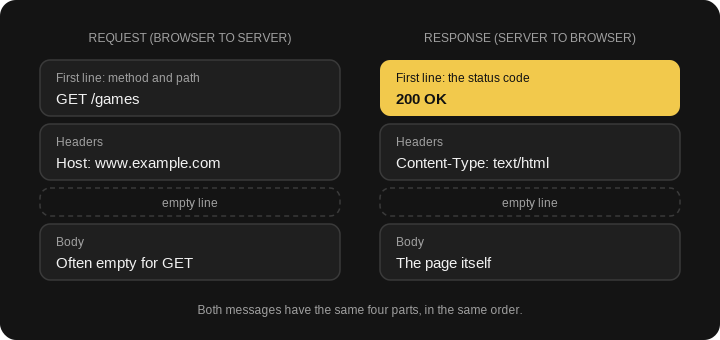
Here is a real response:
HTTP/1.1 200 OK
Content-Type: text/html; charset=utf-8

<!doctype html>
<html> ...the page... </html>
Line by line:
| Line | What it means |
|---|---|
HTTP/1.1 200 OK |
The version of HTTP, then a three-digit number, then a short message. 200 OK means “everything worked, here it is.” |
Content-Type: text/html |
A header that says the body is a web page, written in a language called HTML. (charset=utf-8 says how the letters are stored.) |
| The empty line | The headers end here. |
| The rest | The body. Here, it’s the page itself. |
The three-digit number is called the status code. It’s the most important part of the response. In one number, it tells the browser how the request went.
Go deeper: Take a web page apart and see what’s inside (Level 1) shows what’s inside that HTML.
In short: a response has a first line with a status code, then headers, then the body. The status code says how the request went.
Status codes: how did it go?
There are dozens of status codes. You don’t need to learn them all. The first digit tells you the most important thing:
| Starts with | Meaning | Like at the school canteen… |
|---|---|---|
| 2 | It worked | “Here’s your lunch.” |
| 3 | Look somewhere else | “We moved. Pizza is at the other counter now.” |
| 4 | Problem with the request | “We don’t sell that here.” |
| 5 | Problem on the server’s side | “Sorry, the kitchen is broken today.” |
The codes you’ll see most often:
-
200 OK: it worked. -
301 Moved Permanently: the page moved permanently. The response includes the new address, and the browser goes there by itself. When a server sends you to a different address like this, it’s called a redirect. -
404 Not Found: the server has nothing at that path. Often the address has a typo, or nobody ever made that page. -
500 Internal Server Error: something broke inside the server while it handled the request. Often the cause is a bug, a mistake in the code of the server.
Here’s the key idea. 4 means the problem is in the request. 5 means the problem is in the server. When you know which one, you know where to look.
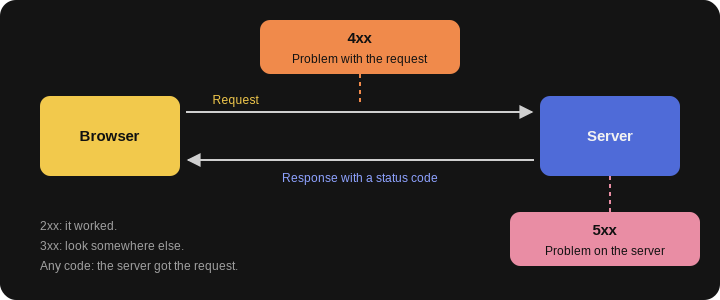
And one more thing. Any status code at all, even an error, means the server received your request and answered. The trip to the server worked.
In short: the first digit of a status code tells you how it went. A 2 means it worked, and a 3 means look elsewhere. A 4 means a problem with the request, and a 5 means a problem on the server.
How it goes wrong
You trust the page instead of the status code. A page can say “Oops, not found!” while its status code is 200. Or it can show a friendly picture with a 404 behind it. The words are for people. The status code is the real answer from the server, and browsers, search engines and tools use it. When something looks wrong, check the status code.
You look in the wrong place. Someone sees an error code and starts to change random things. But a 404 and a 500 point to different places. A 404 says: check the address, or whether that page exists. A 500 says: something broke inside the code of the server.
A redirect never ends. Page A says “go to page B”. Page B says “go to page A”. The browser goes from A to B and back again, many times, until it stops. Chrome then shows a message that the site “redirected you too many times”. The fix is in the settings or code of the website, not in your browser.
You say “it doesn’t work”. When you ask an AI for help, “my site is broken” gives it no useful facts. It must guess. And an AI that guesses may rewrite code that was fine.
In short: trust the status code, not the words on the page. Use its first digit to decide where to look. And describe problems exactly.
What good looks like
Describe a request with three facts: the method, the path, and the status code.
Compare these two messages to an AI:
-
“My chat doesn’t work.”
-
“
POST /messagesreturns a 500 error.”
The second message tells the AI exactly which request failed. It also says that the problem is inside the server. So the AI can go directly to the right code.
When you build your own app, make it answer honestly. If the server can’t find something, it should answer with a 404. If something broke, it should answer with a status code that starts with 5. Never send 200 with an error message inside. Honest status codes help you, your browser and your AI find problems fast.
In short: describe failures as method + path + status code. Make your own app send status codes that tell the truth.
Try it yourself
You need a laptop or desktop computer with Chrome.
Experiment 1: Read a real request and response
- Open
example.com. - Open developer tools: press F12 on Windows, or Cmd+Option+I on Mac.
- Click the Network tab. Then reload the page.
- Click the first row. Then click the Headers tab.
You’ll see three sections:
-
General: the summary. Find the Request URL, the Request method (
GET), the Status code (200) and the Remote address (the IP address of the server). -
Response headers: the headers that the server sent back. Find
content-type. -
Request headers: the headers that your browser sent. Find
user-agentandaccept-language. Does youruser-agentmention your device?
The names may be in lowercase. That’s fine. Header names work the same with or without capital letters.
Experiment 2: Make a 404
- Keep the Network tab open.
- Go to
example.com/this-page-does-not-exist. - Look at the Status column for the first row.
It says 404. The server got your request and answered: “nothing here”.
Experiment 3: A friendly page with a 404 behind it
- Go to
en.wikipedia.org/wiki/This_page_does_not_exist_xyz123. - Look at the page. Then look at the Status column.
The page looks normal and friendly. It even offers to help you search. But the status code is 404. The words on the page are for you. The status code is for computers.
Takeaways
Key terms
| Term | Meaning |
|---|---|
| Protocol | A set of rules that two computers follow to talk |
| HTTP | The protocol that browsers and web servers use |
| Method | The first word of a request. It says what you want to do, like GET or POST. |
| Header | A line of extra details in a message, written as a name and a value |
| Body | The main content of a message, like a chat message or a page |
| Status code | The three-digit number in a response that says how it went |
| Redirect | A response that sends the browser to a different address |
What the status code tells you
| Status code | What it means |
|---|---|
2xx |
It worked. |
3xx |
The server sent the browser somewhere else. |
4xx |
Problem with the request. Check the address, and whether the page exists. |
5xx |
Problem inside the server. Check the code of the server. |
| Any status code at all | The request reached the server and got an answer. |
Ask your AI
-
“Explain this HTTP request line by line, in simple words: [paste it].”
-
“The request [method] [path] returns status code [number]. What does that code usually mean, and where should I look first?”
-
“Check the server code of my app. Does every error send an honest status code, or does it sometimes send 200 with an error message?”
Going deeper (optional, for readers who want more detail)
HTTP versions. The messages in this lesson look the way HTTP/1.1 sends them: as text that people can read. HTTP/2 sends the same requests and responses in a binary format (0s and 1s, not readable text). It packs them into pieces called frames. This lets many requests share one connection at the same time. HTTP/3 does the same over a newer way to move data, called QUIC. Developer tools show you the readable version in all cases.
Header names and capital letters. Header names are case-insensitive: Content-Type and content-type are the same header. HTTP/2 and HTTP/3 always send them in lowercase. That’s why Chrome often shows them that way. These versions also send the name of the website as :authority instead of a Host header. So you may see that name in the Request headers.
The fifth group. Status codes that start with 1 also exist. They are informational: “I got the first part, keep going.” You will rarely see them in developer tools.
A famous joke code. 418 I'm a teapot started as an April Fools’ joke about control of coffee pots over the internet. Servers used it as a joke so often that the current HTTP standard (RFC 9110) reserves 418. So nobody can give it another meaning for now.
HTTP doesn’t remember you. HTTP is stateless: each request stands alone. The server doesn’t automatically know that it came from the same person as the last one. Websites remember who you are with cookies. A cookie is a small piece of data that the browser sends back in a header with each request to that website. Never store a password. Here’s what to store instead (Level 2) explains how logins use them.
More methods. There are more methods than GET and POST, for example PUT, PATCH and DELETE. The app said “Saved!”. The note was never saved (Level 2) covers them.
References (11)
- Overview of HTTP: MDN Web Docs. How requests (method, path, version, headers, body) and responses (status code, headers, body) are built, and why HTTP is stateless.
- HTTP response status codes: MDN Web Docs. The five groups of status codes and the meaning of 200, 301, 404 and 500.
- Host header: MDN Web Docs. The
Hostheader tells a server which website the request is for. - RFC 9110: HTTP Semantics: IETF. The HTTP standard: methods, case-insensitive header names, status codes, and the reserved 418 code.
- RFC 9113: HTTP/2: IETF. HTTP/2 sends messages as binary frames, requires header names in lowercase, and carries the website’s name in
:authority. - RFC 9114: HTTP/3: IETF. HTTP/3 runs over QUIC and also requires lowercase header names.
- User-Agent header: MDN Web Docs. For historical reasons, almost every browser today starts its
User-AgentwithMozilla/5.0, including Chrome. - 418 I’m a teapot: MDN Web Docs. The April Fools’ joke status code.
- Network features reference: Chrome for Developers. The Headers tab in Chrome’s Network panel and the Status column.
- RequestHeadersView.ts: Chrome DevTools source code. The exact labels in the Headers tab: General, Request URL, Request method, Status code, Remote address, Response headers and Request headers.
- error_page_strings.grdp: Chromium source code. Chrome’s “redirected you too many times” error message.