Level 1 · Foundations
The hidden conversation behind every button you tap
The hidden conversation behind every button you tap
Before you start This lesson uses words from earlier lessons.
- Request and response: your browser asks a server for something. The server answers. (Every website is a conversation. Here’s how it goes)
- Status code: a three-digit number in every response. It says how the request went, like
200(OK) or404(not found). (Every website is a conversation. Here’s how it goes)- Frontend: the part of your app that runs in the user’s browser. (A player scored 999,999 points by editing the page. How?)
- Backend: the part of your app that runs on your server. (A player scored 999,999 points by editing the page. How?)
The heart turns red
You watch a video in a video app. You tap the heart under it.
At once, the heart turns red, and the number goes from 1,203 to 1,204. The page doesn’t reload.
The server must save your like. If it doesn’t, the like is gone the next time you open the app.
So the server found out about your like. But no new page loaded. How?
The page sent a small message to the server, and you didn’t see it. The server sent a small answer back. This lesson is about those messages. Almost every app you build with AI is full of them. Many bugs and security problems are in them too.
Pages can ask for data, not only pages
In earlier lessons, the browser asked for a whole page. The server sent back HTML, and the browser built the page.
But a page doesn’t ask only once. While you use a page, its JavaScript (the frontend) can send more requests. You don’t see these requests. Developers say that they happen “in the background”.
These requests usually don’t ask for a whole page. They ask for, or send, a small piece of data: a number, a name, a list of messages.
Here’s what happened when you tapped the heart:
- The frontend sent a request: “Save a like for video 42.”
- The backend saved the like and answered: “Done. Video 42 now has 1,204 likes.”
- The frontend changed only the number next to the heart.
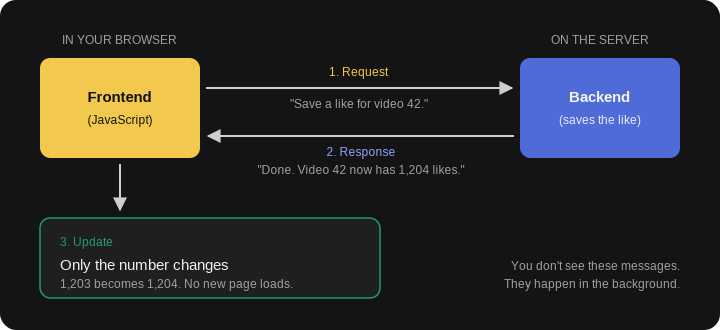
The rest of the page didn’t change. That’s why the update felt instant.
You see this in many apps. New messages appear in a group chat. Search suggestions appear while you type. More videos load when you scroll down.
In short: pages can send small requests in the background while you use them. They send and receive data, and the page updates only the part that changed.
The API: a menu for your server
Think of the canteen at school. A menu board hangs above the counter. You can order anything on it: pizza, pasta, juice. If you ask for sushi and it’s not on the menu, you don’t get it. You also have to ask in a way that the staff understand.
Your backend has a menu too. It’s the list of things the backend agrees to do, and the exact way to ask for each one. This menu is called an API, short for Application Programming Interface. The long name doesn’t help much. Remember the menu.
Your app’s backend has an API. Other companies have APIs too: weather services, maps, games, AI tools. Your app can send requests to their APIs. It does this in the same way that your frontend sends requests to yours.
Where this comparison stops working: canteen staff can think for themselves. If you ask for “pizza, but no cheese”, a person can maybe help. A server can’t. It does exactly what its code says, nothing more. If your request is a little different from what the code expects, the request fails.
In short: an API is the menu of requests a server agrees to answer, and how to ask for each one.
Endpoints: one item on the menu
Each item on your API’s menu is called an endpoint. An endpoint is one address on your server that does one job.
Here’s what the menu might look like for a small video app:
| Endpoint | What it does |
|---|---|
GET /api/videos/42 |
“Give me the details of video 42” |
POST /api/likes |
“Save this new like” |
GET /api/videos/42/comments |
“Give me the comments on video 42” |
Each endpoint has two parts.
The address, like /api/likes. Many apps start their endpoint addresses with /api/. Then you can tell them apart from the addresses of normal pages.
The kind of request. The word at the front is called the method. It says what kind of request this is:
GETmeans “give me something”. You saw it in the request examples in earlier lessons.POSTmeans “here’s something new to save”.
So GET /api/likes and POST /api/likes can be two different items on the menu. They have the same address, but a different method.
Go deeper: The app said “Saved!”. The note was never saved (Level 2) covers the other methods and what they’re for.
In short: an endpoint is one item on the API’s menu. It has an address and a method, like
POST /api/likes.
JSON: the shape of the data
The frontend and the backend must agree on how to write data down. If they don’t, one side can’t read what the other side sent.
Most apps use a format called JSON. It looks like this:
{
  "name": "Mia",
  "age": 13,
  "isOnline": true,
  "favoriteGames": ["Minecraft", "Chess"]
}
In plain English: this describes a player. Her name is Mia, and she’s 13. She’s online now. Her favorite games are Minecraft and Chess.
JSON has a few strict rules:
| Rule | Example |
|---|---|
Curly brackets { } hold a group of named values |
{ "name": "Mia" } |
| Every name is in double quotes | "name", not name or 'name' |
| Text is in double quotes | "Mia" |
Numbers, true and false have no quotes |
13, true |
Square brackets [ ] hold a list |
["Minecraft", "Chess"] |
| Commas go between items, never after the last one | { "a": 1, "b": 2 } |
JSON stands for JavaScript Object Notation. It came from JavaScript, but many programming languages can read and write it. That’s why so many apps use it. Your frontend, your backend and other companies’ APIs can all understand it.
In short: JSON is a way to write down data as text, with names and values. Frontends and backends use it to send data to each other.
The whole trip in code
Here’s the heart button again, as the AI might write it. You don’t need to understand every symbol. Read the plain English after each part.
The frontend (runs in the browser):
const response = await fetch("/api/likes", {
  method: "POST",
  headers: { "Content-Type": "application/json" },
  body: JSON.stringify({ videoId: 42 }),
});
const data = await response.json();
likeCount.textContent = data.likes;
In plain English:
- Line 1: send a request to the endpoint
/api/likes, and wait for the answer.fetchis the JavaScript command that sends a request. - Line 2: use the
POSTmethod, because the request saves something new. - Line 3: add a header (an extra label on the request). It says “the data I send is JSON”.
- Line 4: the data itself:
{ "videoId": 42 }, turned into JSON text. - Line 6: when the answer arrives, read it as JSON.
- Line 7: put the new number of likes next to the heart.
The backend (runs on the server):
app.post("/api/likes", async (req, res) => {
  const videoId = req.body.videoId;
  const likes = await saveLike(videoId);
  res.json({ likes: likes });
});
In plain English:
- Line 1: when a
POSTrequest arrives at/api/likes, run the code below.reqis the request.resis the response that the code sends back. - Line 2: read the video’s ID (the number that names the video) from the data the browser sent.
- Line 3: save the like, and get the new total.
saveLikeis another piece of code that the AI wrote. It saves the like where the app keeps its data. - Line 4: send back the total as JSON, like
{ "likes": 1204 }.
The piece of backend code that answers one endpoint is called an API route. You’ll see this name a lot.
In short: the frontend uses
fetchto send JSON to an endpoint. An API route on the backend does the work and answers with JSON. The frontend updates the page.
How it goes wrong
1. The address is wrong.
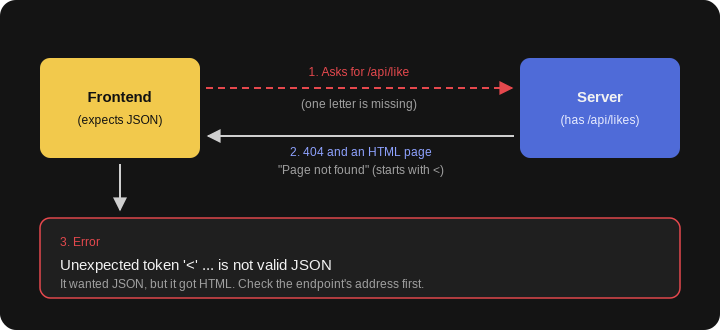
The frontend asks for /api/like, but the endpoint is /api/likes. The server has no such item on its menu, so it answers with a 404 status code. Often, it also sends its “page not found” HTML page.
The frontend expected JSON, but it got HTML. In Chrome, the error looks like this:
SyntaxError: Unexpected token '<', "<!DOCTYPE "... is not valid JSONIt looks scary, but you can read it. A SyntaxError means that the text breaks the rules of its format. A token is one piece of the text, here the character <.
HTML pages start with <!DOCTYPE or <html. So Unexpected token '<' means: “I wanted JSON, but this starts with <. It’s probably HTML.” Check the endpoint’s address first.
2. The server crashed.
If the code inside the API route has a bug, the server usually answers with a 500 status code. The problem is in the backend, not the frontend.
3. The response says too much. Say that your leaderboard endpoint sends each player’s name, score and email address. The page shows only names and scores, so it looks fine. But the whole response reaches the browser. Anyone can open developer tools and read every email. Remember: anyone can read everything that the server sends to the frontend.
4. Anyone can call your endpoints. To call an endpoint means to send it a request. Your endpoints are addresses on the internet. Your pages call them, but anyone else can call them too, with any data they like. If the API route trusts that data and doesn’t check it, users can cheat.
Go deeper: Change one number in the URL, see everyone’s invoices (Level 2) covers this. It shows how users read other people’s data through endpoints that don’t check enough.
In short: a wrong address gives a
404(and often the “not valid JSON” error). A bug gives a500. Too much data in a response leaks it. And endpoints answer anyone, not only your pages.
What good looks like
- Clear names.
/api/likestells you what the endpoint is for. - Send only what the page needs. If the page shows names and scores, send names and scores.
- The backend checks everything that arrives. It never believes the browser about scores, prices or who the user is.
- Honest status codes. A missing video gets a
404and a short JSON message, like{ "error": "Video not found" }. Then the frontend can show a helpful message and doesn’t break.
In short: good endpoints have clear names, send only what’s needed, check every request and answer with honest status codes.
Try it yourself
Experiment 1: Read a real API
GitHub is a website where people store and share code. It has a public API. Open this address in your browser:
https://api.github.com/users/octocatYou see JSON instead of a normal page. It’s the public profile of GitHub’s example account, Octocat. Look for these lines:
"login": "octocat": text, in double quotes."public_repos"and"followers": numbers, with no quotes.public_reposis how many public code projects the account has.- Lines with
null: this means “empty, no value here”.
There’s no page, no pictures and no buttons. There’s only data. Endpoints usually send data like this. GitHub limits how many times you can ask without an account. If it stops working, wait an hour.
Experiment 2: Catch a page talking to its server
You need a laptop or desktop computer with Chrome.
- Open a website you use often.
- Open developer tools. On Windows, press F12. On Mac, press Cmd+Option+I.
- Click the Network tab.
- Click the Fetch/XHR button near the top. This filter shows only the background requests that pages send for data.
- Use the site: scroll, type in a search box, click buttons.
Watch new rows appear. Each row is the page talking to an endpoint. Click a row. Then click the Response tab. You often see JSON there.
Takeaways
Key terms
- API: the menu of requests a server agrees to answer, and how to ask for each one.
- Endpoint: one item on that menu: an address and a method, like
POST /api/likes. - Method: the word that says what kind of request it is, like
GET(give me) orPOST(save this). - JSON: a text format for data, with names and values in curly brackets.
- API route: the backend code that answers one endpoint.
Which step broke?
404and “not valid JSON”: the address of the endpoint is probably wrong.500: the API route on the backend crashed.- The page works, but the response has data that the page doesn’t show: a leak.
- The API route saves whatever the browser sends: anyone can cheat.
Ask your AI
- “List every API endpoint in my app, with its method, its address and what it does.”
- “For each endpoint, what data does it send back? Is any of it data the page doesn’t show?”
- “I get ‘Unexpected token <’ when my page calls [endpoint]. Help me check the address and what the server sends back.”
Going deeper (optional, for readers who want more detail)
Turning data into JSON and back. In JavaScript, JSON.stringify() turns data into JSON text, so that the code can send it. JSON.parse() turns JSON text back into data that your code can use. In the example above, response.json() does this second step for you. It fails with a SyntaxError when the text isn’t valid JSON.
JSON has no comments. You can’t write notes inside a JSON file. Comments, single quotes and a comma after the last item all make JSON invalid. People who change settings files by hand often make these mistakes.
The error message depends on the browser. The Unexpected token '<' wording is Chrome’s. Other browsers use different words for the same problem, but the cause is the same.
Other companies’ APIs usually need a key. Many APIs, like AI services and maps, ask you to send a secret key with each request. The key tells them who to charge. That key must stay on your backend. Your API key leaked, and strangers are spending your money explains why.
“Sending too much” has a name. OWASP is a group that writes guides about web security. Its API Security Top 10 list (2023 edition) has “Broken Object Property Level Authorization” as risk number 3. This risk includes sending more pieces of data than the user should see. Older lists called this “Excessive Data Exposure”.
References (8)
- API: MDN Web Docs. What an Application Programming Interface is.
- Working with JSON: MDN Web Docs. JSON’s rules, and
JSON.stringify()andJSON.parse(). - Response: json() method: MDN Web Docs.
response.json()reads a response as JSON and fails with aSyntaxErrorwhen it isn’t valid JSON. - RFC 8259: The JavaScript Object Notation (JSON) Data Interchange Format: IETF. The JSON standard.
- message-template.h: V8 source code. The wording of Chrome’s “Unexpected token ’<’, … is not valid JSON” error.
- Network features reference: Chrome for Developers. The Fetch/XHR filter and the Response tab in the Network panel.
- Rate limits for the REST API: GitHub Docs. Without logging in, you can make 60 requests per hour.
- API3:2023 Broken Object Property Level Authorization: OWASP API Security Top 10. Sending more data than the user should see, once called “Excessive Data Exposure”.