Level 2 · Builder
One company went down, and a big chunk of the internet went with it
- Reverse proxy
- Origin server
- DNS
- CDN
- DDoS protection
- Web application firewall
- SSL/TLS modes
- Workers
- Pages
- R2
One company went down, and a big chunk of the internet went with it
Before you start This lesson uses a few words from earlier lessons:
- DNS record: an entry in the internet’s address book. It says where a domain name points. (From your laptop to a real website in one push)
- CDN: servers in many countries that store copies of your files. Visitors get the files from a server near them. (From your laptop to a real website in one push)
- Redirect: a response that sends the browser to a different address. (Every website is a conversation. Here’s how it goes)
- HTTPS and certificates: HTTPS is the locked connection between a browser and a server. A certificate is the file that proves a server’s identity. (What the padlock icon really protects, and what it doesn’t)
The day many websites broke at once
On 18 November 2025, people around the world opened X, ChatGPT and many other websites and apps. They saw error pages instead. These companies do not share code. They do not share servers. But they broke at the same moment.
What they did share was a company that most visitors never thought about: Cloudflare.
That day, Cloudflare changed the permissions on one of its database systems. Because of this change, a configuration file (a file of settings) roughly doubled in size. Cloudflare’s system for detecting bots (programs that act like visitors) uses that file. The software that handles traffic in Cloudflare’s network had a size limit, and the bigger file went over it. The software failed. Visitors got error pages with status codes that start with 5, which mean “something went wrong on the server’s side”.
Cloudflare’s own report says that the problems started at about 11:20 UTC. Most traffic flowed normally again by 14:30, and everything was fixed by 17:06. It was not an attack. Cloudflare called it its worst outage (a time when a service stops working) since 2019.
How can one company’s mistake take down websites that it does not own? Cloudflare stands in front of a huge number of websites: by its own count, about one in five. To understand why that matters, you need to know what “in front of” means.
A guard at the front door
Normally, a visit to a website works like this. The visitor’s browser asks DNS: “Where is example.com?” DNS answers with your server’s address, like 203.0.113.10. Then the browser connects to your server at that address.
With Cloudflare, this changes. DNS answers with a Cloudflare address. The browser connects to the nearest Cloudflare data center. Cloudflare checks the request and answers from its cache (its stored copies of your files) if it can. It contacts your server at 203.0.113.10 only when needed.
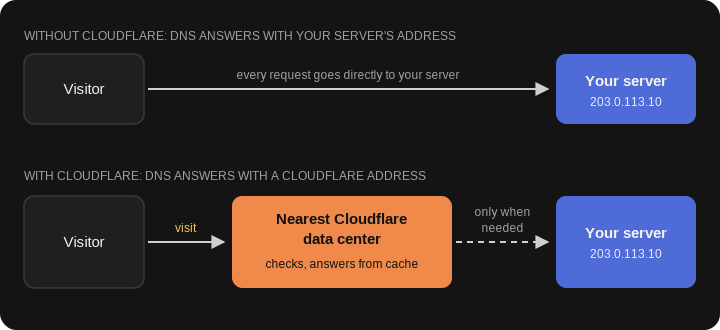
Cloudflare runs data centers (buildings full of servers) in more than 300 cities. When your site is “behind” Cloudflare, visitors never talk to your server directly. They talk to Cloudflare. Cloudflare passes their requests on to your server and brings back the answers.
A reverse proxy is a server that sits in front of other servers like this and receives requests for them. (“Proxy” means “someone who acts for someone else.”) Your real server, the one behind the proxy, is called the origin server, or just the origin.
Do not confuse this “origin” with the “origin” in “Blocked by CORS policy”: why the browser said no. In that lesson, origin meant scheme + host + port. The word is the same, but the meaning is different. In Cloudflare’s dashboard and docs, “origin” means your own server.
Think of a security guard at the front desk of an office building. Visitors talk to the guard. The guard checks who they are and turns away troublemakers. The guard also hands out leaflets from a stack at the desk. The guard sends people upstairs only when they really need to go.
Where this comparison stops working: a building usually has one front desk. Cloudflare has hundreds, one in each city, and every visitor goes to the nearest one. Also, in a real building, people cannot walk around the guard. On the internet, they can, if they know your server’s address. This lesson explains that problem later.
How your site gets behind Cloudflare
First, add your domain to a Cloudflare account. You bought your domain from a company called a registrar. On the registrar’s website, change your domain’s nameservers to the two that Cloudflare gives you. Nameservers are the DNS servers that hold the official records for your domain. After this change, Cloudflare answers every DNS question about your domain. The change can take some time to take effect.
Your DNS records now live in Cloudflare’s dashboard (its control panel website). Each website record has a small cloud icon next to it.
The orange cloud
| Cloud | Setting | What DNS answers | Traffic goes through Cloudflare? |
|---|---|---|---|
| Orange | Proxied | Cloudflare’s own IP addresses | Yes. You get the CDN, protection and other features. |
| Grey | DNS only | Your server’s real IP address | No. Cloudflare only answers the DNS question. |
Only records that point to websites (types A, AAAA and CNAME) can be orange. Email records are always grey.
This one icon is the most important setting in the whole dashboard. Orange means that the guard is on duty. Grey means that visitors go directly to your server, and they can see its real address.
What the guard does
Cloudflare stands between every visitor and your server, so it can do a lot. The free plan includes everything in this section.
DNS. Cloudflare answers the “which IP address?” question for your domain, as you just saw.
CDN. Cloudflare keeps copies of your files in its data centers, so visitors get them from a nearby city. Keeping these copies is called caching, and a stored copy is a cached copy. By default, Cloudflare caches files like images, CSS (the files that style a page) and JavaScript. By default, it does not cache HTML pages or JSON (a text format for data).
HTTPS. Cloudflare gives your domain a free certificate. So visitors get a secure connection to Cloudflare, and you do not need to set anything up.
DDoS protection. A DDoS attack (distributed denial of service) floods a website with fake traffic from thousands of computers at once. These computers are often hacked devices. The flood continues until the real server cannot answer real visitors. Cloudflare’s network is so large that it can absorb these floods before they reach you. On the free plan, this protection is “unmetered”: you do not pay more when an attack is bigger.
Firewall. A web application firewall (WAF) looks at each request. It blocks requests that match known attack patterns, such as common SQL injection attempts. The free plan includes a small set of these rules, called the Free Managed Ruleset. Cloudflare maintains these rules.
A WAF is a helpful extra layer, but it does not fix your code. It blocks known patterns, and attackers try new ones. Your app still needs the real fixes: parameterized queries (from the SQL injection lesson), escaped output (from the XSS lesson) and permission checks.
Go deeper: Bots signed up 10,000 times overnight. Now what? (Level 2) covers limiting how many requests one visitor can send.
Cloudflare’s own hosting
Cloudflare does not only stand in front of other people’s servers. It also rents out its own network. In this way, it competes with Vercel, Netlify and AWS:
- Workers: your backend code (the code that runs on a server) runs on Cloudflare’s servers, close to each visitor, and only when a request arrives. This is called serverless, like the functions from the hosting platforms lesson. Workers can also serve whole websites. The free plan includes 100,000 requests a day.
- Pages: hosts websites directly from your GitHub repository (the online folder for your code), with preview links, like Vercel and Netlify. Pages is still supported. But since 2025, Cloudflare recommends that new projects start on Workers, because new feature work goes to Workers.
- R2: stores files such as images, videos and backups, like AWS S3. Cloudflare does not charge for the data that visitors download from it.
When your app runs on Workers, you do not need a separate origin server at all. Cloudflare is both the guard and the building.
How it goes wrong
Problem 1: “Redirected you too many times”
This is the classic Cloudflare problem. Your site worked. You turn on the orange cloud. Now every visitor sees an error that says the page “redirected you too many times”. In Chrome, the error is ERR_TOO_MANY_REDIRECTS.
The cause is a setting called the SSL/TLS encryption mode. It decides how Cloudflare connects to your origin. Every visit now has two halves: visitor → Cloudflare, and Cloudflare → your server.
| Mode | Visitor → Cloudflare | Cloudflare → your server |
|---|---|---|
| Flexible | HTTPS | plain HTTP |
| Full | HTTPS | HTTPS, but Cloudflare doesn’t check the certificate |
| Full (strict) | HTTPS | HTTPS, and Cloudflare checks the certificate |
Now follow a visit in Flexible mode. Your server redirects all HTTP traffic to HTTPS (most servers and hosting platforms do this):
- Visitor → Cloudflare:
GET https://example.com - Cloudflare → your server:
GET http://example.com(Flexible means HTTP) - Your server → visitor: “Redirect to https://example.com”
- Visitor → Cloudflare:
GET https://example.com(back to step 1)
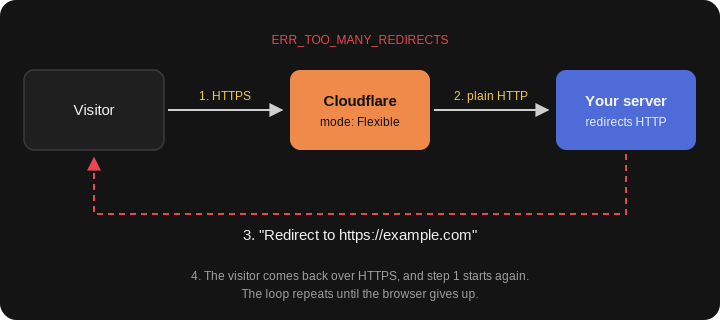
Your server only ever sees HTTP, so it keeps saying “use HTTPS”. The visitor keeps obeying. The browser gives up after many rounds.
The fix: set the mode to Full (strict). Then Cloudflare connects to your server over HTTPS. Your server sees HTTPS, and it stops redirecting. Your server needs a valid certificate for this. Hosting platforms already have one.
Flexible has a second problem. Visitors see a secure connection in the address bar. But half of the trip, from Cloudflare to your server, travels as plain, readable HTTP: the postcard from the HTTPS lesson. Cloudflare itself strongly recommends Full or Full (strict).
Problem 2: Old files after an update
You deploy (put online) a new design. Some visitors see the new HTML with the old CSS, and the page looks broken. Cloudflare served its cached copy of styles.css, because the file name did not change.
Fixes:
- Most build tools (programs that prepare your code to go live, like Next.js and Vite) add a code to each file name. The code changes with every build, like
styles.3f8a1c.css. A new name means a new cache entry. Check that your build tool does this. - In the Cloudflare dashboard, you can purge (empty) the cache. If you purge everything at once, every request goes to your server until the cache fills again. That is fine for a small site. For a busy site, it is a sudden, large increase in requests.
Problem 3: The back door is open
Cloudflare only protects traffic that passes through Cloudflare. Someone may learn your origin’s real IP address. Then that person can send requests directly to it and skip the guard. That path has no DDoS protection and no firewall.
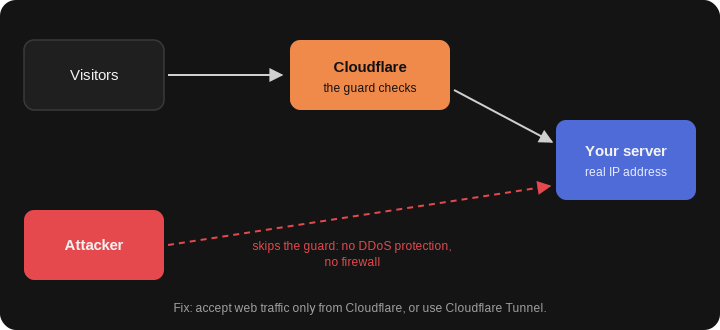
Common ways that the address leaks:
- old DNS records from before you joined Cloudflare, which history websites keep
- grey-cloud (DNS only) records that point to the same server
- emails sent from the same server
Fixes:
- Set your server’s firewall to accept web traffic only from Cloudflare’s IP addresses. Cloudflare publishes the list at
cloudflare.com/ips. - Or use Cloudflare Tunnel. With Tunnel, your server makes an outgoing connection to Cloudflare and needs no public address at all.
- If your address leaked, move to a new one.
Problem 4: Everyone has the same IP address
Your server’s direct connection is now with Cloudflare, not with the visitor. Some code looks at the visitor’s IP address. Examples are logs (records of each request) and rate limiters (code that limits how many requests one visitor can send). This code suddenly sees Cloudflare’s addresses.
Cloudflare adds the real visitor address in a header (a short Name: value label on a request) called CF-Connecting-IP. Configure your app to read it. Trust it only on requests that really came from Cloudflare. Anyone can send that header to an open back door.
Problem 5: Two guards in a row
You host on Vercel, and you also turn on Cloudflare’s orange cloud in front of it. Now there are two CDNs and two caches. Also, Vercel sees Cloudflare’s address instead of the visitor’s. A common setup is to keep your DNS at Cloudflare, but leave the record for your Vercel site grey (DNS only). If you do want both, read your platform’s guide first.
Problem 6: When Cloudflare goes down, you go down
That is the price of one guard for every door. On 18 November 2025, most users could not log in to Cloudflare’s dashboard. So many site owners could not even change their settings.
For most small apps, Cloudflare is far more reliable than anything that you would build yourself, so this is a good trade. But know that it is a trade. Bookmark Cloudflare’s status page (cloudflarestatus.com). If your site and many others break at once, check that page before you change your own code.
What good looks like
- Website records are orange (Proxied), unless your hosting platform recommends something else.
- SSL/TLS mode is Full (strict), never Flexible.
- Always Use HTTPS is on, so Cloudflare sends HTTP visitors to HTTPS. Let Cloudflare handle that redirect, not your server.
- Your origin accepts web traffic only from Cloudflare, or uses Cloudflare Tunnel.
- Your app reads the visitor’s IP from
CF-Connecting-IP, and only for Cloudflare’s requests. - Your build gives changed files new names, and you know where the Purge cache button is.
- You treat the WAF as an extra layer, not as a replacement for fixing bugs in your code.
Test your own site
You need an app of your own for this part. No app yet? Start with Your first app in an afternoon, with an AI doing the typing. Built it in an AI app builder? Ask its AI to do each step below for you, or to add the missing part first (for example, a login).
1. Is the guard on duty?
- Go to
dns.google, as in How does your browser find one computer out of billions?. - Look up your domain.
- Compare the IP addresses with Cloudflare’s list at
cloudflare.com/ips.
If they are in Cloudflare’s address ranges, the orange cloud works. If you see your server’s real address, it does not work.
2. Read the guard’s stamp.
- Open your site in Chrome.
- Open developer tools (F12 on Windows, Cmd+Option+I on Mac).
- Click the Network tab.
- Reload the page.
- Click the first row.
- Click Headers.
- In the response headers, look for the headers below.
server: cloudflare: the answer came through Cloudflare.cf-ray: Cloudflare’s ID for this request. The three letters at the end name the data center that answered.cf-cache-statuson images, CSS or JavaScript:HITmeans that Cloudflare answered from its cache.MISSmeans that it had to ask your server.DYNAMICmeans that it was not allowed to cache this response.
3. Try the back door. If you know your origin’s IP address, try to open it directly in a browser. Or ask your hosting provider how to test it. If your site loads without Cloudflare, Problem 3 applies to you.
4. Check two settings. In the Cloudflare dashboard, open SSL/TLS and check the encryption mode. Then check that Always Use HTTPS is on.
Takeaways
Key terms
- Reverse proxy: a server that stands in front of yours and receives requests for it
- Origin server: your real server, behind the proxy
- Nameservers: the DNS servers that hold the official records for your domain
- Proxied (orange cloud): traffic goes through Cloudflare
- DNS only (grey cloud): traffic does not go through Cloudflare
- DDoS attack: a flood of fake traffic from many computers, meant to stop a site from working
- WAF: a firewall that blocks requests that match known attack patterns
- SSL/TLS mode: how Cloudflare connects to your origin: Flexible, Full or Full (strict)
- Purge: empty the cache so that visitors get fresh copies
Which step broke?
- “Redirected you too many times” right after you turn on the orange cloud → SSL/TLS mode is Flexible. Switch to Full (strict).
- New HTML, old styles → cached files. Check file names, then purge.
- Error page with Cloudflare’s name on it, and other big sites are down too → check
cloudflarestatus.com. - Error page with Cloudflare’s name, only your site → Cloudflare cannot reach your origin. Check that your server runs and accepts Cloudflare’s connections.
- Every visitor has the same IP → read
CF-Connecting-IP.
Ask your AI
- “My site is behind Cloudflare. Here are my SSL/TLS mode and my server’s redirect settings: [paste]. Could they cause a redirect loop?”
- “Does my server accept connections from anyone, or only from Cloudflare? How do I limit it?”
- “Where does my app read the visitor’s IP address, and is it correct behind Cloudflare?”
Going deeper (optional, for readers who want more detail)
More SSL/TLS modes. There are more modes than Flexible, Full and Full (strict). Off means no HTTPS at all. Strict (SSL-Only Origin Pull) always connects to your origin over HTTPS, even when the visitor used HTTP. Cloudflare also has an Automatic SSL/TLS option. It picks the most secure mode that your origin supports and never lowers it.
Other redirect loops. Flexible mode is not the only cause. Loops also happen when your origin redirects HTTPS back to HTTP. They happen when Always Use HTTPS conflicts with an HTTP redirect on your server. They also happen when two redirect rules send requests to each other.
Origin certificates. For Full (strict), your origin needs a certificate that Cloudflare trusts. That can be a normal public certificate, such as one from Let’s Encrypt. It can also be a free Origin CA certificate from Cloudflare. Only Cloudflare trusts Origin CA certificates. Browsers do not trust them, so they work only behind the orange cloud.
One address, many places. Cloudflare answers proxied records with anycast addresses. All its data centers share the same addresses, and the internet’s routing delivers each visitor to a nearby one. That is how visitors reach “the nearest Cloudflare data center” without any extra work.
Why the outage spread so widely. The faulty file was a “feature file” for Cloudflare’s Bot Management system. Cloudflare refreshed it every few minutes and sent it to every server in the network. After the permissions change, a database query started to return duplicate rows. These rows roughly doubled the file. The proxy software had a limit of 200 machine learning features (about 60 were in use). It failed when the file went over the limit. Other affected services included Workers KV, Turnstile, Access and the dashboard login.
What else is in the free plan. Cloudflare’s plans page also lists basic “Simple bots” protection. Limits and features change, so check the plans page.
Workers limits, at the time of writing. The Workers free plan includes 100,000 requests per day and 10 milliseconds of CPU time per request. (CPU time is the time that the processor spends on your code.) Serving static files from Workers is free. R2’s free tier includes 10 GB of storage per month, and data transfer out to the internet is free.
References (12)
- Cloudflare outage on November 18, 2025: Cloudflare blog. The cause (a permissions change that doubled the Bot Management feature file), the 200-feature limit, the timeline, the dashboard login failure, “worst outage since 2019” and that it was not an attack.
- Worldwide Cloudflare outage disrupts X, ChatGPT, PayPal, Uber, and other sites: PCWorld, 18 November 2025. Which well-known sites were affected.
- The Cloudflare network: Cloudflare. “1 in 5 sites on the Internet” and the number of cities with data centers.
- Encryption modes: Cloudflare docs. Off, Flexible, Full, Full (strict), Strict and Automatic SSL/TLS, and the recommendation to use Full or Full (strict).
- ERR_TOO_MANY_REDIRECTS: Cloudflare docs. Redirect loops caused by Flexible mode, Always Use HTTPS and conflicting redirect rules.
- Cloudflare cache responses: Cloudflare docs. The
cf-cache-statusvaluesHIT,MISSandDYNAMIC, and that HTML and JSON aren’t among the file types cached by default. - Protect your origin server: Cloudflare docs. How origin IP addresses leak (old DNS records, DNS-only records, email), allowing only Cloudflare’s IPs, and Cloudflare Tunnel.
- Cloudflare HTTP headers: Cloudflare docs.
CF-Connecting-IPcarries the visitor’s IP to your origin, andCF-Raynames the data center. - Pricing: Cloudflare. What the Free plan includes: DNS, CDN, Universal SSL, unmetered DDoS protection, the WAF with the Free Managed Ruleset, and “Simple bots” protection; the Workers free tier (100,000 requests a day, 10 ms CPU) and R2’s free tier (10 GB) with no egress fees.
- Proxy status: Cloudflare docs. Proxied records return Cloudflare anycast IPs, only
A,AAAAandCNAMErecords can be proxied, and email records stay DNS only. - Cloudflare origin CA: Cloudflare docs. Origin CA certificates only protect the connection between Cloudflare and your server; visitors see certificate errors if traffic stops going through Cloudflare.
- Your frontend, backend, and database, now in one Cloudflare Worker: Cloudflare blog, April 2025. New projects should start with Workers; Pages stays supported, but new feature work goes to Workers; static assets are served for free.