Level 4 · Reliability & scale
SQL or NoSQL? The AI chose for you. Was it right?
- Relational databases
- Document databases
- Schemas
- Embedding vs references
- JSON columns
- jsonb
- Trade-offs
SQL or NoSQL? The AI chose for you. Was it right?
Before you start This lesson uses a few words from earlier lessons:
- Table, row and SQL: a table holds one kind of thing, and each row is one item. SQL is the language for questions to the database. (Your app forgot everyone’s messages overnight. Why?)
- Foreign key: a column that points to a row in another table, so each fact is stored once. (You changed your name. Half the app still shows the old one)
- Transaction: a group of database changes that all happen, or none do. (A customer got charged twice. How?)
- Index: a sorted list that the database keeps, so it can find rows fast. (Fast with 100 users, frozen at 10,000. The missing index)
Two friends, two databases
You and a friend both ask an AI to build a habit tracker for teams. People join a team, add habits, and tick them off each day.
Your AI sets up MongoDB. Your friend’s app builder (a tool that builds a whole app from chat messages) connects a PostgreSQL database. Nobody asked either of you. Both apps work on day one.
Three months later, you both need the same new page: “For each team, show how many habits its members completed last week.”
Your friend asks the AI, and it writes one SQL query. Your AI writes a loop. The loop reads every user, then every habit, and then adds things up in your code. It is slow. You also notice that some users still show their old team’s name, because each user’s document holds its own copy.
Was the AI wrong to choose MongoDB? Not necessarily. But it chose without knowing what your app would need, and the choice is expensive to change later. This lesson gives you the questions that the AI did not ask.
The mental model: one fact once, or everything together
You will meet two big families of databases:
- A relational database keeps data in tables with fixed columns. It stores each fact once, and rows point to each other with foreign keys. Sometimes you need data from several tables. Then the database combines them for you while it answers. That is called a join. You ask questions in SQL. PostgreSQL, MySQL and SQLite are relational.
- A document database keeps each record as a document: a JSON-like object that can contain lists and other objects. Documents are grouped into collections. Data that the app reads together is often stored together, in one document. MongoDB and Firebase’s Firestore are document databases. Document databases are part of a larger group called NoSQL. NoSQL also includes other kinds, such as the key–value store Redis.
Think of a school office. The relational way is a filing cabinet with one drawer for students, one for classes and one for teachers. A student’s card says “class 7B”, and you look up 7B in the class drawer. The document way is one folder per student. Each folder holds a copy of everything about that student: their class, their teacher’s name, their timetable.
The folder is quicker when you want everything about one student. The cabinet is better when the teacher of 7B changes. Then you fix one card, not thirty folders.
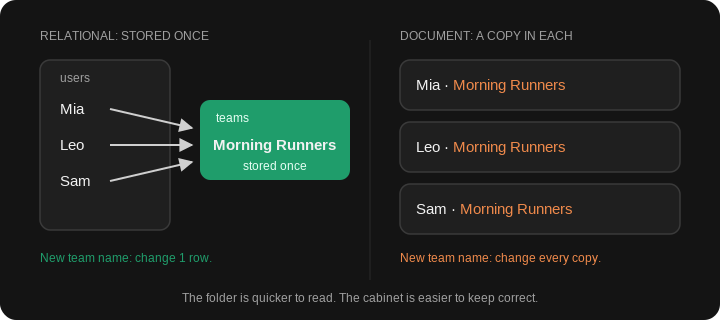
Where this comparison stops working: real databases are not this strict. Document databases can store an ID and look things up separately. MongoDB even has a join-like step called $lookup. And relational databases can store whole JSON documents in a column, as you will see below.
The same data, two ways
Here is one user in a document database:
{
  "_id": "u_17",
  "name": "Mia",
  "team": { "id": "t_3", "name": "Morning Runners" },
  "habits": [{ "title": "Run 5 km", "doneDates": ["2026-11-02", "2026-11-03"] }]
}
In plain English: Mia’s document holds her name, a copy of her team’s name, and her habits with the days that she completed them. One read gets everything about Mia.
In a relational database, the same data lives in four tables (users, teams, habits, completions). A join combines them:
SELECT teams.name, count(*) AS completed
FROM completions
JOIN habits ON habits.id = completions.habit_id
JOIN users ON users.id = habits.user_id
JOIN teams ON teams.id = users.team_id
WHERE completions.done_on >= current_date - 7
GROUP BY teams.name;
In plain English:
- Start with every completion from the last 7 days.
- Follow the foreign keys to its habit, its user and the user’s team.
- Count the completions per team.
That is the “new page” from the start of this lesson, in one query. And the team name exists in exactly one place.
The honest trade-offs
| Relational (PostgreSQL, MySQL) | Document (MongoDB, Firestore) | |
|---|---|---|
| Shape | Tables with fixed columns | Nested documents; fields can differ |
| Relationships | Foreign keys and joins | Copies inside documents, or IDs your code follows |
| Rules about the data | The database enforces them: types, required fields, unique values, foreign keys | Mostly in your code; MongoDB’s validation rules are optional |
| A new question about old data | Usually one new query, maybe an index | Can mean reading many documents, or reshaping and copying data |
| Changes across several records | Transactions across any tables | MongoDB supports multi-document transactions, but its docs say they usually cost more than single-document writes |
| Getting started | Design tables first | Save whatever JSON you have |
Why the AI picked without asking
AI tools choose a database for reasons that have little to do with your app:
- The tool’s default. App builders come with a database already connected. For example, Lovable’s built-in backend (the server side of the app) includes a managed PostgreSQL database. It creates tables from your chat messages.
- The most common tutorial. AI models repeat the patterns that they saw most often. Pairs like “React + Firebase” and “Node + MongoDB” appear in many tutorials, so they come out often.
- The first demo. A document database lets the AI save any JSON without a table design first. The demo works sooner. The cost shows up later, when the questions change.
None of these reasons ask: what will your app need to know about its data in a year?
How it goes wrong
Problem 1: Copies that stop matching
To show “Mia · Morning Runners” without a second read, the AI put a copy of the team name inside each user’s document. Then the team gets a new name. Now 2,000 user documents hold the old name, and someone must update every one. If the update stops halfway, half the app shows the old name and half shows the new one.
This is the “copied data” bug from You changed your name. Half the app still shows the old one. In document databases, copies are the normal way of working. So you need a plan for every copy: what updates it, and what happens if that update fails.
Problem 2: The question nobody planned for
Document databases are fast at the questions that their documents were shaped for, such as “get everything about Mia”. They are much weaker at questions that combine many documents. Examples are “completions per team per week”, “the most popular habits” and “users who have not been active in 30 days”.
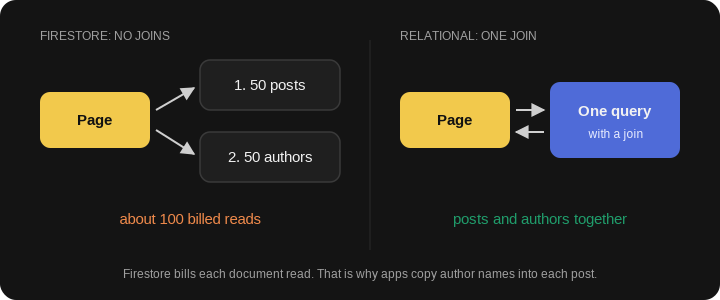
In Firestore, there are no joins. Say that a page shows 50 posts with their authors’ names. Your code reads 50 posts and then 50 author documents. Firestore bills each document read, so that one page costs about 100 reads. This is why Firestore apps store copies of author names in each post, and that brings back Problem 1.
Problem 3: “Schemaless” means the schema is in your code
A schema is the description of the shape of your data: which fields exist and what type each one has. A document database does not check what you save, unless you add rules. So over a few months:
- Old documents say
completed, and new ones saydoneDates, because the AI renamed a field halfway through. - One document has
"name": "Mia", and another has"nmae": "Leo", because of a typo in one version of the code. - Dates are sometimes text and sometimes real dates.
The database accepted all of it. Now every piece of code that reads users must handle every shape that was ever saved. A relational database has column types and constraints (rules such as “this field is required”). They would have refused the wrong data on the first day. And a column change would be a deliberate migration (a planned change to the database structure).
Problem 4: Forcing very different things into one rigid table
The mistake goes the other way too. An online shop sells phones, sofas and lamps. Phones have a screen size, sofas a fabric, lamps a wattage. One column for every possible attribute gives you a table with 80 columns. For any one product, most of them are empty. Documents really are a better shape for that part of the data.
The good news: in PostgreSQL, you do not have to switch databases to get that shape.
What good looks like
Start with PostgreSQL, unless you have a clear reason not to
Most app data is relational: users belong to teams, orders contain items, comments belong to posts. The questions that you will need later cross between those things. A relational database answers them with joins and keeps each fact in one place. It refuses bad data with constraints, and it groups related changes in transactions.
PostgreSQL is the common default for good reasons. It is open source (its code is public and free to use), mature, and offered by most hosting services. These include Supabase, Neon, AWS and Google Cloud. In the 2026 Stack Overflow Developer Survey, it was the most used database, by 57.9% of respondents.
Use jsonb for the parts that really are flexible
PostgreSQL can store JSON inside a normal table. Its documentation recommends the jsonb type for most apps. It stores JSON in a processed form that is faster to search, and you can index it.
CREATE TABLE products (
  id bigint GENERATED ALWAYS AS IDENTITY PRIMARY KEY,
  name text NOT NULL,
  price_cents integer NOT NULL,
  attributes jsonb NOT NULL DEFAULT '{}'
);
CREATE INDEX products_attributes_idx ON products USING GIN (attributes);
SELECT name FROM products WHERE attributes @> '{"color": "red"}';
In plain English:
- Lines 1–6: fields that every product has are real columns, with types and
NOT NULL(meaning “required”). The attributes that differ by product go in onejsonbcolumn. - Line 7: create a GIN index on the JSON. It is a special kind of index for values that contain many parts, like JSON documents.
- Line 8: find products whose attributes contain
"color": "red". The@>operator (a symbol that does an action, like+) means “contains”. The GIN index makes this search fast.
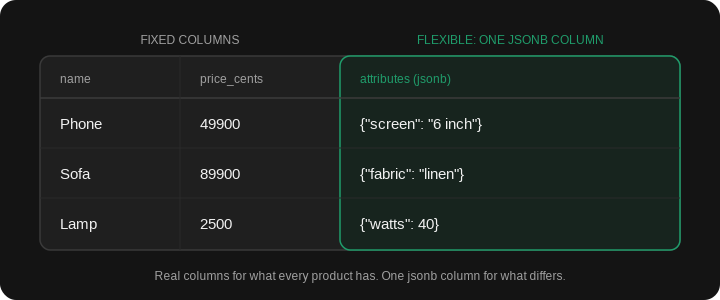
You get flexible documents where you need them. You also keep joins, constraints and transactions for everything else.
One thing to know: jsonb does not keep the order of keys or extra spaces. If a key appears twice, it keeps only the last value.
When a document database is a fair choice
A document database can be the right choice when most of these are true:
- Each record is self-contained, and the app usually reads and writes it as one piece. Examples are a saved drawing, a form with a changing set of questions, a game’s save file, or a log of events.
- You rarely need questions that combine many kinds of records.
- You want a feature that a product is built around. One example is Firestore’s offline support for mobile apps. It is on by default on Android and Apple devices.
- Your team already knows the tool well.
If you choose one, use its safety features. In MongoDB, use schema validation rules. In Firestore, use security rules that check what each user can write.
Ask the questions the AI skipped
Before you let the AI pick, write down:
- The 5 most important questions your app will ask its data. “Show a team’s weekly progress.” “List a user’s unpaid invoices.” Do they combine different kinds of things? Then your data is relational.
- What must never be half-saved? Payments, stock, credits. You want transactions that you can trust.
- What really varies? That part can be
jsonb. - What does your hosting or app builder already give you? It is fair to use what is there, if it fits the answers above.
Then tell the AI: “Use PostgreSQL with these tables. Use jsonb only for these fields.” If you chose a document database, tell the AI why. Then ask it to design for the questions in your list.
If the AI already chose
Do not rewrite everything because of a feeling. But check soon, because a switch gets more expensive every week. Each week adds more data to move and more queries to rewrite. If your app is still small and you already see Problems 1 to 3, now is the cheapest time to change.
Test your own app
You need an app of your own for this part. No app yet? Start with Your first app in an afternoon, with an AI doing the typing. Built it in an AI app builder? Ask its AI to do each step below for you, or to add the missing part first (for example, a login).
- Find out what you have. Open
package.json, the file that lists your app’s packages. Packages likepg,postgres,@prisma/client,drizzle-ormor@supabase/supabase-jsusually mean SQL.mongodb,mongooseorfirebaseusually mean a document database. Ask your AI to confirm. - Write your 5 questions from the section above. For each question, ask the AI: “Show me the query for this. How many reads or queries does it need?” Count the loops.
- Look for copies. Pick one value that appears in many places, like a team name or a product price. Where is it stored? What updates the copies when it changes?
- Look for mixed shapes. In a document database, open 10 old and 10 new documents from the same collection. Do they have the same fields with the same types?
- Check the rules. Try to save a user without an email, or a price that is text. Does the database refuse it? Do this test in staging (a copy of your app for tests).
Takeaways
Key terms
- Relational database: data in tables with fixed columns, linked by foreign keys and combined with joins
- Document database: each record is a JSON-like document, grouped in collections
- NoSQL: databases that do not use the relational model, including document and key–value stores
- Join: the database combines rows from several tables while it answers a query
- Schemaless: the database does not check the shape of the data, so your code must do it
- jsonb: PostgreSQL’s indexed, searchable JSON column type
Red flags
- The same name, price or status copied into many documents with no plan to update them
- Pages built from loops of reads, not one query
- Documents in one collection with different field names for the same thing
- A database choice that nobody can explain, made on the first prompt
- 50 mostly empty columns for attributes that differ by product type
Ask your AI
- “Which database does my app use, and why was it chosen? What would be hard to do with it later?”
- “Here are the 5 most important questions my app asks its data. Write the query for each and tell me how many reads each one takes.”
- “Where does my app store copies of the same data? What keeps them in sync?”
- “Design my tables in PostgreSQL. Use jsonb only where the fields really vary, and explain why for each one.”
Going deeper (optional, for readers who want more detail)
Other kinds of NoSQL. There are other kinds besides document databases:
- Key–value stores, like Redis: one value per key, very fast.
- Wide-column stores: built for huge amounts of data spread over many machines.
- Graph databases: built for networks of connections, such as “friends of friends”.
Each one solves a specific problem well. Many apps use one of them next to PostgreSQL, not instead of it.
Embedding vs referencing in MongoDB. Embedding means that you store related data inside the document. Referencing means that you store only an ID. MongoDB’s own docs say that an operation on a single document is atomic: it happens completely or not at all. They also say that embedding related data in one document reduces the need for multi-document transactions.
The same docs say that transactions are no replacement for good schema design. A useful guide: embed what belongs only to its parent and is read with it, like the lines of one order. Reference what is shared, like a team or a product.
MongoDB transactions. MongoDB has supported multi-document transactions since version 4.0 for replica sets (groups of database copies). For sharded clusters (data split over many machines), the support came in version 4.2. Its documentation notes that a single-document write is usually cheaper.
Scaling claims. You will often read that NoSQL “scales better”. Some document databases were built from the start to spread data across many machines, and this helps at very large sizes. But most apps never get near the limits of one well-tuned PostgreSQL server. Scaling problems usually come first from missing indexes and too many queries. Your app went viral. Will it survive? covers what to fix first.
When jsonb is the wrong tool. Sometimes you search, join or update the same JSON field all the time. Then it should probably be a real column, or its own table with a foreign key. JSON values cannot have foreign keys that point into them.
Firestore queries cost reads, even empty ones. Firestore’s pricing page says that each query costs at least one document read, even if it returns nothing. It also says that Firestore still bills documents that you skip with an offset (a “skip the first N” setting). Cursor-based pagination is cheaper there, as in Your app tried to load 50,000 rows at once.
References (8)
- JSON types: PostgreSQL documentation. The difference between
jsonandjsonb, the recommendation to preferjsonb, the@>containment operator and GIN indexes. - Transactions: MongoDB manual. Single-document atomicity, multi-document transactions (from version 4.0 for replica sets and 4.2 for sharded clusters), and their extra cost.
- Schema validation: MongoDB manual. The flexible schema by default and optional validation rules.
- Cloud Firestore data model: Firebase. Firestore as a NoSQL, document-oriented database with collections and no tables or rows.
- Understand Cloud Firestore billing: Firebase. Billing per document read, the one-read minimum per query, and offsets billed as reads.
- Configure offline persistence: Firebase. Offline persistence on by default on Android and Apple platforms, off by default on the web.
- Stack Overflow Developer Survey 2026: Technology: Stack Overflow. PostgreSQL as the most used database, by 57.9% of respondents.
- Database: Lovable. The built-in backend includes a managed PostgreSQL database, with tables created from chat.