Level 1 · Foundations
There is no cloud. It's someone else's computer
There is no cloud. It’s someone else’s computer
Before you start
- Server: a computer that waits for requests and answers them, usually in a building called a data center. You pressed Enter. What happened in the next second?
- Backend: the part of your app that runs on a server, where secrets and rules are safe. A player scored 999,999 points by editing the page. How?
- Database: a program that stores your app’s data safely, in tables and rows. Your app forgot everyone’s messages overnight. Why?
- Hosting and deploying: to put your app on a computer that’s always on the internet, so anyone can open it. It works on my laptop. Why can’t my friend open it?
There is no cloud
Your photos are “backed up to the cloud”. Your game progress is “saved in the cloud”. People say apps “run in the cloud”.
It sounds like your things float somewhere in the sky. They don’t.
Here is the truth: the cloud is computers. Real ones, in big buildings, owned by big companies. When something is “in the cloud”, it’s stored on one of those computers. You reach it over the internet.
You already know these computers. In the first lesson, you met servers and data centers. The cloud is the same idea, with one new part: you can rent them.
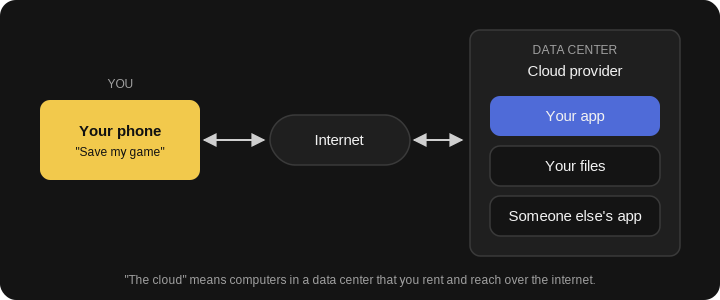
This lesson explains who rents them out, how you pay, and what you can rent. It matters because your own app will run on rented computers like these when you put it online.
In short: “the cloud” means servers in data centers that you reach over the internet. Nothing floats in the sky.
Renting instead of buying
Say you want to ride a bike this weekend. You could buy one. Then you must store it, pump the tyres and fix it when it breaks. Or you could rent a bike for two hours, ride it, and give it back.
Running an app has the same choice.
Buying: you buy your own servers. You find a room for them. You pay for electricity and cooling. You replace broken parts. If your app suddenly gets popular, you need more servers, and it takes weeks to buy them.
Renting: a company that already has huge data centers lets you use some of its computers. You ask for a computer, and a few minutes later it’s ready. When you don’t need it anymore, you give it back.
A company that rents out computers, storage and other services over the internet is called a cloud provider.
Where the bike comparison stops working: you never see or touch the rented computer. You control it from a website or with commands, from anywhere in the world.
In short: a cloud provider rents you computers in its data centers. You don’t buy, store or repair anything yourself.
You pay for what you use
A bike rental shop charges by the hour. Cloud providers charge in a similar way, but in much smaller pieces.
The way you pay depends on what you rent:
- By time: for a rented computer, often counted by the second.
- By size: for storage, by how many gigabytes you keep.
- By use: for some services, by how many times your code runs and for how long.
This is called pay-as-you-go. You make no big payment at the start. At the end of the month, you get a bill for what you used.
Pay-as-you-go is very good for small projects. A tiny app with few visitors can cost very little. But it also works the other way. If you use more, you pay more. And if you forget to give something back, you keep paying for it.
Go deeper: You woke up to a $10,000 cloud bill. What happened? (Level 3) shows how bills grow and how to set limits.
In short: pay-as-you-go means you pay for exactly what you use, measured in seconds, gigabytes or requests. Use more, pay more.
The big three
Many companies rent out computers. Three of them are much bigger than the rest:
| Cloud provider | Run by |
|---|---|
| AWS (Amazon Web Services) | Amazon |
| Google Cloud | |
| Microsoft Azure | Microsoft |
AWS started in 2006 and is the biggest. Google Cloud and Azure offer very similar things under different names.
All three rent out more than computers. They offer storage, databases, tools to send emails, tools for AI, and much more. AWS alone says it has over 200 services. Each service is a separate building block. You pick the blocks your app needs and connect them yourself.
The rest of this lesson uses AWS as the example, because you’ll hear its names most often. Google Cloud and Azure have a matching block for each one.
In short: the three biggest cloud providers are AWS, Google Cloud and Microsoft Azure. Each offers hundreds of building blocks you can rent.
Two building blocks: a computer and a storage room
Four AWS building blocks come up again and again. Here are the first two.
EC2: rent a whole computer
EC2 lets you rent a computer that runs all the time. You choose how powerful it is: how fast its CPU (the part that runs the code) is, and how much memory it has. Then you install what you want on it, like your app’s backend.
Think of a gaming PC that you rent at a gaming café. While you pay, it’s yours. You can install anything. But you also have to set it up, keep it updated and switch it off when you leave. And you pay for every minute you sit there, even if you don’t play.
S3: a giant storage room for files
S3 is a place to keep files: pictures, videos, music, backups. You put files in, and you can get them back later with a web address.
Think of a storage locker that grows as you fill it. You never run out of shelves. You pay for how much you keep in it.
Your app would use S3 for things like profile pictures that users upload. Files in S3 are private unless you choose to share them.
In short: EC2 is a rented computer that’s always on. S3 is a storage room for files that grows as you add more.
Two more: a database AWS looks after, and code that wakes up
RDS: a database AWS looks after
In an earlier lesson, you learned that your app’s data belongs in a database. You could install a database yourself on an EC2 computer. Then you’d have to update it, make backups and fix it if it crashes.
RDS is a database that AWS runs for you. AWS installs it, updates it and takes the backups. Your app uses it.
Think of a pet fish. You can keep it at home yourself, or pay a pet shop to look after it in their tank. It’s still your fish. Someone else cleans the tank.
Lambda: code that runs only when it’s needed
An EC2 computer runs all day, even when nobody uses your app. That’s a waste for code that runs only now and then, like code that sends a “thanks for signing up” email.
Lambda runs a piece of your code only when something asks for it, like a request from your app. When the code finishes, it stops. You pay only while it runs. AWS calls each piece of code like this a Lambda function.
Think of a light with a motion sensor. It switches on when someone walks past, and off again when they leave. You don’t pay for light in an empty hallway.
This way to run code is called serverless. The name is confusing: there are still servers. But you never set them up, update them or switch them off. The cloud provider does all of that.
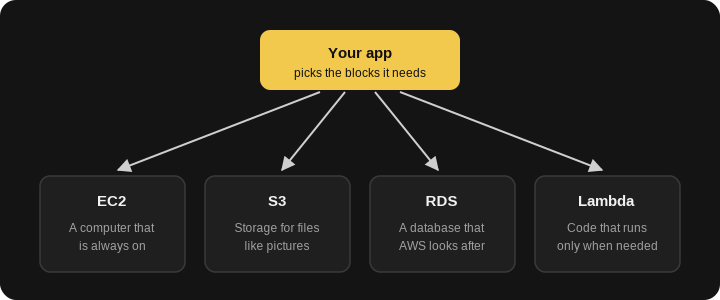
In short: RDS is a database that AWS looks after for you. Lambda runs your code only when needed, and that’s called serverless.
How it goes wrong: raw parts and real bills
If the cloud is so useful, why don’t beginners start on AWS?
Because AWS gives you raw parts. It’s like buying flour, eggs and sugar instead of a cake. You can make anything, but you have to make every choice yourself. Each building block has many settings, and you must connect the blocks correctly.
That causes three common problems:
1. Something is set up wrong. Someone makes a storage room public by accident, so anyone can see the files. Or the database accepts connections from the whole internet.
2. Something is left running. You try EC2 for a weekend project, then forget about it. It keeps running, and pay-as-you-go keeps charging you every second, for months.
3. Someone else uses your account. To control AWS from your code, you use secret keys. If a key gets into a public place, strangers can rent computers with your account. Then you get the bill.
Go deeper: Your API key leaked, and strangers are spending your money (Level 2) shows how keys leak and how to stop it.
None of this means AWS is bad. Big apps use it every day. It means AWS expects you to know what you’re doing.
In short: AWS gives you raw parts with many settings. Mistakes, like a forgotten computer or a leaked key, can cost real money.
What good looks like
For your first apps, let someone else put the parts together.
A hosting platform is a service that puts your app online for you. Hosting platforms like Vercel and Netlify use cloud building blocks and set them up for you. The next lesson shows how.
If you do use AWS, Google Cloud or Azure:
- Set up a budget alert immediately. It emails you when your spending passes an amount you choose. An alert only warns you. It doesn’t switch anything off.
- Never put secret keys in your code. Keep them in environment variables (settings that you keep outside your code).
- Turn off and delete anything you don’t use.
- Know which building block each part of your app uses. This table helps:
| Your app needs… | AWS building block | Pays for… |
|---|---|---|
| A computer that’s always on | EC2 | Every second it runs |
| A place for uploaded files | S3 | How much you store (and how much is downloaded) |
| A database | RDS | The time it runs, plus storage |
| Code that runs now and then | Lambda | Each time it runs, and for how long |
In short: start on a hosting platform. If you use a cloud provider directly, set a budget alert, protect your keys and switch off what you don’t use.
Try it yourself
Experiment 1: Count the building blocks
- Open
aws.amazon.com/productsin your browser. - Look through the categories: Compute, Storage, Database, and many more.
- Try to count the services. Stop when you get bored.
You’ll see why AWS can feel like a giant hardware store with no map.
Experiment 2: Find the four from this lesson
- On the same page, use the search or the categories to find EC2, S3, RDS and Lambda.
- Open each one and read the first sentence.
- Compare it with what you learned here. Does it match?
You don’t need an account for either experiment, and nothing costs money.
Takeaways
Key terms
- The cloud: servers in data centers that you rent and reach over the internet
- Cloud provider: a company that rents out computers, storage and other services, like AWS, Google Cloud or Microsoft Azure
- Pay-as-you-go: you pay only for what you use, measured in seconds, gigabytes or requests
- EC2: a rented computer that runs all the time
- S3: storage for files like images, videos and backups
- RDS: a database that AWS runs and looks after for you
- Lambda: code that runs only when it’s needed
- Serverless: you run code without managing any servers yourself (the servers still exist)
Red flags
- You tried a cloud service once and never turned it off
- A secret key is written inside your code
- You have a cloud account with no budget alert
- Your AI tells you to change a setting to “public” and you don’t know why
Ask your AI
- “My app has [describe it]. Which cloud building blocks would it use: a computer that’s always on, file storage, a database, or code that runs only when needed?”
- “Before I create anything on AWS, list everything that will cost money and how to turn each one off.”
- “Explain the difference between EC2 and Lambda for my app, with the costs in plain words.”
Going deeper (optional, for readers who want more detail)
Your rented computer is usually a part of a bigger one. AWS calls an EC2 computer an instance and describes it as a virtual server. Special software splits one powerful physical computer into several smaller pretend computers. Each one acts like its own computer, with its own operating system, and they can’t see each other. That’s how a cloud provider can give you a computer in minutes. It doesn’t install new hardware. It starts a new pretend computer.
The same building blocks at Google Cloud and Azure. Google publishes a comparison table. The closest matches are:
| AWS | Google Cloud | Microsoft Azure |
|---|---|---|
| EC2 | Compute Engine | Azure Virtual Machines |
| S3 | Cloud Storage | Azure Blob Storage |
| RDS | Cloud SQL | Azure SQL Database, Azure Database for PostgreSQL or MySQL |
| Lambda | Cloud Run functions | Azure Functions |
Regions. Cloud providers have data centers in many parts of the world. A group of data centers in one area is called a region. When you create something, you choose its region. A region close to your users makes your app faster for them.
What RDS does for you. AWS’s own comparison lists what AWS handles with RDS. That includes backups, and software updates for the database and the operating system. It also includes failure detection. You still design your tables and write your queries. With a database on EC2, you’d do all of the updates and backups yourself.
Billing details change. AWS bills EC2 on-demand computers per second, with a minimum of 60 seconds. It bills Lambda per request, plus how long the code runs. Prices, free-tier offers and billing rules change often. Always check the provider’s current pricing page before you build.
Budget alerts are delayed. AWS’s documentation warns about a delay between when you use something and when the budget notification arrives. Your costs can pass your limit before the email reaches you.
Market share. Analysts at Synergy Research Group (now part of TechInsights) track cloud spending every quarter. In their 2026 reports, AWS had the largest share, then Microsoft, then Google. The exact percentages change every quarter.
References (8)
- Overview of Amazon Web Services: AWS whitepaper. AWS started offering cloud services in 2006, uses pay-as-you-go pricing, and has over 200 services.
- What is Amazon EC2?: AWS docs. An EC2 instance is a virtual server, and on-demand instances are billed per second with a 60-second minimum.
- Blocking public access to your Amazon S3 storage: AWS docs. New S3 buckets and files don’t allow public access unless someone changes the settings.
- What is Amazon Relational Database Service (Amazon RDS)?: AWS docs. With RDS, AWS handles backups, database and operating system updates, and failure detection. With a database on EC2, you do.
- AWS Lambda pricing: AWS. Lambda is billed by the number of requests and how long the code runs.
- Managing your costs with AWS Budgets: AWS docs. Budget alerts by email, and the warning that notifications can arrive after costs have already passed the limit.
- Compare AWS and Azure services to Google Cloud: Google Cloud docs. The matching building blocks at AWS, Google Cloud and Azure.
- Q2 Cloud Market Passes $143 Billion; Highest Growth Rate in Eight Years: Synergy Research Group (now part of TechInsights), July 2026. Amazon has the largest share of the cloud market, followed by Microsoft and Google.