Level 4 · Reliability & scale
Your cache expired and the database collapsed
- Cache-aside
- Read-through
- Write-through
- Write-back
- TTLs
- TTL jitter
- Cache stampedes
- Request coalescing
- Stale-while-revalidate
Your cache expired and the database collapsed
Before you start This lesson uses a few words from earlier lessons:
- Cache hit / miss: the saved copy was there and was used / it wasn’t, so the real work had to happen. (Fast, but showing yesterday’s data)
- TTL: how many seconds a cached copy lives before it’s deleted. (Fast, but showing yesterday’s data)
- Cache invalidation: making cached copies match the real data again, by waiting for expiry or removing them. (Fast, but showing yesterday’s data)
- Lock: a way to make sure only one task does something at a time. (Two tasks waiting for each other forever)
A crash every 60 seconds
The home page of your shop shows “Top 20 products this week”. The database query (the request for data) behind it adds up a week of orders. It takes about 0.8 seconds. That is too slow for every visitor. So your server keeps the result in Redis (the shared in-memory store from the caching lesson) with a TTL of 60 seconds. Normally, the query runs once a minute.
At 9:00, you send a newsletter to 200,000 people. Traffic jumps to 3,000 requests per second. Your monitoring shows something strange. The database is calm for 59 seconds, then at 100% for a few seconds, then calm again. This happens every minute. Some visitors get errors during each spike.
At 9:14, the spike doesn’t end. The database goes to 100% and stays there. The site is down.
Your cache didn’t fail. It did exactly what you told it: it deleted the copy after 60 seconds. What happened next is called a cache stampede. To understand it and choose a fix, you first need to know the main ways to fill a cache and keep it up to date.
The mental model: four decisions
Every caching setup answers four questions, even if the code does not say so:
- Reading: who puts data into the cache when it’s missing?
- Writing: when the real data changes, what happens to the cached copy?
- Time: how long may a copy live? (The TTL.)
- Expiry: what happens when a popular copy disappears while many people want it?
AI-written code usually answers the first question well, the second one sometimes and the last two almost never. The names below are the standard answers, from the AWS and Redis docs.
Reading: cache-aside and read-through
Cache-aside (lazy loading)
This is the pattern from the caching lesson. Your code checks the cache. On a miss, your code reads the database and saves the result in the cache. The cache sits “to the side” and knows nothing about your database. It is also called lazy loading: data goes into the cache only when someone asks for it.
async function cached(key, ttlSeconds, load) {
  const saved = await redis.get(key);
  if (saved !== null) return JSON.parse(saved); // hit
  const fresh = await load(); // miss: do the real work
  await redis.setEx(key, ttlSeconds, JSON.stringify(fresh));
  return fresh;
}
In plain English: cached takes a key, a TTL and a function that does the slow work (load). If there is a saved copy, it returns that copy. If not, it runs load, saves the result for ttlSeconds and returns it. For the top products list, you call cached("products:top", 60, loadTopProducts).
Good: the cache only holds data that someone asked for. Redis can go down or restart empty. Then the app still works, but slower, because every miss goes to the database.
Bad: every miss costs three trips (check the cache, read the database, write the cache). Also, the copy can be stale until it expires or your code deletes it.
Read-through
The flow is the same, but the cache layer does the loading. Your code only asks the cache. On a miss, the cache (or a library in front of it) gets the data from the database. The loading logic lives in one place.
Plain Redis doesn’t load from your database by itself. So in practice, use a shared helper like cached for all your cache reads. This gives you most of the same benefit.
Writing: three choices
When someone changes data, you have three main options.
1. Invalidate on write (delete the key). Save to the database, then delete the cached copy. The next read is a miss and loads fresh data. This is the usual partner for cache-aside.
A delete is safer than a write of the new value into the cache. Two updates at almost the same time can write their values to the cache in the wrong order. Two deletes can’t cause this problem.
2. Write-through. Every time you write to the database, you also write the new value to the cache. Reads right after a change get the new value from the cache.
- Good: the cache is rarely stale.
- Bad: every write does two writes, so it is slower.
- Bad: you also fill the cache with data that nobody may read. AWS calls this cache churn.
- Bad: if the database write succeeds but the cache write fails, the two disagree.
3. Write-back (also called write-behind). You write to the cache only and reply at once. Later, a background job (code that runs outside the request) copies the changes to the database, often in groups.
- Good: very fast writes, and far fewer database writes. Imagine a popular page that gets 1,000 views per minute. You can count the views in Redis and save one total per minute to the database, instead of 1,000 separate writes.
- Bad: for a while, the cache holds the only copy. If Redis crashes before the copy runs, you lose that data.
| Strategy | Writes | Freshness | Risk | Good for |
|---|---|---|---|---|
| Invalidate on write | Normal speed | Fresh after the next miss | Small window of stale reads | Most apps; the safe default |
| Write-through | Slower (two writes) | Fresh right away | Cache and database can disagree if one write fails | Data that is read right after it’s written |
| Write-back | Very fast | The database is behind | Data loss if the cache fails | Counters, view counts, analytics. Never orders or payments |
The AWS docs suggest that you combine lazy loading with write-through, and add a TTL to everything as a backup. The other common combination is lazy loading with delete-on-write plus a TTL.
Choosing a TTL
A TTL is a promise: “this data may be up to N seconds old.” To choose N, ask three questions:
- What is the harm if it’s old?
- How often does it really change?
- How expensive is a miss? A 0.8-second query needs a longer TTL than a 5 ms query.
Some starting points, not rules:
| Data | TTL to start with | Plus |
|---|---|---|
| Blog posts, product descriptions | 5–60 minutes | Delete the key on edit |
| “Top products” lists, search suggestions | 30–120 seconds | Serve stale while refreshing (below) |
| Stock shown on a product page | 5–30 seconds | Check the database at checkout |
| A user’s own profile | A few minutes | Delete the key on every update |
| Permissions, balances, prices at checkout | Don’t cache | Read from the database when deciding |
Always set a TTL, even when you delete keys on every write. One day, some code will forget to delete a key. Then the TTL limits how long the wrong data can live.
Add jitter. Imagine that you fill 10,000 keys at the same moment with the same TTL. They all expire in the same second, and your database gets 10,000 queries at once. Jitter means that you add a small random amount to each TTL, for example 300 seconds plus 0 to 60 more. Then the expiries spread out over a minute, not one second.
How it goes wrong: the stampede
Back to 9:00. Here is the arithmetic of one expiry:
- The copy expires. 3,000 requests arrive every second.
- The first request misses and starts the 0.8-second query.
- During those 0.8 seconds, about 2,400 more requests arrive. Each one checks Redis, finds nothing and starts the same query.
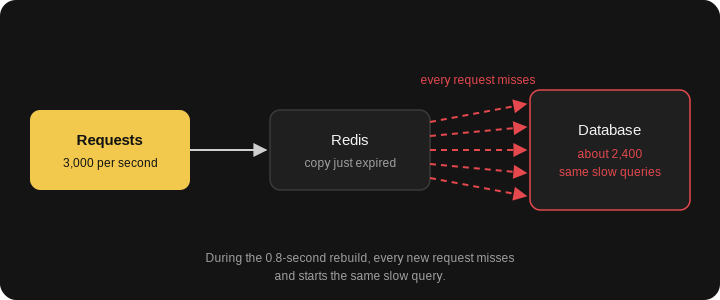
So once a minute, the database gets about 2,400 copies of its most expensive query at the same moment. Under this load, every query gets slower. A slower rebuild means a longer gap with no copy in the cache. Then even more requests miss. At 9:14, the queries took so long that new misses arrived faster than old ones finished. The database never recovered.
This is a cache stampede, also called the thundering herd problem: many requests try to rebuild the same missing copy at once. It is worst for keys that are both popular and slow to rebuild. With 50 visitors per minute, you never see it. That’s why it appears for the first time on your biggest day.
There are two related ways to get the same large wave of queries:
- Many keys expire together, as in the jitter example.
- A cold cache. Redis restarts, or you add a new, empty Redis server. Every key misses at once. Cache-aside keeps your app working, but only if the database can handle the full load for a while.
What good looks like
There are four standard fixes, and big apps often use more than one.
Fix 1: Request coalescing
Sometimes many requests in the same server want the same missing key. Let one of them do the work, and make the others share its result:
const inFlight = new Map(); // key → work that is already running

function coalesce(key, load) {
  if (inFlight.has(key)) return inFlight.get(key); // join the running work
  const work = load().finally(() => inFlight.delete(key));
  inFlight.set(key, work);
  return work;
}
In plain English: load() returns a promise, the JavaScript object for “a result that will arrive later”. The first request starts the work and stores its promise in inFlight. Requests that arrive while the work runs get the same promise. So they all wait for the one query. When it finishes, the code removes the entry. Use it inside the miss path: cached(key, 60, () => coalesce(key, loadTopProducts)).
This works inside one copy of your app. If you run 20 copies, you get at most 20 queries instead of 2,400. That is often good enough. CDNs (servers around the world that keep copies of your files) do the same for files. The Fastly docs call it request collapsing: many requests for the same object become one request to your server.
Fix 2: A lock, plus the stale copy
You can get down to one query across all copies of your app. Use a lock in Redis. Also keep the old copy a little longer, so that nobody has to wait:
const saved = JSON.parse(await redis.get("products:top")); // null if missing
if (saved && Date.now() < saved.freshUntil) return saved.data; // fresh hit
const gotLock = await tryLock("lock:products:top", 10); // only one request wins
if (!gotLock && saved) return saved.data; // someone else is refreshing
const data = await loadTopProducts();
const entry = { data, freshUntil: Date.now() + 60_000 }; // fresh for 60 s
await redis.setEx("products:top", 600, JSON.stringify(entry)); // kept 10 min
return data;
In plain English (this is the inside of a getTopProducts function):
- Lines 1–2: Each saved copy now has two times: a “fresh until” time 60 seconds away, and a real Redis TTL of 600 seconds. If the copy is still fresh, use it.
- Line 3: The copy is old. Try to take a lock.
tryLockruns the Redis commandSET lock:products:top 1 NX EX 10.NXmeans “only set this key if it doesn’t exist”, so only one request in your whole app gets the lock.EX 10makes the lock delete itself after 10 seconds, so a crash can’t block refreshes forever. - Line 4: If you didn’t get the lock, another request rebuilds the copy. Return the old copy at once.
- Lines 5–8: If you got the lock, run the slow query once. Save a fresh copy and return it.
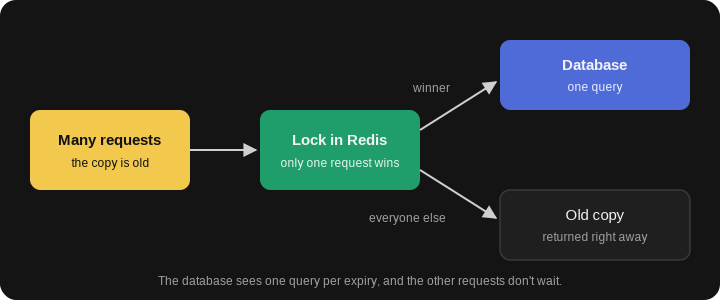
Now the database sees one query per minute, for any amount of traffic. The trade-off: some visitors see data that is up to about a minute older. For a “top products” list, that is fine.
One gap remains. If there is no saved copy at all (a cold cache), every request still loads. Fix 1 inside each copy of your app makes that problem smaller.
Fix 3: Stale-while-revalidate in HTTP
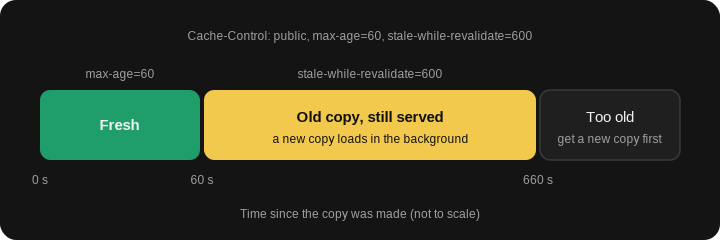
Browsers and CDNs support the same idea with a Cache-Control directive:
Cache-Control: public, max-age=60, stale-while-revalidate=600The copy is fresh for 60 seconds. For 600 seconds after that, a cache may still give out the old copy while it gets a new one in the background. Visitors don’t wait, and your server gets one refresh instead of a crowd of requests. Cloudflare supports this when your server sends the directive. Only use it on responses that are the same for everyone.
Fix 4: Jitter and refresh ahead of time
Add jitter to TTLs, so that many keys don’t expire together. You can also refresh your few most expensive keys on a schedule with a background job. For a 60-second TTL, refresh every 50 seconds. Then the keys never expire while people read them.
Go deeper: Sign-up takes 10 seconds because of one email (Level 3) explains background jobs.
What changes at scale
At small scale, the cache makes your app faster. At large scale, the cache keeps your database alive. So plan for an empty cache: Redis restarts, or a deploy (a release of a new version) changes every key name. Before a big launch, ask this question. “If the cache were empty now, could the database handle a minute of this traffic?”
If not, fill (warm) the cache before the traffic arrives.
Go deeper: Your app went viral. Will it survive? (Level 4) covers how to add servers and spread load.
Test your own app
You need an app of your own for this part. No app yet? Start with Your first app in an afternoon, with an AI doing the typing. Built it in an AI app builder? Ask its AI to do each step below for you, or to add the missing part first (for example, a login).
Do this on your own laptop or a staging copy (a private test copy) of your app. Never do it on someone else’s site.
- List your cached keys. Ask your AI for every cache read in your code, with the key, the TTL and the rebuild time. Note any key without a TTL. Also note any popular key whose rebuild takes more than about 100 ms. That key is a stampede risk.
- Make a stampede on purpose. Run your app locally. Use a load testing tool (a program that sends many requests) on a cached page, for example:
npx autocannon -c 200 -d 30 http://localhost:3000/api/products/topThis command keeps 200 connections busy for 30 seconds. While it runs, delete the key from Redis. Use DEL products:top in redis-cli, the Redis command-line tool. Then look at your database logs. How many times did the slow query run?
Add Fix 1 or Fix 2 and do the test again. The goal is one query per expiry.
- Test a cold cache. Empty your local Redis with
FLUSHALL. This command deletes everything, so only use it locally. Then run the load test again. Does the database survive?
Takeaways
Key terms
- Cache-aside (lazy loading): your code checks the cache and fills it on a miss
- Read-through: the cache layer loads from the database on a miss
- Write-through: every database write also updates the cache
- Write-back / write-behind: writes go to the cache first and reach the database later
- TTL jitter: a small random extra time, so keys don’t expire together
- Cache stampede (thundering herd): many requests rebuild the same missing copy at once
- Request coalescing: requests for the same missing key share one rebuild
- Stale-while-revalidate: serve the old copy while a new one loads in the background
Red flags in AI-written code
- A popular key that is slow to build, with plain cache-aside and nothing to stop a stampede
- Many keys set at once with the exact same TTL
- A cache key with no TTL
- Write-back caching for orders, payments or anything you can’t afford to lose
- Write-through that writes the cache before the database, or ignores a failed cache write
- No plan for an empty cache: “Redis is always there”
Ask your AI
- “For every cached value in my app, tell me the strategy (cache-aside, read-through, write-through or write-back), the TTL, and what happens when the data changes.”
- “Which cached keys are popular and slow to rebuild? Add request coalescing or a Redis lock with stale-while-revalidate to them.”
- “If Redis restarted empty during peak traffic, how many database queries per second would hit my database?”
Going deeper (optional, for readers who want more detail)
Probabilistic early expiration. This is an alternative to a lock. Each request can decide at random to refresh a copy a little before it expires. The chance gets higher as the expiry gets closer. The decisions are random and independent, so usually only one or a few requests refresh, and you need no lock. Search for “probabilistic cache stampede prevention” to find the research behind it.
The cache-aside race. Even with “delete on write”, stale data can come back. Reader A misses and reads the old value from the database. Before A saves it, writer B updates the database and deletes the key. Then A saves the old value. Now the cache holds old data until the TTL ends.
This is rare, and it is another reason to always set a TTL.
Safer lock release. The lock in Fix 2 only expires. If you delete a lock yourself, store a random value in it. Delete it only if the value still matches. Then you never delete a lock that expired and that another request then took.
The Redis SET docs show this pattern. They also point to the Redlock algorithm for stronger guarantees across several Redis servers.
Stale-while-revalidate on CDNs. On Cloudflare, the first request after expiry starts a background refresh. That request gets the stale copy with cf-cache-status: UPDATING. Cloudflare can follow your server’s headers. The Cloudflare docs say that in this case, some directives stop stale serving, including s-maxage and must-revalidate.
References (7)
- Caching strategies for Memcached: AWS ElastiCache docs. Lazy loading, write-through, three trips per miss, cache churn, and adding a TTL to both.
- Cache consistency: strategies to keep data fresh: Redis blog. Cache-aside, write-through and write-behind trade-offs, including data loss in write-behind and the thundering herd.
- SET: Redis docs. The
NXandEXoptions and the simple lock pattern with a self-expiring key. - Cache-Control header: MDN. How
stale-while-revalidateworks. - Revalidation: Cloudflare. Serving stale content with
UPDATINGwhile refreshing in the background. - Request collapsing: Fastly. Combining many requests for the same object into one request to the server.
- autocannon: GitHub. The
-cand-doptions of the load testing tool.