Level 4 · Reliability & scale
One slow request froze the whole server
- Event loop
- Single thread
- async and await
- Blocking the event loop
- Worker threads
- Offloading to background jobs
One slow request froze the whole server
Before you start This lesson uses a few words from earlier lessons:
- CPU: the chip that follows your program’s instructions, one small step at a time. (Your app restarted and all the likes vanished)
- Process: a program that runs right now, with its own memory. (Your app restarted and all the likes vanished)
- Background job, queue and worker: work done outside the user’s request; a saved list of jobs; and separate code that does the jobs. (Sign-up takes 10 seconds because of one email)
- Hashing a password: turning it into a scrambled value that you can check but not reverse. It’s slow on purpose. (Never store a password. Here’s what to store instead)
Eight seconds of silence
Your shop’s admin page has a button: Export all orders as CSV. CSV is a simple spreadsheet file, with values separated by commas. The AI wrote this feature in a few minutes. It works.
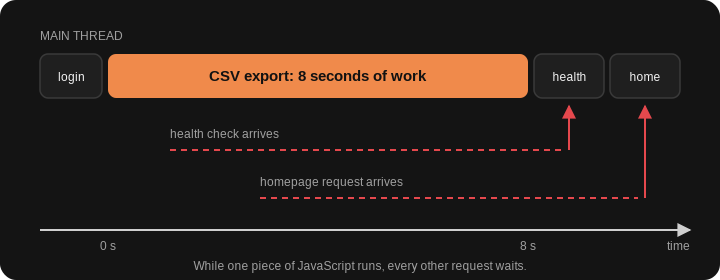
One morning, your colleague clicks it. For the next 8 seconds, something strange happens to everyone else who uses your app:
- Customers on the homepage see a loading animation.
- People who try to log in wait, then get a timeout (the app stops waiting and shows an error).
- Your hosting platform has a health check: a tiny route that only answers “ok”. It gets no answer. The platform decides that the server is broken and restarts it.
Then everything works again, as if nothing happened. Your logs show no errors, only a restart.
One request made the whole server stop answering. The cause wasn’t heavy traffic. The cause was how Node.js runs your code. (Node.js is the program that runs JavaScript on your server.) This lesson explains that model and the one rule that you must not break.
The mental model: one waiter, many tables
In the background jobs lesson, you met the restaurant where the waiter takes orders and the cooks cook. Node.js takes that idea further: for your JavaScript, there is only one waiter.
A thread is one line of work inside a process: a list of instructions that the CPU follows, one after another. A process can have several threads. Node.js runs all of your JavaScript on one main thread.
How can one thread serve thousands of users? Most of a web request is waiting: for the database, for a payment service, for a file. The waiter never stands at a table and waits for the kitchen. He takes an order, gives it to the kitchen, and goes to the next table. When a dish is ready, he gets a signal and brings it out.
In Node.js, that loop is the event loop:
- Pick the next piece of work that’s ready to run: a new request, or a database answer that just arrived.
- Run that piece of JavaScript until it finishes.
- Go back to step 1.
While a request waits for the database, the thread isn’t involved. The waiting happens elsewhere, in the operating system or in helper threads. (The operating system is the main program of the computer, such as Linux.) The thread is free to run other users’ code. That’s why the Node.js docs say that Node handles growth well: it uses a small number of threads for many clients.
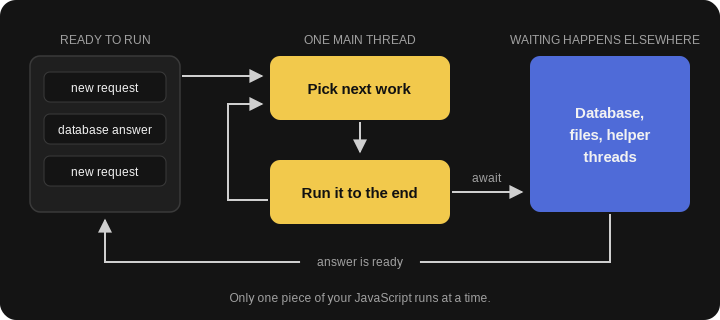
Where the comparison stops working: a real waiter can stop what he does if there’s a fire in the restaurant. The event loop can’t. When a piece of JavaScript starts, it runs to the end. Nothing can stop it to serve someone else.
That gives the main rule from the Node.js docs:
Node.js is fast when the work associated with each client at any given time is small.
What async and await really do
You’ve seen await in almost every route. A route is the code that answers one web address. Here’s what await means for the event loop:
app.get("/api/export", async (req, res) => {
  const orders = await db.order.findMany(); // waiting: others can run
  const csv = toCsv(orders);                // working: everyone waits
  res.send(csv);
});
In plain English:
- Line 2: ask the database for every order. At
await, this function pauses, and the thread goes back to the event loop to serve other requests. When the orders arrive, the function continues. - Line 3: turn 200,000 orders into CSV text. This is your own JavaScript, and it does work. There’s no
await, so nothing pauses. The thread is busy until it’s done. - Line 4: send the file.
At an await, your function gives back the thread. The code between two awaits runs without a break. Many people misunderstand this: the async keyword doesn’t move work into the background. It only lets you use await. A long loop inside an async function blocks the thread in the same way as one outside it.
The numbers
Two kinds of time matter in a request. “I/O” means input and output: talking to anything outside your program.
| Waiting (I/O) | Working (CPU) | |
|---|---|---|
| Examples | Database queries, calling an API, reading a file the async way | Loops over big lists, building files, parsing huge JSON, hashing with ...Sync |
| Uses the main thread? | No | Yes |
| What others feel | Nothing | They wait |
The working time sets a hard limit. Say every request needs 5 ms of JavaScript work. Then one thread can finish at most about 200 requests per second (1,000 ms ÷ 5 ms), however fast your database is. If one request needs 8 seconds of work, the limit for those 8 seconds is zero.
Big work arrives faster than you expect. The Node.js docs give an example with JSON.parse, which turns JSON text into a JavaScript object. For a 50 MB string, it took 1.3 seconds.
How it goes wrong
Bug 1: Heavy work inside a route
The export above is the classic case. Other examples: building a PDF, resizing images in pure JavaScript, sorting or filtering a huge list in memory, or JSON.parse on a large upload. Each one works well in testing, with 50 orders and one user. With 200,000 orders, it takes seconds.
Bug 2: Functions that end in Sync
Node.js has two versions of many functions. The Sync versions do the work on the main thread and block it:
const hash = crypto.pbkdf2Sync(password, salt, 600000, 64, "sha256"); // blocks
const file = fs.readFileSync("big-report.csv");                       // blocks
In plain English: hash a password, then read a file. Each one stops the whole server until it finishes.
Password hashing is slow on purpose, so that guessing passwords costs an attacker a lot of time. That’s good for security and bad for the main thread. A busy launch brings many sign-ups and logins, and each one blocks for a moment. So the whole app becomes very slow.
The Node.js docs list the Sync functions that a server must not use. They are in crypto (hashing and encryption), zlib (compression), fs (files) and child_process (running other programs). Some password libraries also offer hashSync. Don’t use it in a server, for the same reason.
Bug 3: Input that makes your code slow on purpose
Some code is fast for normal input and very slow for special input. A regular expression is a pattern for matching text, such as a check for an email address. The Node.js docs warn about complex regular expressions on user input: some inputs can make them run for seconds or longer.
The docs call this a security problem, not only a speed problem. If one request can block your server, an attacker can send it again and again. That’s a denial of service attack: it makes your app unavailable to everyone else.
Bug 4: A “fix” that changes nothing
Ask the AI to “make the export non-blocking”, and you can get this:
const csv = await new Promise((resolve) => resolve(toCsv(orders)));In plain English: put the CSV work inside a promise (an object for a result that arrives later) and await it. It looks asynchronous. But the function that you give to new Promise runs immediately. So toCsv(orders) still runs right there, on the main thread, before the code reaches await. The server freezes as before. A wrapper doesn’t move the work.
How to recognize it
A CPU has several cores. Each core can run one thread at a time.
- Everything is slow at the same moment, including routes that do almost nothing, like a health check.
- One CPU core is at 100% while the others do nothing. One busy thread can use only one core.
- No errors in the logs, only timeouts and maybe restarts.
What good looks like
The Node.js docs advise this: the event loop must coordinate requests, not do the heavy work itself. There are four ways to keep it free, from smallest to biggest.
Fix 1: Use the asynchronous versions
const hash = await util.promisify(crypto.pbkdf2)(password, salt, 600000, 64, "sha256");
const file = await fs.promises.readFile("big-report.csv");
In plain English: the same two jobs, but now the main thread only starts them and continues. Some older functions report back through a callback: a function that you give them, and they call it later. util.promisify turns such a function into one that you can await.
Where does the work go? Node.js has a small worker pool. These are helper threads, run by a library called libuv. They do tasks like file reading, some crypto functions and compression. By default, the pool has 4 threads.
This matters when your app grows. If 50 sign-ups arrive at once, 4 hashes run at a time, and the others wait in line. File reads share the same 4 threads. While they wait, your server continues to answer other requests.
Fix 2: Worker threads for heavy JavaScript
Your own CPU-heavy JavaScript, like the CSV export, needs a different tool. Node.js lets you start extra threads with the worker_threads module (a part of Node.js that you load in your code):
const { Worker } = require("node:worker_threads");
const csv = await new Promise((resolve, reject) => {
  const worker = new Worker("./csv-worker.js", { workerData: orders });
  worker.once("message", resolve);
  worker.once("error", reject);
});
In plain English:
- Line 3: start a new thread that runs the file
csv-worker.js, and give it the orders. - Lines 4–5: when the worker sends back a message (the finished CSV), use it. If it fails, report the error.
The worker file does the heavy part:
const { parentPort, workerData } = require("node:worker_threads");
parentPort.postMessage(toCsv(workerData));
In plain English: build the CSV from the data you got, and send it back to the main thread.
The main thread stays free. But there are costs:
- Copying costs time. Node.js copies the orders into the worker, and copies the CSV back. For huge data, the copy itself takes some time.
- Starting a worker isn’t free. The Node.js docs advise a pool of workers that you use again and again, not one new worker per task. Libraries such as Piscina manage a pool for you.
- Threads share the CPU cores. On a server with 2 cores, only about 2 heavy tasks can really run at the same time.
The Node.js docs also say that worker threads don’t help much with I/O. The event loop already handles database waits well.
Go deeper: How one server handles thousands of users at once (Level 4) compares processes and threads. Two tasks waiting for each other forever (Level 4) covers problems when threads share data.
Fix 3: Move it out of the request completely
Does the user need the result before the next screen? For an export of 200,000 orders, no. Add a background job to a queue and reply “We’re preparing your export”. A separate worker process builds the file and sends an email with a link.
This is the strongest fix for big work. The web server never does the heavy part, so exports can’t freeze it. You can retry the job if it fails. The time limit of a web request doesn’t apply to it.
Go deeper: Sign-up takes 10 seconds because of one email (Level 3) shows how to set up queues and workers.
Fix 4: Limit and split the work
- Limit input. Set a maximum size for request bodies and uploads. On user input, use simple text checks, not complex regular expressions.
- Load data in pages, not all at once, so no single request handles 200,000 rows.
- Split long work into small parts. The Node.js docs describe this: do a little work, let the event loop run with
setImmediate, then continue. It works, but a worker thread or a background job is usually clearer.
Go deeper: Your app tried to load 50,000 rows at once (Level 4) covers loading data in pages.
Test it yourself
Experiment 1: Freeze a server on purpose
On your laptop, add these two routes to a small Express app. (Express is a common library for Node.js servers.)
app.get("/slow", (req, res) => {
  const end = Date.now() + 5000;
  while (Date.now() < end) {} // keep the CPU busy for 5 seconds
  res.send("done");
});
app.get("/health", (req, res) => res.send("ok"));
In plain English: /slow does nothing useful for 5 seconds, but it keeps the thread busy all that time. /health answers at once.
- Open
/healthin a browser tab. It answers instantly. - Open
/slowin one tab. - Immediately open
/healthin another tab.
The health check waits until /slow finishes. You froze your own server with one request.
Experiment 2: Measure the event loop in your app
Node.js can measure how late the event loop runs. Add this to your server:
const { monitorEventLoopDelay } = require("node:perf_hooks");
const h = monitorEventLoopDelay({ resolution: 20 });
h.enable();
setInterval(() => {
  console.log("event loop delay, p99 (ms):", h.percentile(99) / 1e6);
  h.reset();
}, 10000);
In plain English: every 10 seconds, log how late the event loop was in the worst 1% of moments (the 99th percentile). Then start to count again. The values are in nanoseconds, so divide by 1,000,000 to get milliseconds. A healthy server shows small numbers. Numbers in the hundreds or thousands mean that something blocks the thread.
Experiment 3: Search your code
Ask your AI this:
- “Find every function ending in Sync, every loop over data loaded from the database, and every JSON.parse of user input in my server code.”
Look at each result, and ask: how big can this get?
Takeaways
Key terms
- Thread: one line of work inside a process. Node.js runs your JavaScript on one main thread.
- Event loop: Node’s loop that picks the next ready piece of work and runs it to the end
- Blocking: keeping the main thread busy, so no other request can run
await: a point where a function pauses and lets the thread serve others- Worker pool: Node’s helper threads for files, some crypto and compression (4 by default)
- Worker threads: extra threads that you start yourself for heavy JavaScript
- Denial of service: making an app unavailable to everyone, for example with input that blocks the server
Red flags in AI-written code
readFileSync,pbkdf2Sync,hashSync,execSyncor other...Synccalls inside a route- Building a CSV, PDF or big JSON from thousands of rows inside a request
JSON.parseor a complex regular expression on large or unchecked user input- Work inside
new Promise(...)or markedasync“to make it non-blocking” - One new
Workerfor every request, with no pool
Ask your AI
- “Which routes in my server do heavy CPU work instead of waiting? For each one, should it use an async API, a worker thread or a background job?”
- “Add event loop delay monitoring to my Node.js server, and log a warning when the 99th percentile goes above 100 ms.”
- “Is any regular expression in my code run on user input? Could any input make it very slow?”
Going deeper (optional, for readers who want more detail)
Where the waiting happens. The Node.js docs explain that the event loop gives I/O to the operating system when it can. Modern operating systems can handle many such operations in the background. They tell Node.js when each one finishes.
Some work the operating system can’t do that way. Examples are file system calls, dns.lookup(), and some crypto and zlib functions. That work goes to libuv’s worker pool.
Changing the pool size. You can set the UV_THREADPOOL_SIZE environment variable (a setting that the process reads when it starts). The libuv docs say the default is 4 and the maximum is 1024. A bigger pool doesn’t add CPU cores. So it helps most when the pool threads wait, not when they calculate.
Serverless platforms. On serverless platforms, the platform starts copies of your function for you. On standard AWS Lambda functions, each copy (an “execution environment”) handles one request at a time. So a blocked thread mostly hurts that one request, plus your bill and your time limit.
Some platforms now let one copy handle several requests at once. Vercel’s Fluid compute does this for Node.js, and it has been the default for new projects since April 2025. There, a blocked event loop slows every request on that copy, as on your own server.
More processes. You can run several Node.js processes, one per CPU core, so that one server uses all its cores. Then a blocking request freezes only the users on its process. This gives you some safety, but it’s not a fix.
Small tasks can block too. Code scheduled with process.nextTick runs before the event loop continues. The Node.js docs warn about a function that calls process.nextTick on itself again and again. It can stop I/O from ever running, like a long loop.
References (7)
- Don’t Block the Event Loop (or the Worker Pool): Node.js documentation. The rule that Node is fast when each client’s work is small, the worker pool and which APIs use it, the Sync APIs to avoid, the JSON.parse timing, regular expressions and denial of service, partitioning and offloading.
- The Node.js Event Loop: Node.js documentation. The event loop, a single JavaScript thread, and handing I/O to the operating system.
- Worker threads: Node.js API documentation. Workers for CPU-heavy JavaScript, not I/O, and using a pool of workers.
- Performance measurement APIs: monitorEventLoopDelay: Node.js API documentation. Measuring event loop delay, reported in nanoseconds.
- Thread pool work scheduling: libuv documentation. The default pool size of 4 and the
UV_THREADPOOL_SIZEmaximum of 1024. - Fluid compute is now the default for new projects: Vercel changelog. Fluid compute as the default for new projects.
- Understanding Lambda function scaling: AWS documentation. One request per execution environment at a time.